96
DIGITAL GAUGE MODE
When Digital Gauge Mode (GAUG) is selected as the operating mode, the ZEN will
operate as a Digital Depth Gauge/Timer without performing nitrogen and oxygen calcula-
tions.
• To access Gauge mode while the Watch Default Time screen is displayed, press the M
button 2 times (2 seconds each time), or while the NORM Surface Main screen is
displayed, press the M button 1 time for 2 seconds.
• If the graphic GAU is flashing, Gauge Mode can be selected as the operating dive
mode by pressing and releasing the M button momentarily (< 2 sec). The graphic
GAU becomes solid and Gauge Mode is selected.
• If no Gauge dive has be conducted, pressing the M button for 2 seconds will advance
to the Free Surface Main screen.
WATCH TIME >> NORM SURF >> GAUG SURF >> FREE SURF
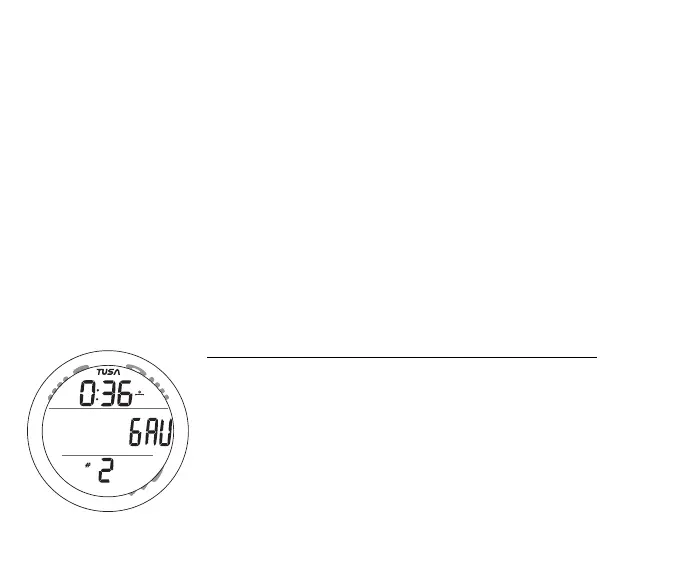
Gauge Surface Main information includes (Fig. 122) -
> Surface Interval Time (hr:min) with clock/wave icon
> Graphic GAU, flashing if not previous selected
> Number of the recent dive conducted, 0 if no dive yet that
period, with # icon
> Battery icon if a Low Battery condition, flashing if Too Low
Upon descending to 5 FT (1.5 M) for 5 seconds, the ZEN will
enter Gauge Dive Mode.
Fig. 87 - GAUG SURF MAIN
M
S
A
L



 To Next Page