19
When the printer is at ready states (Green/Solid), press the button to feed one label to the
beginning of next.
2. Pause the printing job
When the printer is at printing states, press the button to pause a print job. When the printer is
paused the LED will be green blinking. Press the button again to continue the printing job.
4.3 Power-on Utilities
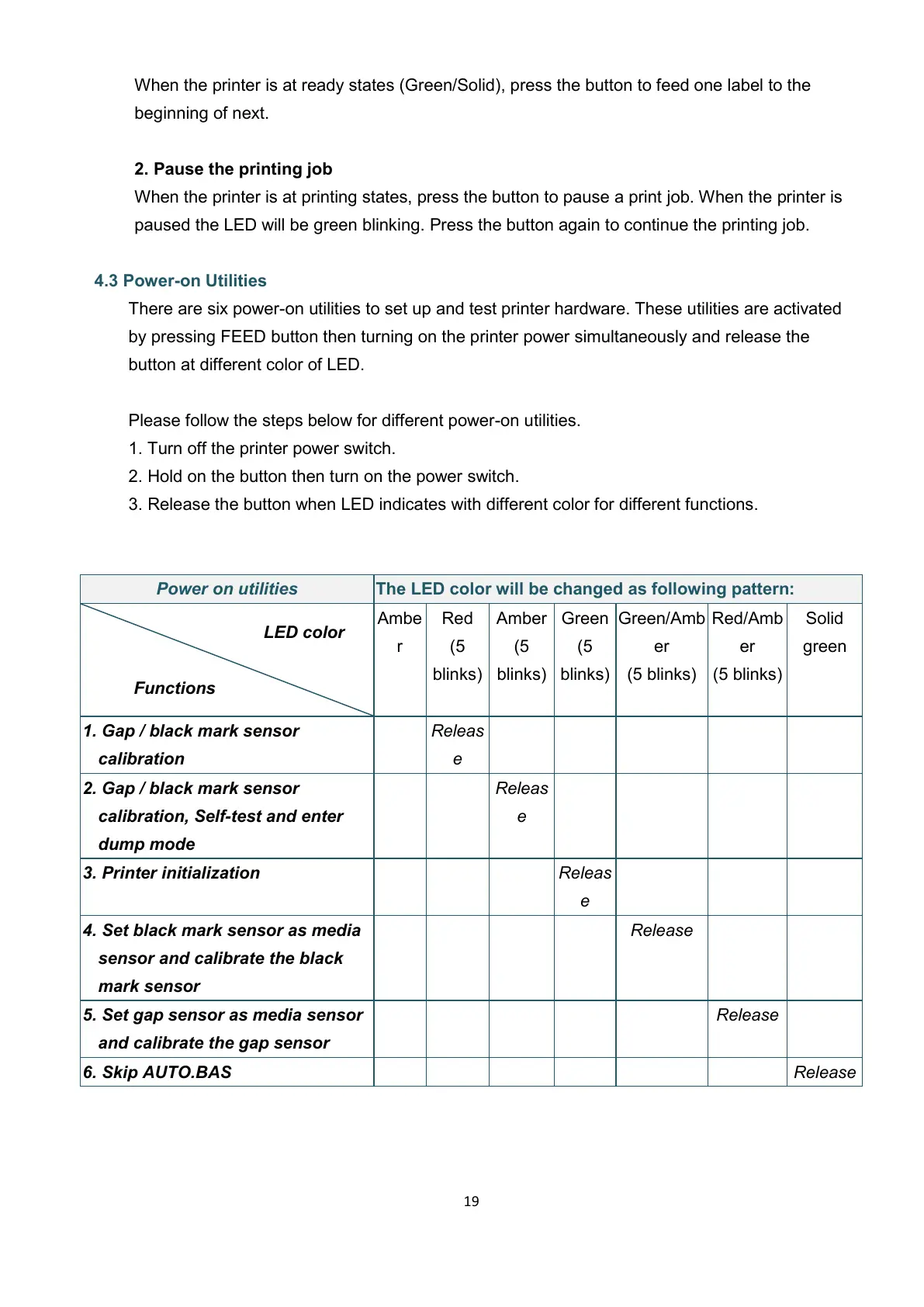
There are six power-on utilities to set up and test printer hardware. These utilities are activated
by pressing FEED button then turning on the printer power simultaneously and release the
button at different color of LED.
Please follow the steps below for different power-on utilities.
1. Turn off the printer power switch.
2. Hold on the button then turn on the power switch.
3. Release the button when LED indicates with different color for different functions.
The LED color will be changed as following pattern:
1. Gap / black mark sensor
calibration
2. Gap / black mark sensor
calibration, Self-test and enter
dump mode
3. Printer initialization
4. Set black mark sensor as media
sensor and calibrate the black
mark sensor
5. Set gap sensor as media sensor
and calibrate the gap sensor


 To Next Page