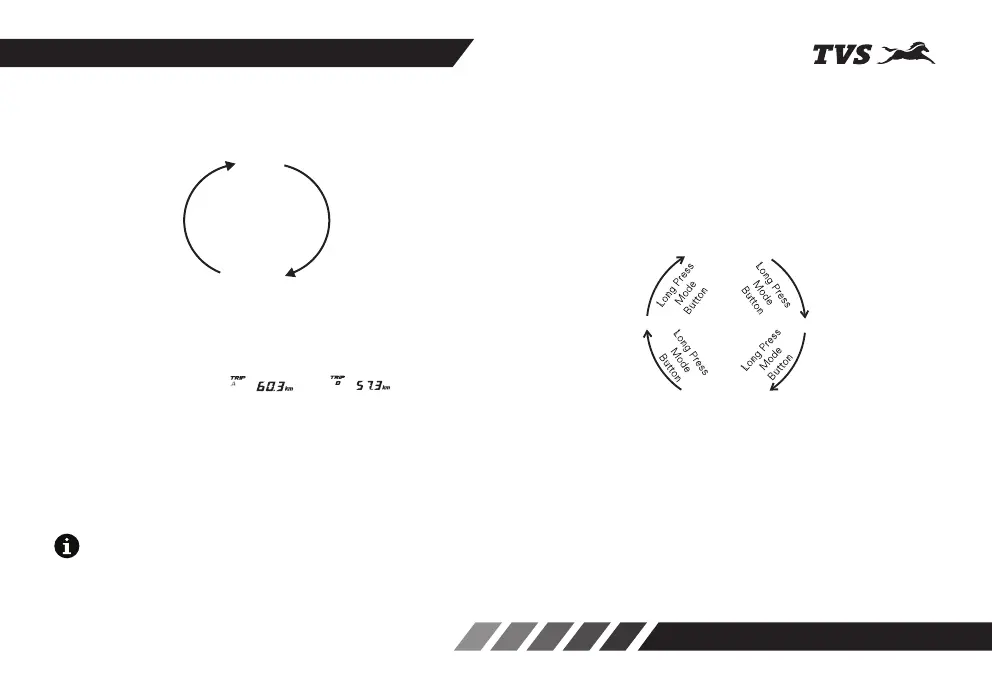
Short press the Mode button to access the
following modes:
1. Trip A
2. Trip B
1. In 'Trip A' mode, press the Mode button once to
enter 'Trip B'.
● To reset any of the trip meter while ensuring
the display is in ' ' or ' ', press
and hold the Set button for a few seconds.
2. Press the Mode button once to change the display
to 'TRIP A' mode again.
3. TRIP A mode by default whenever the ignition is
turned ‘OFF’ and ‘ON’. Ignition OFF to ON previous
mode will be displayed.
On long pressing the Mode button, the following
modes can be accessed.
1. ODO METER
2. LAP MODE
3. TOP SPEED
4. CLOCK SETTING
1. button to In 'ODO' mode, long press the Mode
enter 'LAP' mode.
● Values cannot be reset in LAP mode.
Above mode changes are possible only when the
vehicle is in static condition for safety.
KNOW YOUR TVS STRYKER 3V
18
Note
Short press duration : <2 sec
Long press duration : 3 to 5 sec
TRIP A
TRIP B
Short Press
Mode
Button
Short Press
Mode
Button
ODO METER
LAP MODE
CLOCK SETTING
TOP SPEED


 To Next Page