http://www.tyan.com
29
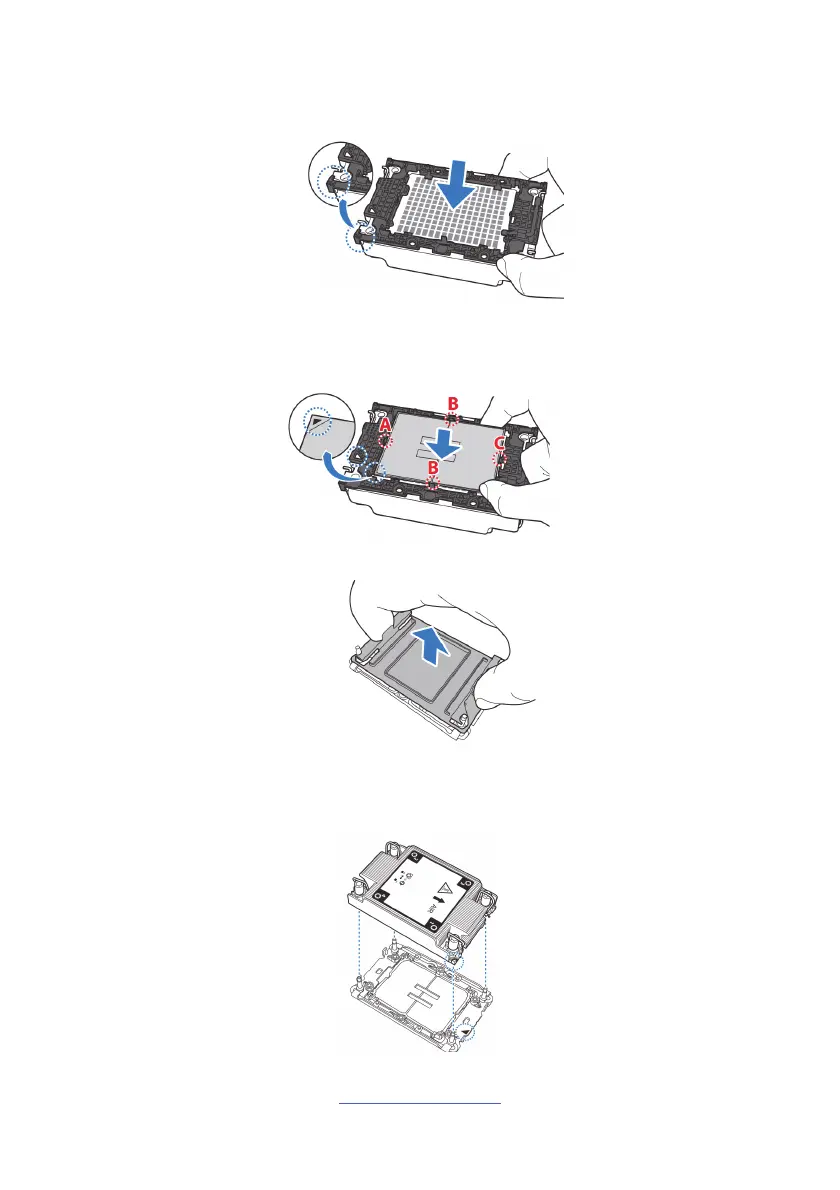
1. Align the triangle edge of the carrier with the notch on the edge of the heatsink.
Then install the carrier on the bottom of the heatsink and make sure the latches
are snapped under the edge of the heatsink.
2. Align and install the processor on the carrier. Make sure the gold arrow is
located in the correct direction. NOTE: When installing the processor, secure the
front side (A) first, and following with the middle and rear sides (BC).
3. Remove the CPU cover.
4. Carefully flip the heatsink assembly. Align the heatsink with the CPU socket by
the guide pins. Make also sure that the triangle edge of the carrier is aligned
correctly with the triangle mark on the CPU socket. Then place the heatsink
assembly onto the top of the CPU socket.


 To Next Page