http://www.TYAN.com
19
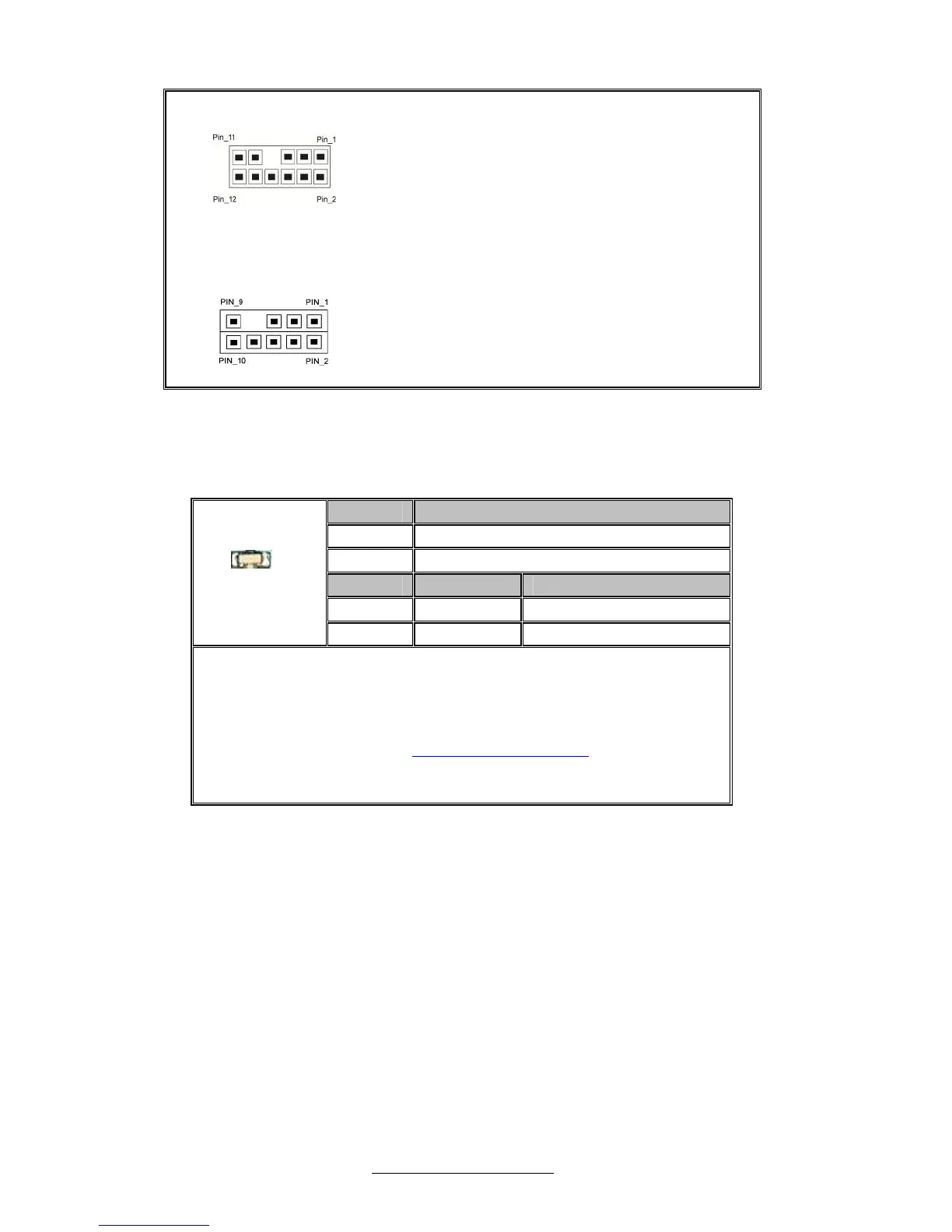
J89: Rear I/O Audio Header(6x2)
⑴MIC1_L/⑵MIC1_R/⑶GND/⑷MIC1-JD/
⑸LINEIN1_L/⑹LINEIN1_R/⑺KEY/⑻LINEIN1-JD/
⑼LINE_OUT_L/⑽LINE_OUT_R/⑾NC/
⑿FRONT-JD
J90:SP5100 SATA SGPIO Pin Header(5x2)
⑴SMB_CLK/⑵DIN/⑶SMB_DAT/⑷DOUT/
⑸GND/⑹END/⑺KEY/⑻CLK/⑼NC/⑽ERR_LED
Onboard ID LED
Pin Signal
+ P3V3_AUX
- ID_SW_L
State Color Description
On Blue System identified
+
-
Off Off System not identified
Note:
You can identify the specific system using this LED.
Users from remote site could also activate ID LED by
input a few commands in IPMI, detailed software
support please visit http://www.tyan.com
for lastest
AST2050 user guide.


 To Next Page