13
Swiveltheouterguide(3)upwards.
Load label roll on the roll retainer in such a way that the labels can be inserted into the printhead in the right
position. The printing side of the labels must be visible from above.
Ensureapproximately4cmofmediaprotrudesoutoftheprinthead.
Pushtherolluntilitmakescontactwiththeinnerguide(3).
Swiveltheouterguide(3)downwardsontothemediahub(4).Therollmustbebrakedslightlybythetheguides
when supplying media. If necessary re-adjust symmetrically the guides.
4.1.2 Inserting a Media Strip into the Printhead
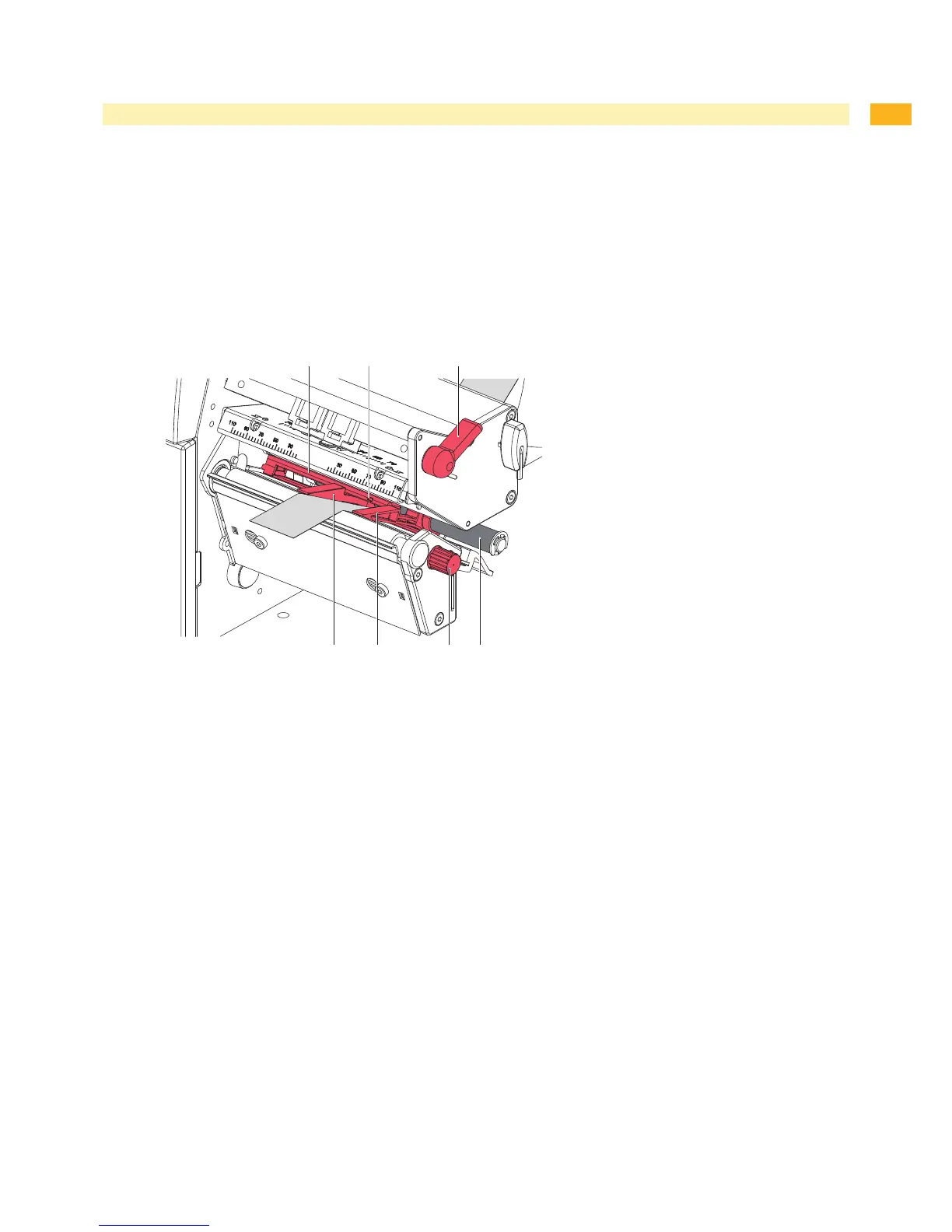
Fig. 7 Inserting a Media Strip into the Printhead
Turnlever(10)counterclockwisetolifttheprinthead.
Moveguides(6)apartwiththeknob(9)untilthemediacanpassbetweenthem.
Pushmediastripbelowtheguideroller(5)betweentheguides(6).
Guidemediastripthroughthelabelsensor(7)insuchawaythatitleavestheprintmechanics(6)g2between
printhead(10)g2andtheprintroller.(11)g2
Moveguides(6)againsttheedgesofthematerialbyturningtheknob(9).
4.1.3 Setting the Label Sensor
Thelabelsensor(7)canbeshiftedperpendiculartothedirectionofpaperowforadaptationtothemedia.The
sensorunit(12)ofthelabelsensorisvisiblefromthefrontthroughtheprintunitandismarkedwithanindentationin
the label sensor retainer. When the printer is switched on, a yellow LED illuminates the sensor position.
Loosentheknurledknob(8)andpositionlabelsensorbymovingtheknurledknobinsuchawaythatthesensor
candetectthelabelgaporareexorcut-outmark.
- or, if the labels deviate from a rectangular shape, -
Alignlabelsensorwiththefrontedgeofthelabelinthedirectionofpaperow.
Turnlever(10)clockwisetolocktheprinthead.
1.
2.
3.
4.
5.
1.
2.
3.
4.
5.
4 Loading Material


 To Next Page