EN – 30
2.3 OMEGO
®
Basic adjustment options
2.3.1 Height adjustment of the monitor handle bracket
You have the option to adjust the bracket of the OMEGO
®
Basic’s monitor handle to the
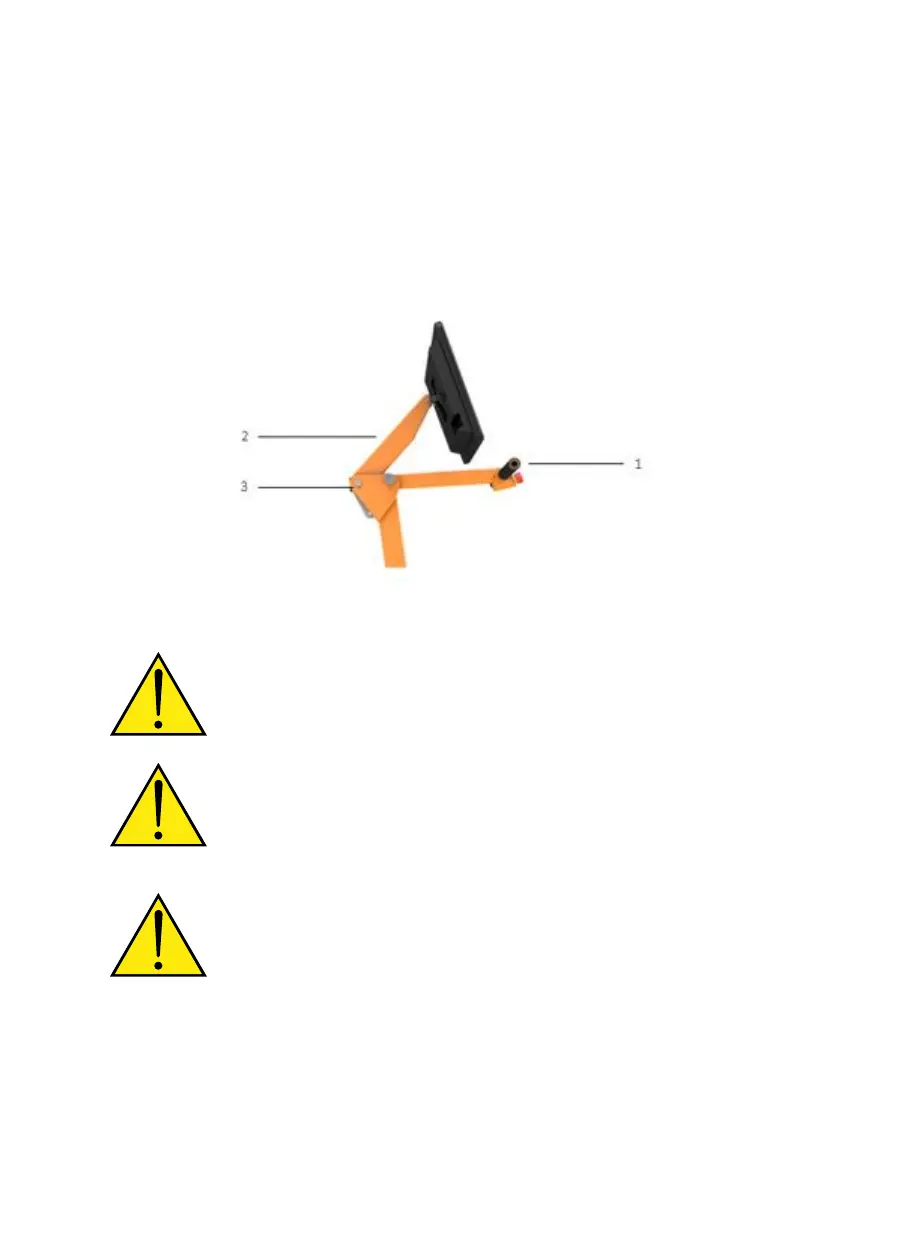
patient’s height. Hold the PC handle (1) or the monitor handle bracket (2), pull out the
catch bolt (3) and keep it in position. You now have the choice of several height positions
for the monitor handle bracket. Let go of the catch bolt once you have established a
suitable height and it will automatically snap into place
Image 5: Height adjustment of the monitor handle bracket
The height is to be adjusted slowly and taking into consideration
spatial requirements as well as the patient’s range of motion.
Always hold the handle/PC carrier tube with one hand before pulling
out the catch bolt in order to prevent the handle/PC carrier tube from
falling to the ground or tilting backwards, as this could pose a risk of
injury for both the therapist and the patient or could damage the All-
IN-ONE PC!


 To Next Page