INSTRUMENTS AND CONTROLSINSTRUMENTS AND CONTROLS
2-262-26
FORK POSITIONING LASER UNIT (OPTION)FORK POSITIONING LASER UNIT (OPTION)
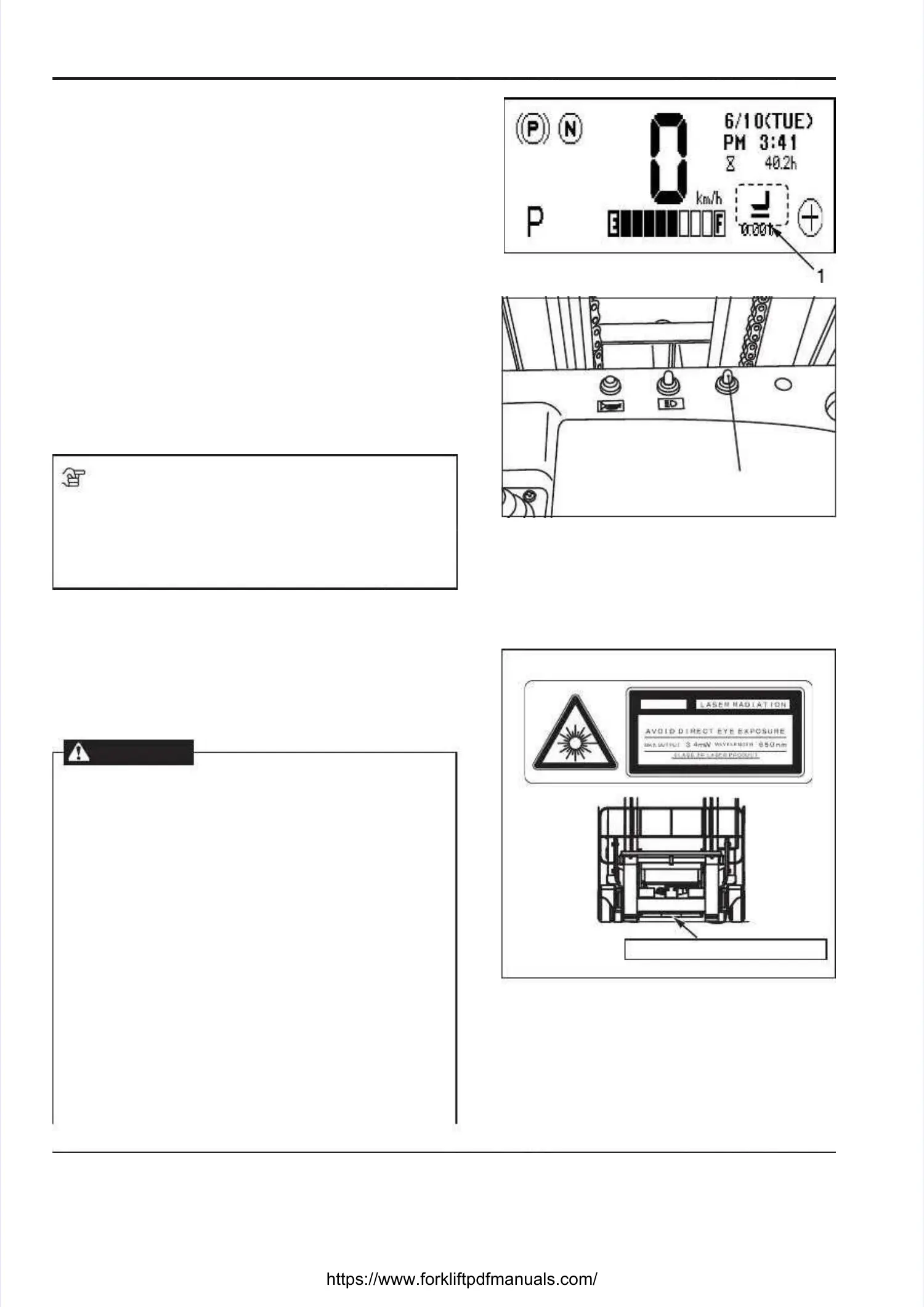
A fork A fork positioning positioning laser laser unit unit is is installed installed on on the the carriage.carriage.
It emits a visible laser beam to help the operator checkIt emits a visible laser beam to help the operator check
the fork height by looking at the meter panel to make itthe fork height by looking at the meter panel to make it
easy to insert the forks into the openings in a pallet.easy to insert the forks into the openings in a pallet.
OPERATIONOPERATION
••
Push the laser switch [2] forward to the “ON” positionPush the laser switch [2] forward to the “ON” position
and tilt the forks until they are horizontal and a laserand tilt the forks until they are horizontal and a laser
beam will be visible. The “Forks are level” icon [1] isbeam will be visible. The “Forks are level” icon [1] is
displayed on the meter panel.displayed on the meter panel.
•• The “Forks are level” icon [1] can be found on theThe “Forks are level” icon [1] can be found on the
Main screen and on the Fuel consumption indicatorMain screen and on the Fuel consumption indicator
screen.screen.
NOTENOTE
Remember that the forks may not be level even if theRemember that the forks may not be level even if the
“Forks are level” icon [1] is lit when there is a heavy“Forks are level” icon [1] is lit when there is a heavy
load on the forks, because the forks may bend toload on the forks, because the forks may bend to
some extent.some extent.
PRECAUTIONS WHEN USING THE FORKPRECAUTIONS WHEN USING THE FORK
POSITIONING LASER UNITPOSITIONING LASER UNIT
The fork positioning laser unit emits a laser beam. MakeThe fork positioning laser unit emits a laser beam. Make
sure to observe the following cautions when using thesure to observe the following cautions when using the
unit to protect yourself and unit to protect yourself and your fellow workers.your fellow workers.
WARNINGWARNING
•• Do not Do not look directly at look directly at the laser light the laser light source orsource or
a reflected laser beam in a mirror; otherwisea reflected laser beam in a mirror; otherwise
you may damage your eyes. If you accidentallyyou may damage your eyes. If you accidentally
look at the laser beam and experience anylook at the laser beam and experience any
problem with your vision or feel discomfort inproblem with your vision or feel discomfort in
your eyes, seek your eyes, seek medical attention immediately.medical attention immediately.
•• Let fellow workers know about Let fellow workers know about the hazard ofthe hazard of
the laser unit and make sure they do not lookthe laser unit and make sure they do not look
directly at the laser beam.directly at the laser beam.
••
Verify that Verify that the fork positioning laser unit isthe fork positioning laser unit is
functioning properly before starting the day’sfunctioning properly before starting the day’s
work, or before each shift. If it is not workingwork, or before each shift. If it is not working
correctlycorrectly, contact your , contact your local UniCarriers local UniCarriers dealer.dealer.
••
Do not try Do not try to disassemble or modify the to disassemble or modify the forkfork
positioning laser unit. You may cause anpositioning laser unit. You may cause an
accident.accident.
22
1. 1. “Forks “Forks are are level” level” icon icon 2. 2. Laser Laser switchswitch
IEC 60825-1 : 2001I EC 6 08 25 -1 : 2 00 1
Laser beam caution decalLaser beam caution decal
A laser beam is emitted A laser beam is emitted from here.from here.






 To Next Page