44 _
17
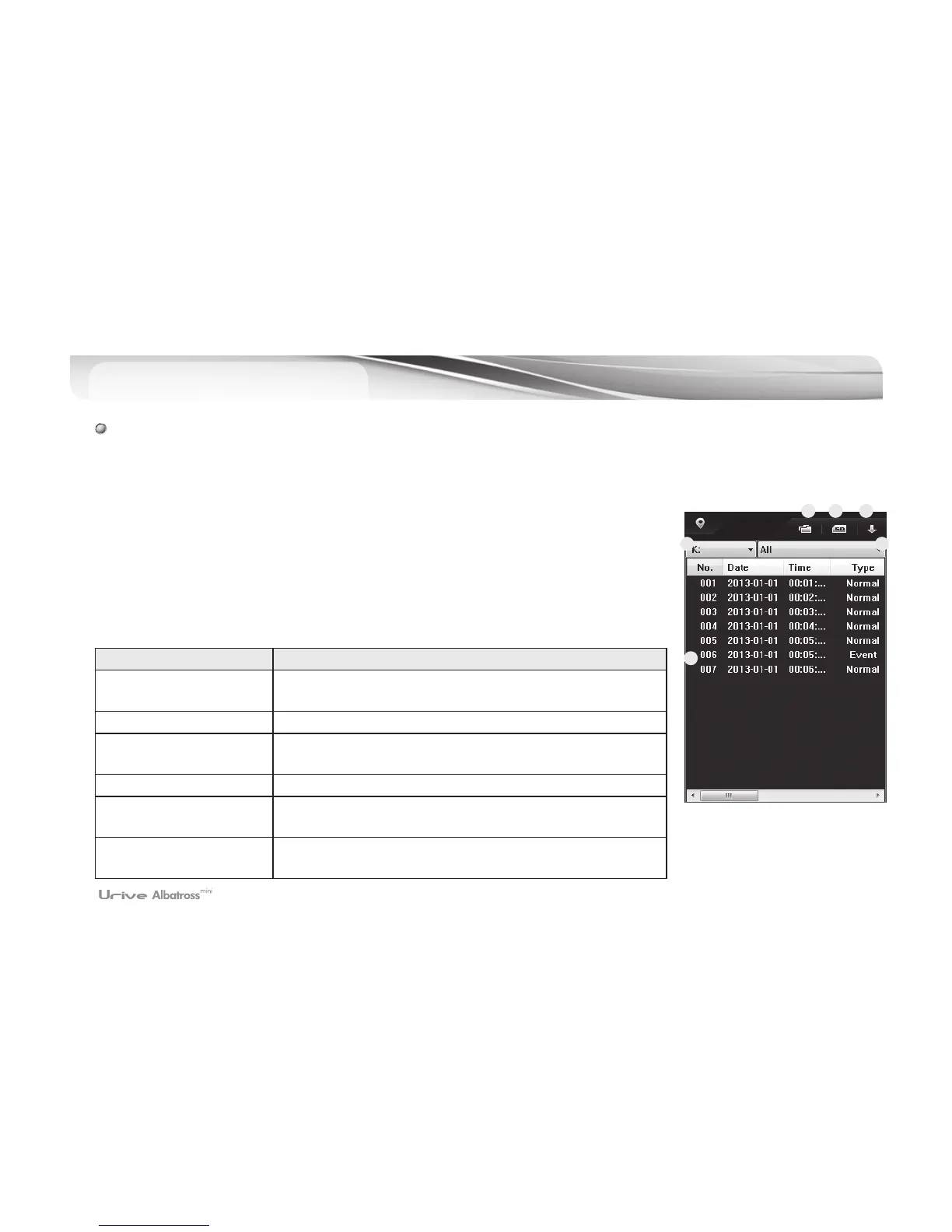
PC Viewer - Play List
# The video data, recorded by the black box and then stored in the micro SD card or in a computer, can be
selected and played back all or by type and. The list of files can be arranged in ascending or descending order.
1.
#
Remove the micro SD card from the black box and connect it to a computer.
2.
#
The viewer, specifically designed for the product, will recognize and search all the
black box video data automatically and show them in a playback list, as shown on
the left side.
3.
#
Can select the types of videos for playing back. It is possible to select all the videos,
or select them by group, such as continuous file, event file, parking file, parking
event file, or according to user’s own selection.
Items Meaning
①
Open files
Individual files of videos can be selected and played back
(Type – Same as in the case of User’s own selection)
②
Format and recover SD The SD card can be formatted, checked and recovered.
③
Descending order/
Ascending order
The videos in the playback list can be arranged in
descending or ascending order.
④
Location of videos The SD card can be located and selected.
⑤
Types of videos
Differentiated as all, continuous file, event file, parking file,
parking event file and user’s own selection
⑥
Playback list
Files that can be played back can be identified in the order
of their numbers.
1 2 3
4 5
6



 To Next Page