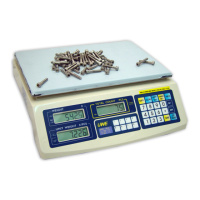
c. When NUMBER SET is pressed, scale displays
CH._C and upper count limit entered on UNIT
WEIGHT and TOTAL COUNT PANEL respectively.
d. Wait until the scale return to normal
operating status.
e. The upper weight limit is now stored in
memory.
NOTE: The upper count limit stored in memory
will be erased when scale is powered off.
f. Start counting transaction. When the upper
count limit is reached or exceeded,
continuous audio beep alarm will be
generated and the count value shown on TOTAL
COUNT PANEL will start flashing.
5.12.3 Clear Upper Weight Limit
a. Press CHECK
b. Press 0
c. Press @WT/SET
d. Wait until the scale return to normal
operating status.
e. The upper weight limit is now erased from
memory.
5.12.4 Clear Upper Count Limit
a. Press CHECK
b. Press 0
c. Press NUMBER SET
d. Wait until the scale return to normal
operating status.
e. The upper count limit is now erased from
memory.
5.13 UNIT PIECE WEIGHT PLU MEMORY
5.13.1 Saving a Unit Piece Weight to PLU Memory
This scale is equipped with 8 unit piece weight
PLU memories. Save a unit piece weight to memory
by one of the following methods.
5.13.1.1 Direct entry method
a. Key in the unit piece weight through keypad.
Make sure the unit piece weight does not
exceed 5 figures disregarding decimal
location.
b. Press PRESET.
c. Press the preferred PLU location to store,
or press PRESET again to quit.
5.13.1.2 Current unit piece weight method
a. When a unit piece weight is displayed on
the UNIT WEIGHT PANEL, press PRESET.



 To Next Page