5.6.2 Video Record
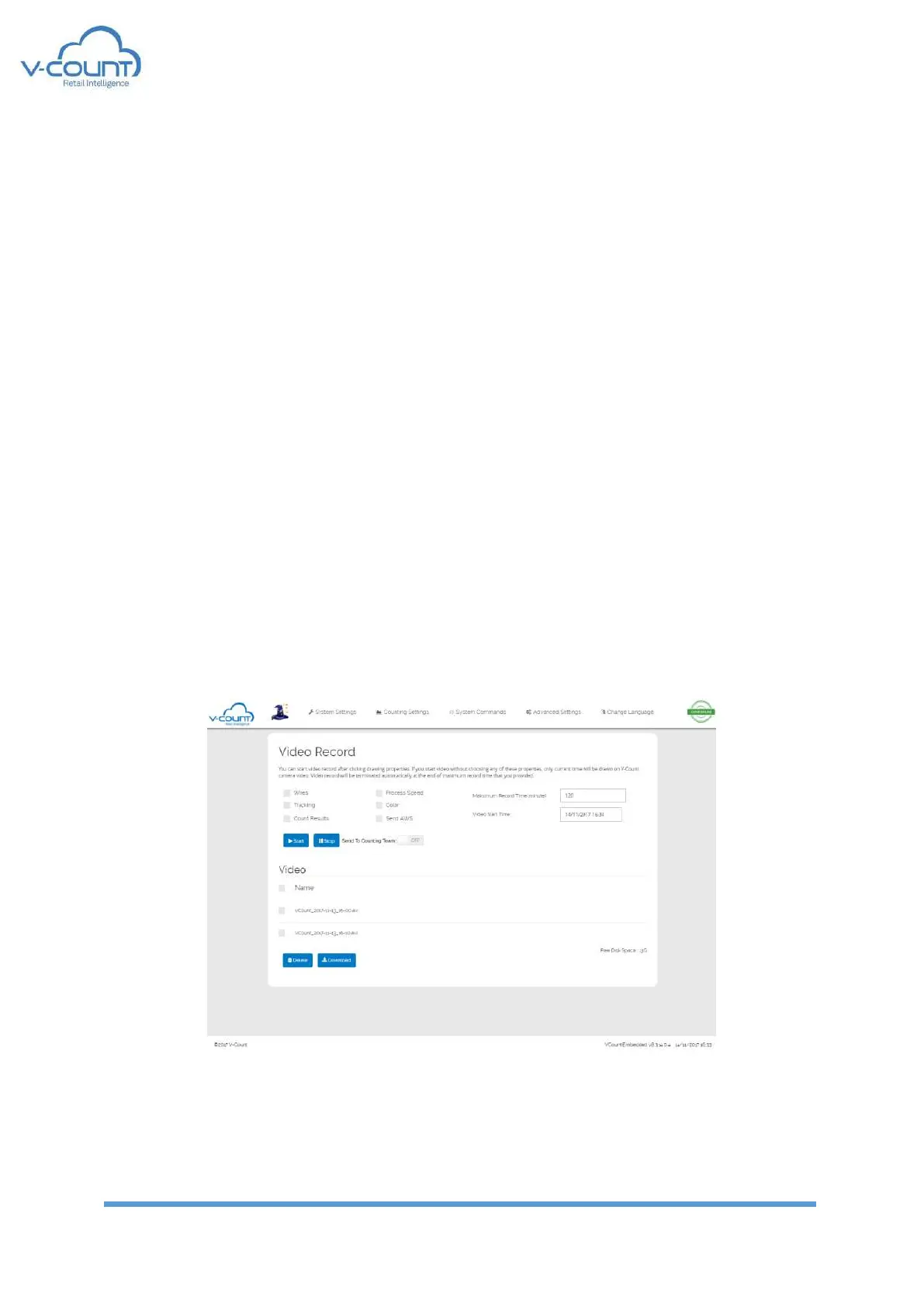
In this page, the system records videos both from processing end of the system and raw
videos directly from the cameras.
Processed images can have:
• Wires: Incoming – Outgoing wires
• Tracking: Tracking lines on the targets
• Counting Results: In/Out numbers displayed on the video
• Process Speed: Frames per seconds for processing
• Color: Colored 3D depth map
• Send Remote: upload videos to V-Count’s AWS or Azure servers
• Maximum Record Time: Number of minutes to record video
• Video Start Time: Start time of the video record
• Send to counting team: Videos are directly sent to V-Count Video Counting team. If
this is checked the counting shall be billed separately. Please contact to V-Count
Technical Team before enabling this option.
Every video is recorded as 10 minutes parts. Maximum Record Time is the total time
composed of 10 minutes length videos.
Free Disk Space indicator is the free space on device. This space must be larger than 1 GB at
least. While recording video, free disk space must be considered. Free disk space can be
controlled by deleting videos after downloading them. If free space is lower than 500 MB,
system automatically deletes the old video files.
Figure 32 Video Record Page


 To Next Page