• SSH Port: 12104
• Admin Username: admin
• Admin Password: qw34qw34
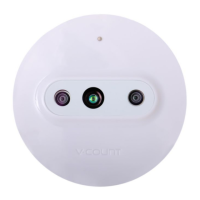
Reset procedure is as follows:
• Hold down the Reset button for at least 10 seconds until observing the following LED
status:
o LED1 continues to be Green at whole process
o LED2 is Red for 1 second, LED3 is off
o LED2 is off, LED3 is Red for 1 second
o This loop continues for 5 times. i.e. totally for 10 seconds
o After successfully completing 10 seconds
o For 5 times LED1 and LED2 flashes in Red
o For 5 times LED1 and LED2 flashes in Green
o LED1 and LED2 goes off. Only LED1 is Green. At this step reset button shall be
released
o System reboots
• If there is any error or reset button release during the reset procedure, device does
not reset itself. And LED indicators will show:
o LED2 and LED3 is Red for 2 seconds
o Continues with the normal working procedure.


 To Next Page