ENGLISH
- 36 -
11 - CONTROL UNIT CONFIGURATION
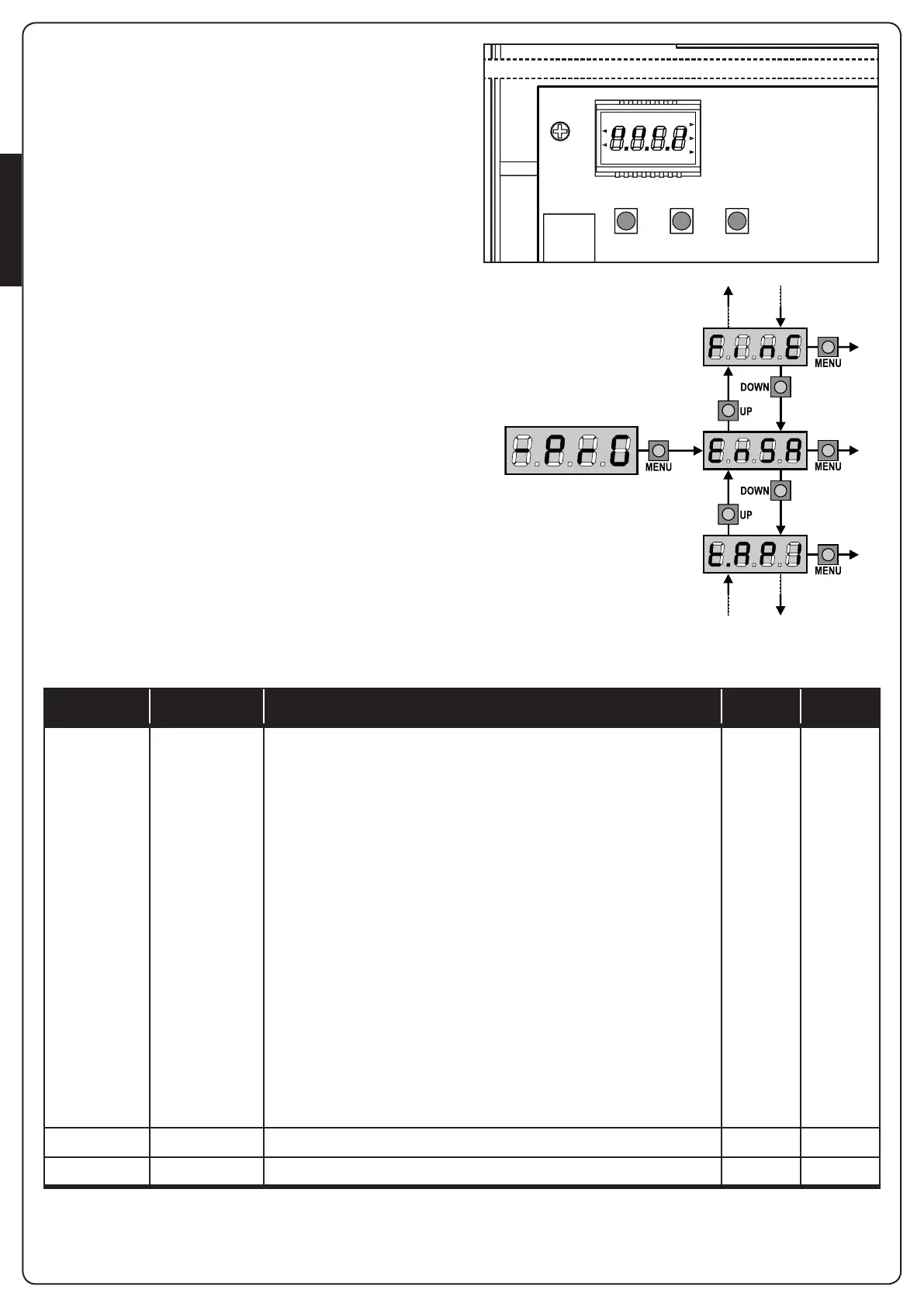
Control unit time and function programming is made within a
special configuration menu, to which you can access and where
you can shift through DOWN, MENU and UP keys placed under
the display.
Hold down the MENU key until -PrG appears on display, to
activate the programming mode while display views the panel.
The configuration menu consists in a list of configurable items;
the display shows the selected item.
• By pressing DOWN, you will pass to the next item
• By pressing UP, you will return to the previous item
• By pressing MENU, you can view the current value of selected
item and possibly change it.
The last menu item (FinE) allows storing the carried out changes
and going back to the control unit normal operation.
You must exit from programming mode through this menu item if
you do not want to lose your configuration.
m WARNING: in case no operation is carried out for
more than one minute, the control unit exits from the
programming mode without saving any of your setups and
changes, which will get lost.
NOTE: By holding down the UP or DOWN keys, configuration
menu items will scroll fast, until item FinE is viewed. In this way,
you can quickly reach either the top or bottom of the list.
PARAMETER VALUE DESCRIPTION DEFAULT MEMO
En.SA
ENERGY SAVING function
This function is useful for reducing the energy consumption of the
automation device while in stand-by mode.
If the function is enabled, the control unit will enter ENERGY SAVING
mode under the following conditions:
• 30 seconds after completion of an operational cycle
• 30 seconds after an opening (if automatic closure is not enabled)
• 30 seconds after exiting the programming menu
In ENERGY SAVING mode, power to the accessories, display, flashing lights
and closure electromagnets is deactivated.
ENERGY SAVING mode is exited:
• If an operational cycle is activated
• If one of the keys on the control unit are pressed
NOTE: during battery powered operation, if the level of charge is
insufficient to activate the automation device (the display shows
Err0), the ENERGY SAVING function is activated automatically in
order to reduce power consumption while awaiting mains power
to be restored.
no
no
Function deactivated
Si
Function activated
F1
LN
LN
F1
MAINS
MAINS
CITY2+
CITY2+L
CITY2+
CITY2+L
CITY2+BC
OVERLOAD
DOWN MENU UP



 To Next Page