AV Bridge MATRIX PRO
AV Bridge Matrix Pro Manual - Document Number 342-0915 Rev C Page 31 of 68
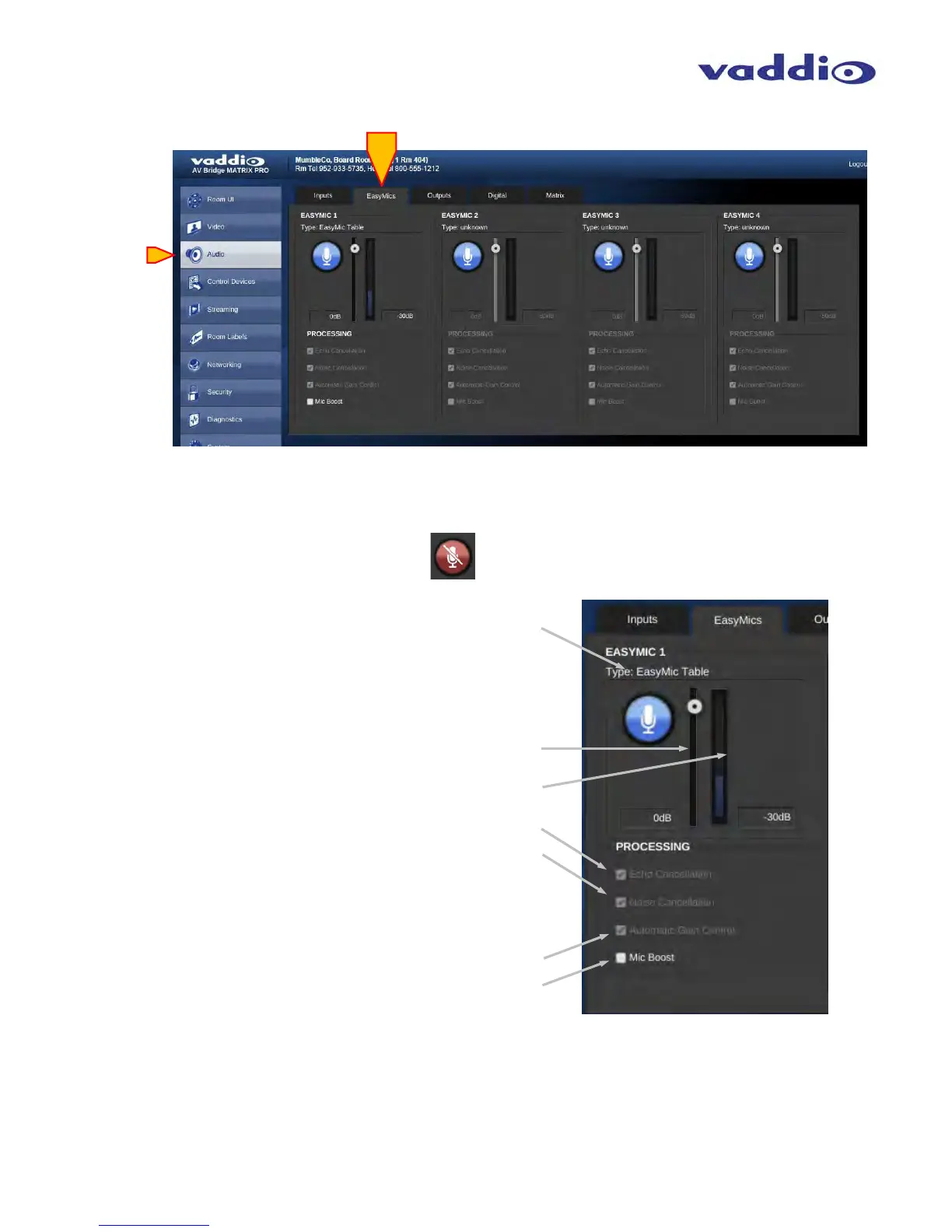
• Vaddio Easy MIC Inputs:
Mute Button: Mutes EasyMic when enabled.
Blue = active, Red = muted
.
Level slider: Adjusts EasyMic signal level for
required amplitude.
Level indicator: Displays active average (RMS)
audio on that specific EasyMic input. Labels indicate
gain or attenuation.
Processing: Echo Cancelation: check box
to enable echo cancelation for the
Vaddio EasyUSB Table MicPOD or
EasyUSB Ceiling MicPOD connected
to that EasyMIC port.
Processing: Noise Cancelation: check box
to enable the noise canceling DSP function
for the EasyMIC connected to that port. This
is not a noise gate, but a method to reduce wide-
band noise in the echo canceller.
Processing: Automatic Gain Control: Check
box to enable the Automatic Gain Control for
that specific EasyMIC.
Processing: Mic Boost: Check box to enable
Additional Gain for that EasyMIC (if required).



 To Next Page