OneLINK For RoboSHOT HDMI Cameras
OneLINK For RoboSHOT HDMI Cameras Page 10 of 20
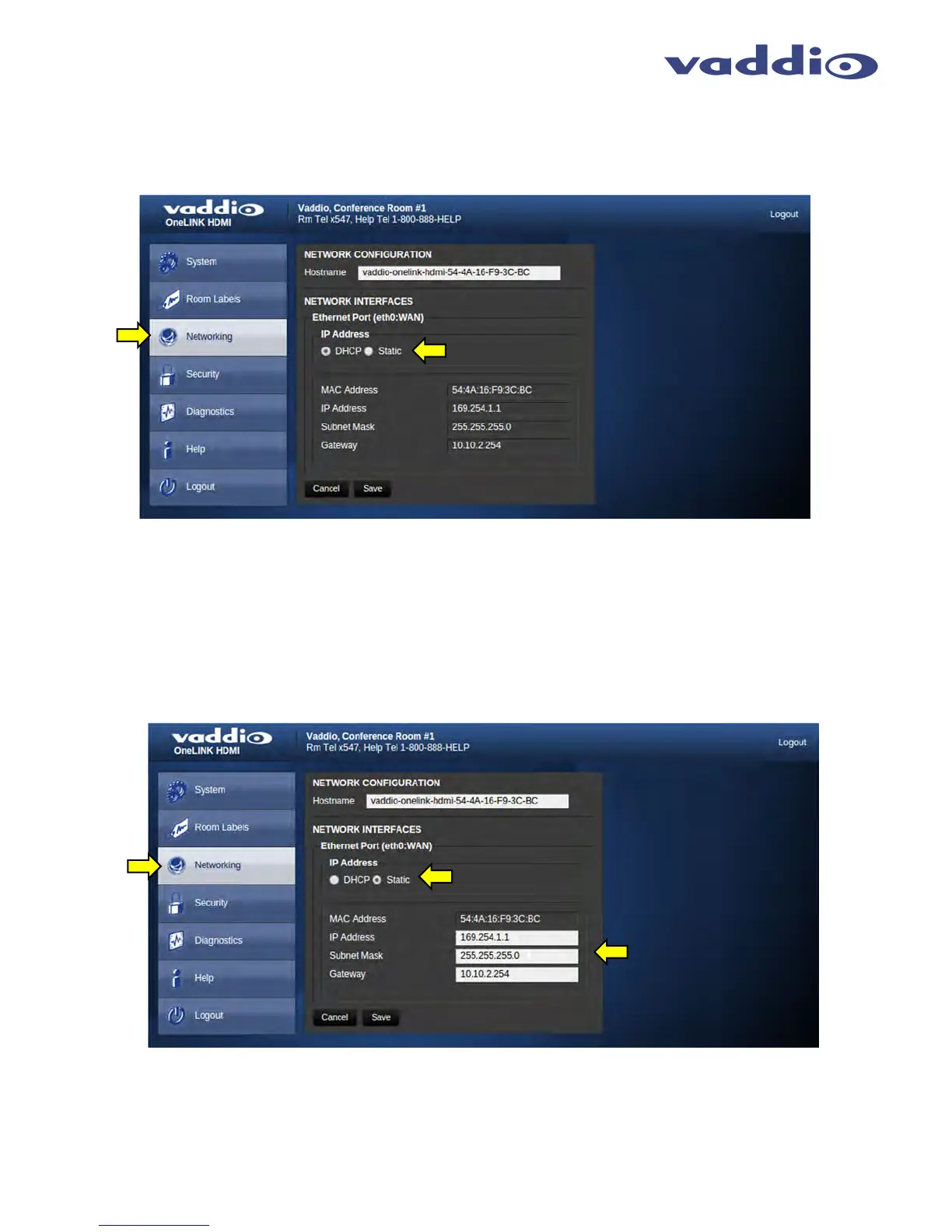
Screen Shot: Networking (DHCP)
Under the Networking menu tab, the Network Configuration and Network Interfaces are displayed. This is where
the Network administrator assigns either DHCP or a Static address and the associated parameters.
Notes: If the LAN has a DHCP (dynamic host configuration protocol) server, then the IP address, gateway and routing information will
automatically be assigned. The software is defaulted to DHCP and will attempt to dynamically obtain an IP address using DHCP, but it will fall
back to the default address of (169.254.1.1) if no DHCP server can be found.
Screen SHOT: Networking (Static IP Configuration)
If Static IP is used, the IP Address, Subnet Mask and Gateway are manually entered. Click on Save to keep the
Static IP information.



 To Next Page