OneLINK For RoboSHOT HDMI Cameras
OneLINK For RoboSHOT HDMI Cameras Page 5 of 20
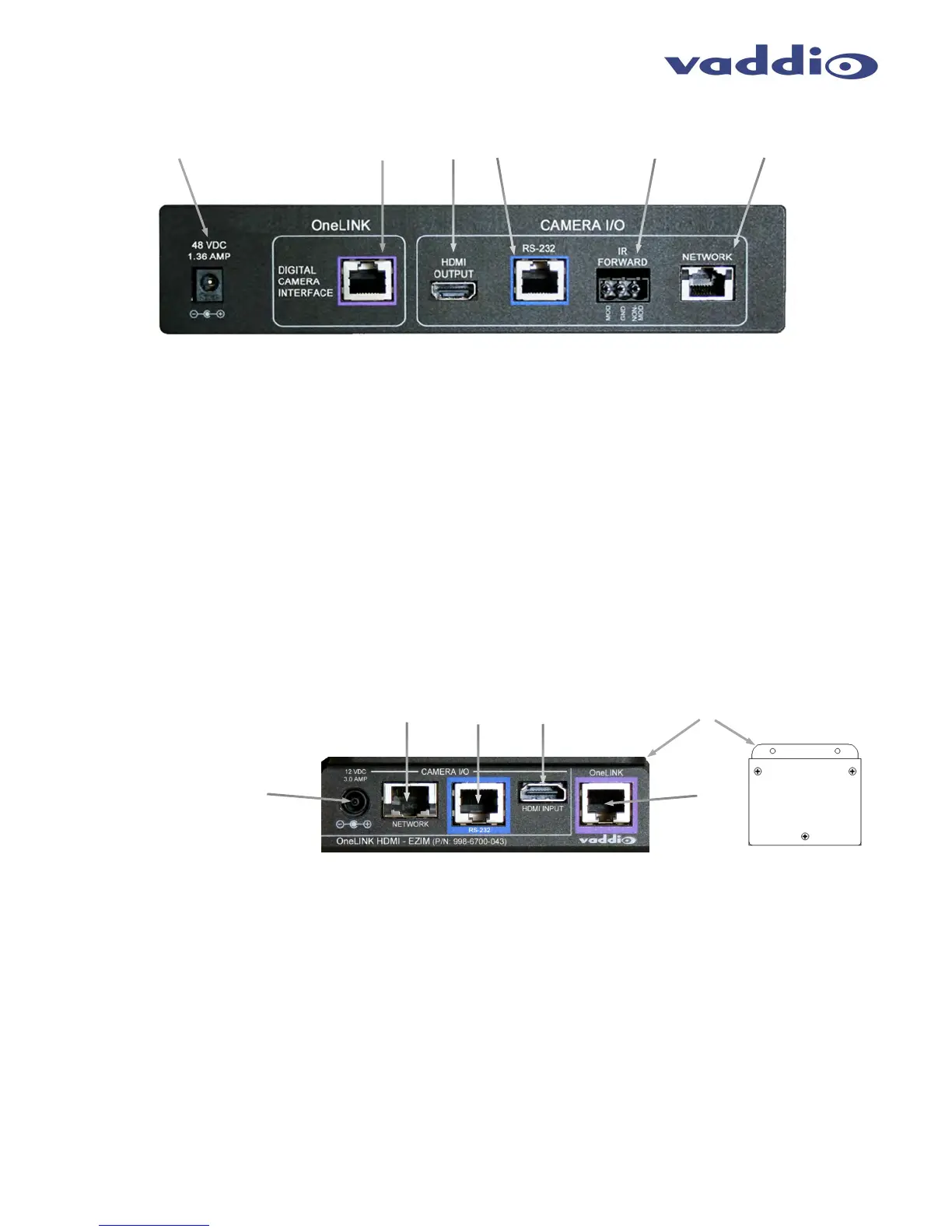
Image: OneLINK HDMI Interface with Rear Panel Connector Call-outs
1. Power Input Jack: Coaxial 5.5mm OD x 2.5mm ID power jack with positive center for use with supplied 48VDC, 1.36A
power supply. This power jack supplies power to both ends of the OneLINK system as well as the camera.
2. OneLINK Interface Port: Shielded RJ-45 jack for connecting a single Cat-5e or better cable for connectivity to the EZIM
(TX) at the camera location to the OneLINK HDMI Interface (Rx). Cat-6 or Cat-7 cabling might provide better performance
in noisier RF or EMF environments - when in doubt, use shielded Cat-6 cable. Cable distance between the OneLINK EZIM
and OneLINK HDMI Interface is a maximum of 328 feet (100 m).
3. HDMI Output: HDMI output to provide camera HDMI signal.
4. RS-232 port:
Shielded RJ-45 jack for connecting a bi-directional RS-232 signal to be transported by the
OneLINK system (if required. This signal will be transported on the OneLINK system simultaneously with the
other signals
5. IR Forwarding: 3-pin Phoenix-style connector for forwarded IR signals from the camera EZIM. Modulated and non-
modulated outputs provided. Note: IR Forwarding is not used with the RoboSHOT HDMI cameras.
6. Network IP Port: Shielded RJ-45 network jack for transport of Ethernet signals for camera control or webserver access.
Image: OneLINK EZIM Camera Interface with Connector Call-outs
1. Camera Power Jack: EIAJ-04 coaxial power connection to provide power to the camera. An appropriate
cable is provided to connect the camera to this jack.
2. Ethernet Port: Shielded RJ-45 network jack provided to allow connection of Ethernet control to the camera.
3.
RS-232: Shielded RJ-45 jack for bi-directional RS-232 connection to camera.
4.
HDMI Connection: HDMI connector for HDMI video signal coming from the camera to be inserted into the EZIM for
transport.
5.
Mounting flange: A convenient mounting flange is provided for mounting the EZIM to the camera’s included wall mount
or to another appropriately located position.
6.
OneLINK Interface Port: Shielded RJ-45 jack for connecting a single Cat-5e or better cable for connectivity to the EZIM
(TX) at the camera location to the OneLINK HDMI Interface (Rx). Cat-6 or Cat-7 cabling might provide better performance
in noisier RF or EMF environments - when in doubt, use shielded Cat-6 cable. Cable distance between the OneLINK EZIM
and OneLINK HDMI Interface is a maximum of 328 feet (100 m).
②① ③ ④ ⑤ ⑥
②
①
③
④
⑤
⑥
Front View



 To Next Page