OneLINK For RoboSHOT HDMI Cameras
OneLINK For RoboSHOT HDMI Cameras Page 14 of 20
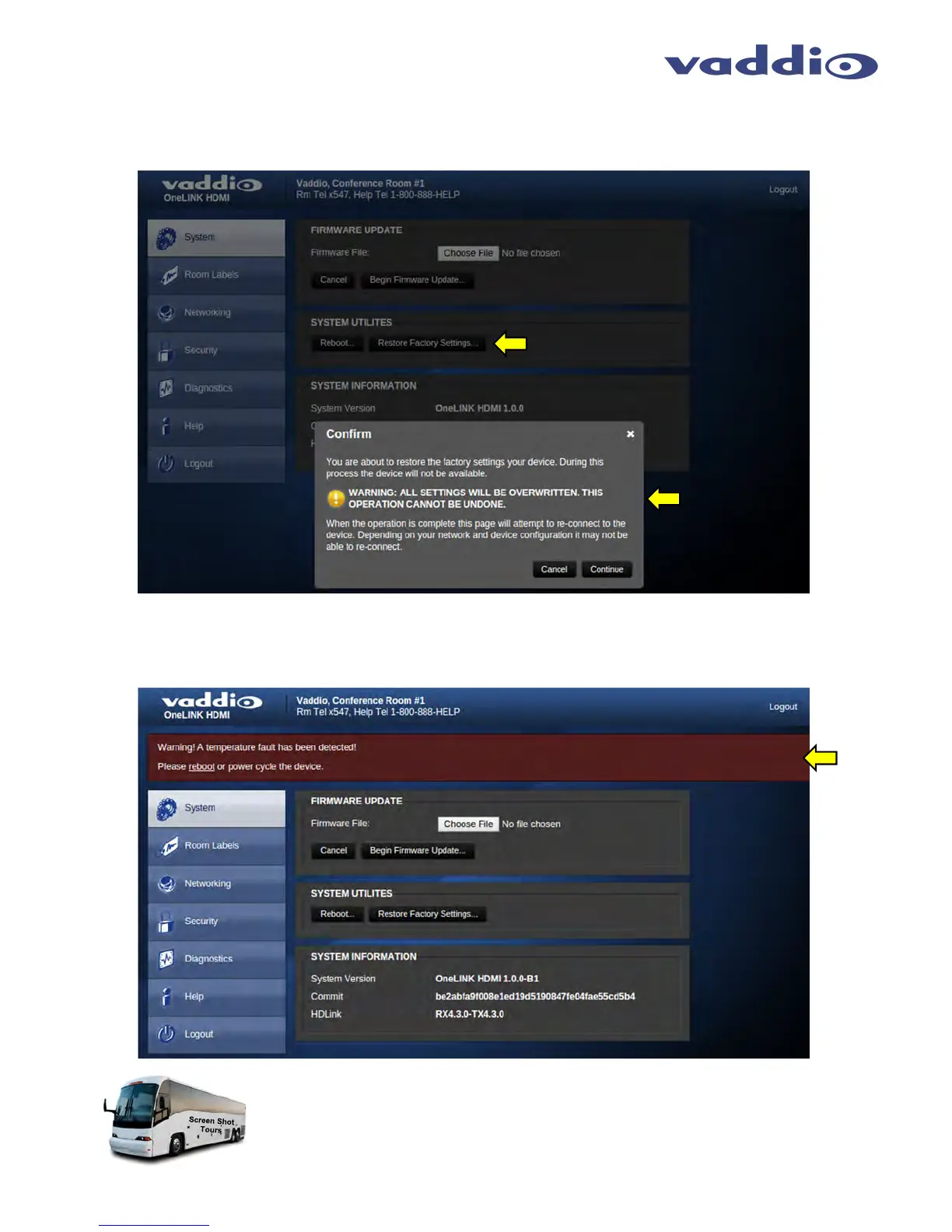
Screen Shot: System Menu - Restore Factory Settings Confirmation
After clicking on Restore Factory Settings, a confirmation message pop-up is shown. Click on continue or cancel
one the content of the pop-up is understood.
Screen Shot: System Menu - Temperature Fault
With HDBaseT technologies, the transmit side (EZIM on the camera end) can tend to run warm, which is very
normal. If the system detects that the temperature is too high, a temperature fault banner will appear and give
direction to reboot or power cycle the system.
This concludes the Screen Shot Tour for the OneLINK HDMI Interface. The General
Specifications, Pin-outs, Declaration of Compliance and Warranty Statement are to follow
and are as breathtaking and stimulating as one would expect.



 To Next Page