PROGRAMMABLE
FUNCTIONS
HYDRAULICS
There are totally 9 different programmable hydraulic controls
in the SmartTouch armrest. The auxiliary hydraulic controls are
positioned on the armrest. The joystick, ngertip levers and
linear levers are programmable, thus you can select which
lever controls which valve.
1.
Joystick
2.
Joystick ngertip lever
3.
Upper button (Front loader selecto 3)
4.
Lower button (Front loader selecto 4)
5.
Hydraulics ngertip lever 1
6.
Hydraulics ngertip lever 2
7.
On/off valve A
8.
On/off valve B
9.
Blue linear lever
10.
Brown linear lever
11.
Green linear lever
12.
White linear lever
13.
Master activation switch
PROGRAMMABLE
HYDRAULICS
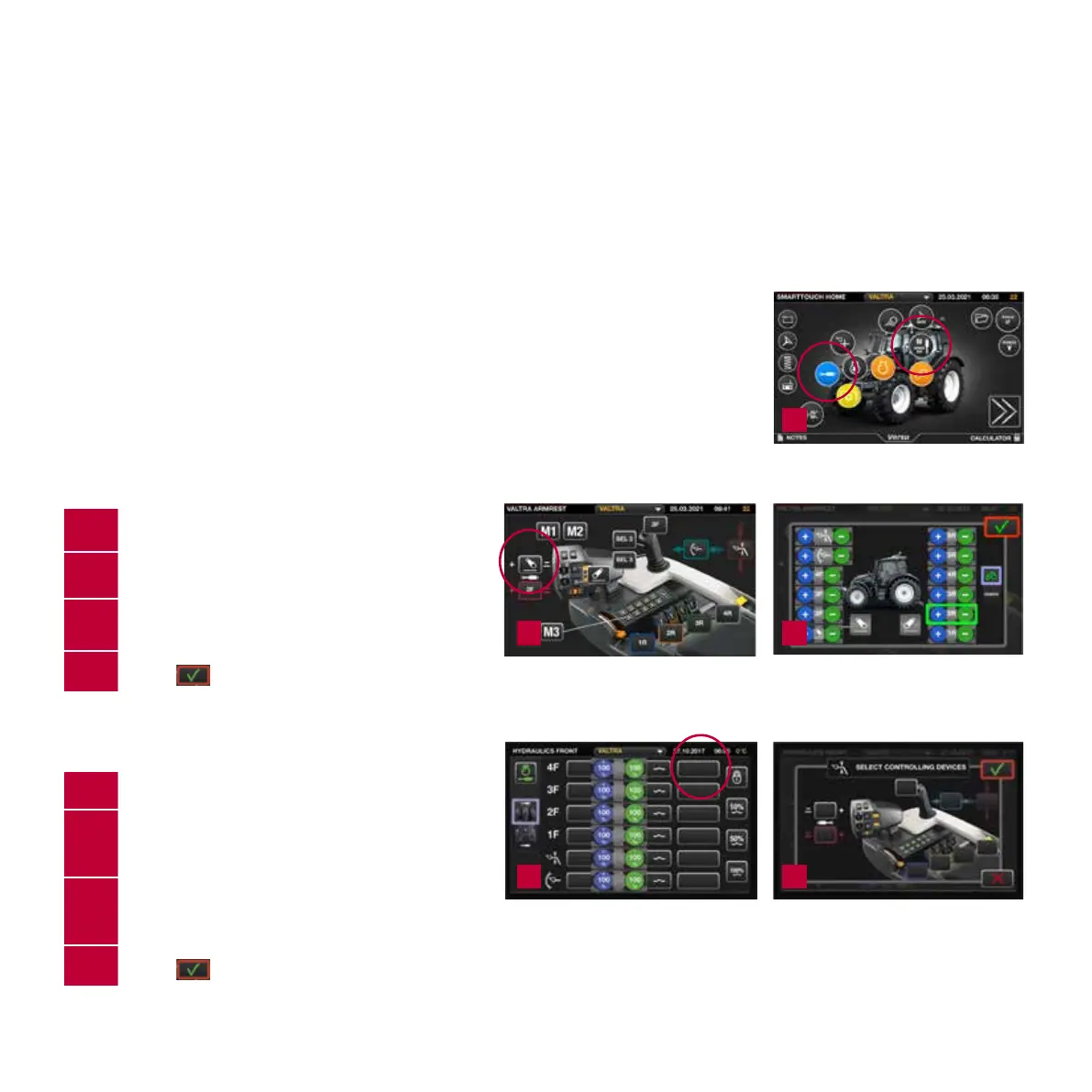
You have two ways to congurate your hydraulics
and hydraulic controls with the SmartTouch armrest:
1. FROM MEMORY BUTTONS SETTING YOU CAN
PROGRAM A VALVE TO ANY CONTROL
1.
Open the memory buttons setting.
2.
Select control you want to program.
3.
Tap the front or rear valve, front or rear linkage,
front loader or ISOBUS function to select it.
4.
Select
to accept changes.
2. FROM THE HYDRAULIC SETTING YOU CAN
SET A CONTROL TO ANY VALVE
1.
Open the front or rear Hydraulics screen.
2.
Tap the icon of the valve control device from
the desired valve row.
3.
Tap the control device to select it
NOTE: You can select multiple control devices
for the same valve.
4.
Select
to accept changes.
1
3
3
2
2
23
T/N Series Quick Guide / Direct


 To Next Page
 Loading...