VARI❋LITE - VL2200 SERIES SPOT LUMINAIRE USER’S MANUAL
96 22-May-01 02.9673.0001 A
CAUTION: Do not touch color filters with bare fingers. Wear cotton gloves or other
covering while replacing. Clean with glass cleaner and soft cloth if required.
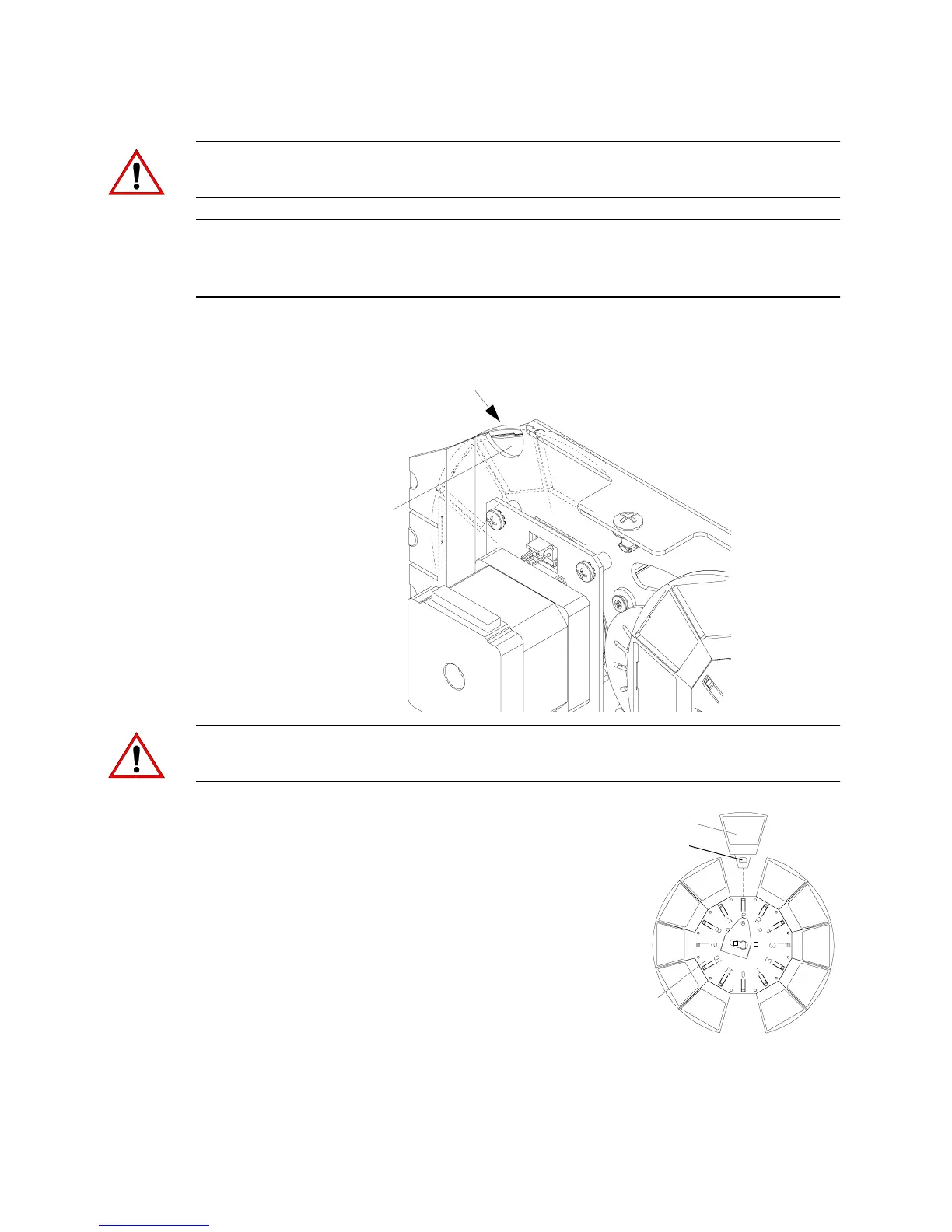
Note: In some cases it is easier to slide bulkhead partially out of head assembly to
access color filters. To do this, use #2 Phillips screwdriver to turn captive screw one-
quarter turn and slide bulkhead upward. Disconnect motor connections as necessary.
3. Rotate wheel until required color filter is accessible at finger access cutout.
CAUTION: Do not touch color filters with bare fingers. Wear cotton gloves or other
covering while replacing. Clean with glass cleaner and soft cloth if touched.
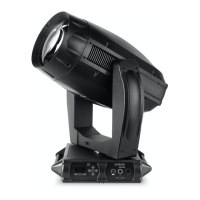
4. Using fingers, pull color filter out of
wheel.
5. Noting proper orientation of carrier
slot, insert new color filter into
position and push fully into place.
6. Re-install bulkhead (if applicable)
and re-install removable cover.
Finger Access
Cutout
Color Filter
Color
Filter Wheel
Color Filter
Carrier Slot


 To Next Page