VARI❋LITE - VL2200 SERIES SPOT LUMINAIRE USER’S MANUAL
54 22-May-01 02.9673.0001 A
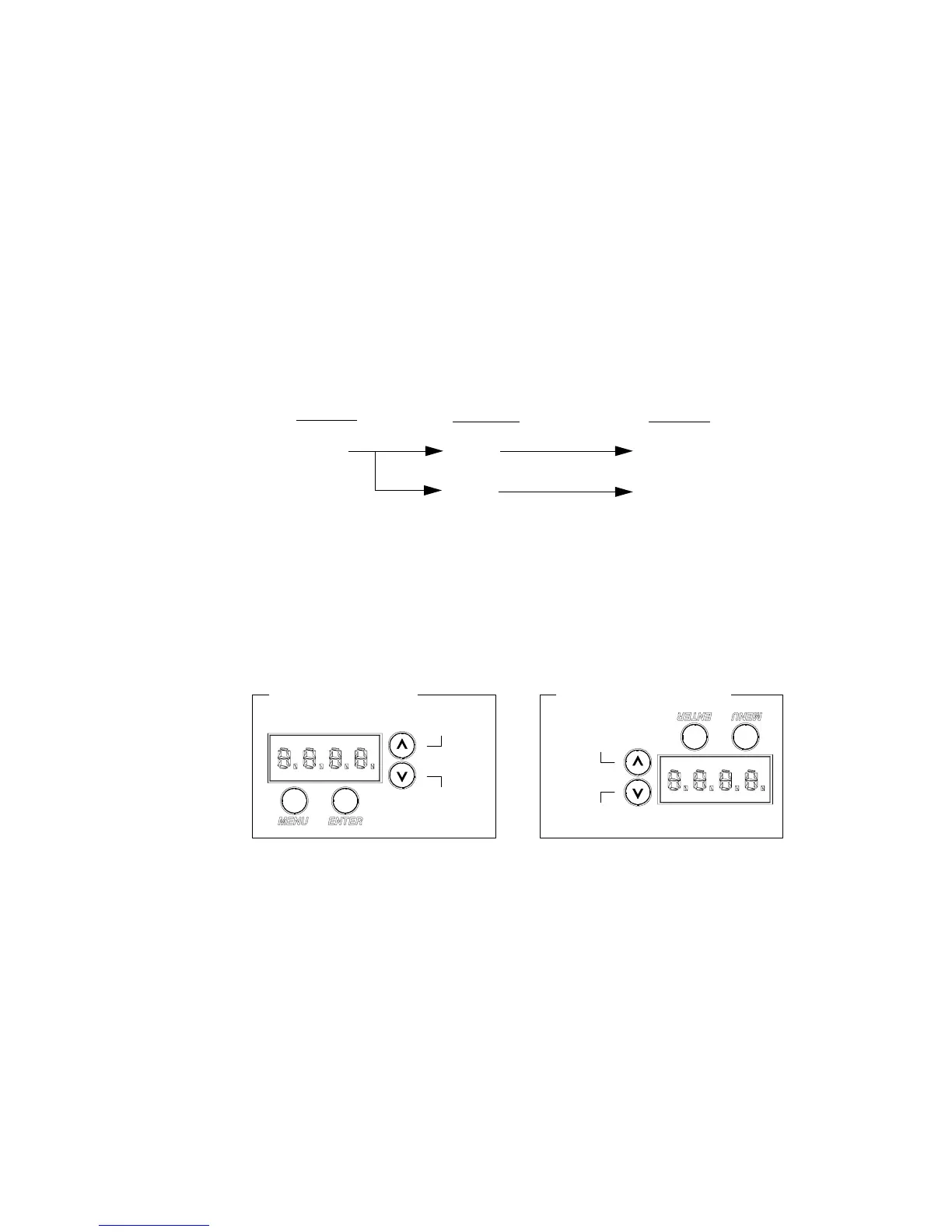
To enter the menu system, first press [Menu]. The functions displayed will be 1st level
functions. Scroll through the 1st level functions by pressing [Up] / [Down] arrows.
Once the desired function appears in the display, press [Enter]. You are now at the 2nd
level. Once again, press the [Up] / [Down] arrows to scroll through 2nd level
functions. Press [Enter] to access 3rd level functions and so forth. When the highest
level for the function is reached, [Up] / [Down] arrows can be pressed to select a value
or select a toggle activation such as ON/OFF. Press [Enter] to store the value or select
an action.
For example, the Addr (Address) function has two sub-levels: DMX and VIRT
(Virtuoso). Both of these 2nd level menus allow access to a 3rd level, which is a value
in both of these functions. The Address function is a 3-level menu.
Display Orientation
To assist in reading the Menu System if the luminaire is installed in a hanging
position, the display read-out orientation can be changed so that it still reads from left-
to-right. Keep in mind that when the display read-out orientation is switched, the
function of the [Up] / [Down] arrows are also switched respectively. In any case, when
the display is in its readable orientation, the lower arrow button functions as down/
decrease and the upper arrow button functions as up/increase.
The default setting for the display orientation is Auto, which will automatically
detect the orientation of the luminaire and adjust the display accordingly. However, a
fixed orientation can also be programmed.
To program a fixed display read-out orientation:
1. Press [Menu].
2. Press [Up] / [Down] arrows until CFG (Configuration) appears. Press
[Enter].
3. Press [Up]/ [Down] arrows to access DDir. Press [Enter].
4. Press [Up] / [Down] arrows to select ⇑⇑ or ⇓⇓. When desired direction is
reached, press [Enter].
1st Level
2nd Level 3rd Level
Addr
DMX
VIRT
XXX
XXXX
Floor Installation Hanging Installation
Up /
Down /
Increase
Decrease
Up /
Increase
Down /
Decrease



 To Next Page