Infotainment system 179
1 )
Press: switch power on / off
2 b
Turn: adjust volume
3 i
Display the radio menu
4 G
Display the media menu
for external devices
5 a
Display the phone menu if
a mobile phone is connected
Display a list of all paired
devices if no phone is connected
6 h
USB port for external devices
7 :
Display the system
settings menu
8 _
Display the vehicle
settings menu
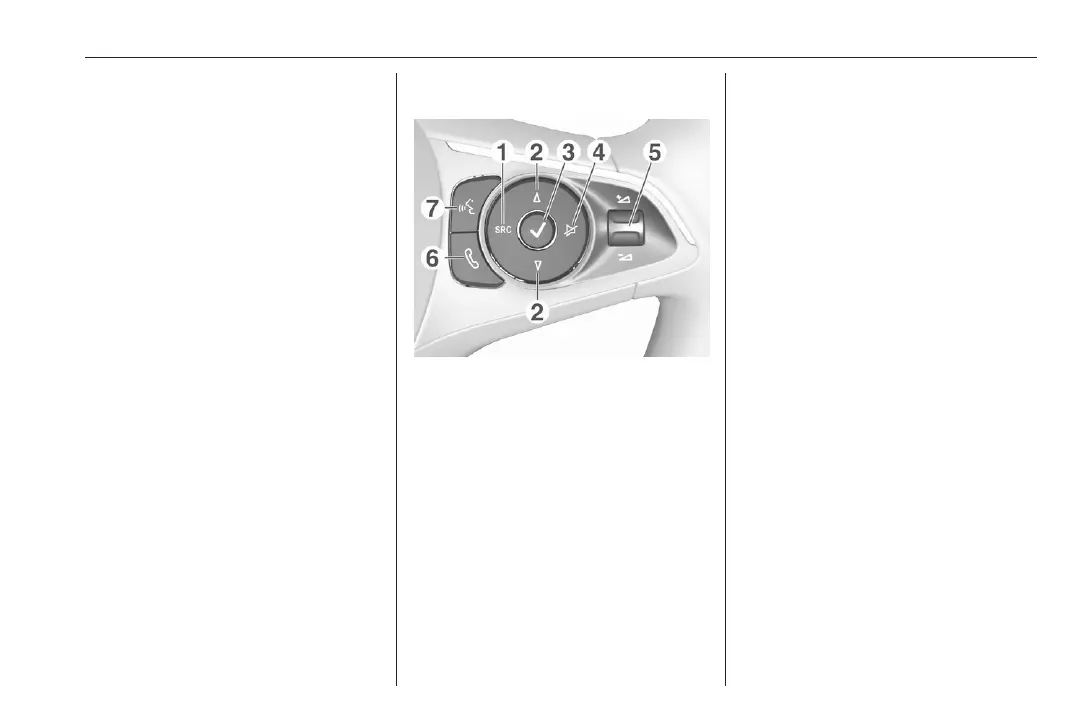
Steering wheel controls
1 SRC (Source)
Select audio source,
confirm selection with A
Long press: mute system
2 ä / å
Select next / previous
preset radio station when
radio active
or select next / previous
track / picture when
external devices active
or select next / previous
entry in station list, media
list, call / contacts list when
operation started via
steering wheel controls
Confirm selection with A
3 A
Confirm selected item
or open station list, media list
4 x
Activate / deactivate mute
function
5 Y / Z
Turn upwards /
downwards: increase /
decrease volume
6 6
Short press: accept
incoming call
Long press: reject
incoming call, hang up call













 To Next Page