16 © Continental Automotive Issue 02/2017
2.2 Main screen
2.2.1 Description
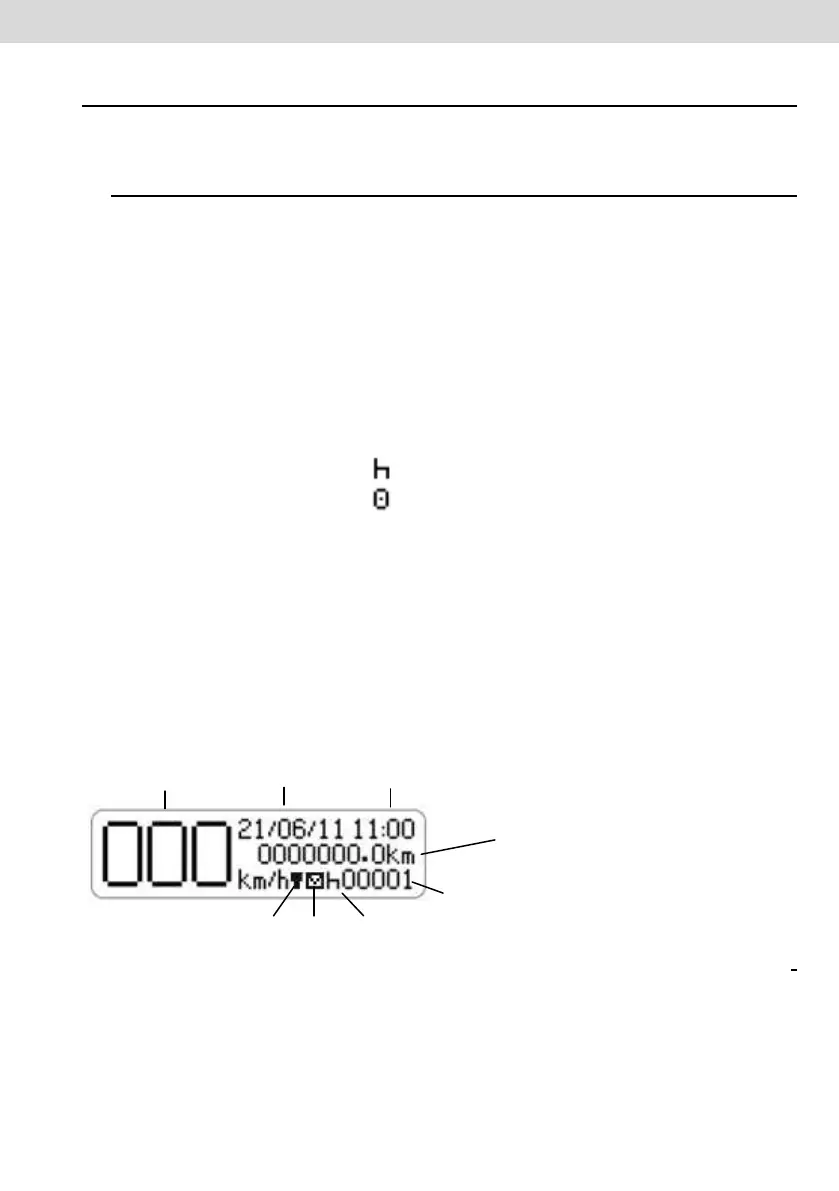
This screen, as Figure 2.2.1.1 indicates all key information from the tachograph.
(1) Conditions Speed, every 1km/h. Reaching certain speeds, speed characters
will flash for 5 seconds, this is a normal characteristic of the product;
(2) Date programmed in Digital tachograph as dd/mm/yy;
(3) Local time, as hh:mm;
(4) Total odometer of vehicle;
(5) Vehicle Status:
• Rest / Stopped
• Travelling / Direction
(6) Driver code - Logged Driver;
The driver code will only be correctly identified after the previous registration, as
per item 2.4.1 of this manual. In case there is no driver identified, "?????" is
displayed on the screen and in the case of direction, an audible alarm will be
activated. To disable the alarm just press the OK button.
(7) Print receipt (in case of integration with telematics device);
(8) Available message (in case of integration with telematics device).
Illustrative Figure 2.2.1.1 – Main screen of Digital BVDR Tachograph



 To Next Page