22 © Continental Automotive Issue 02/2017
2.4 Main Functionalities of Menu
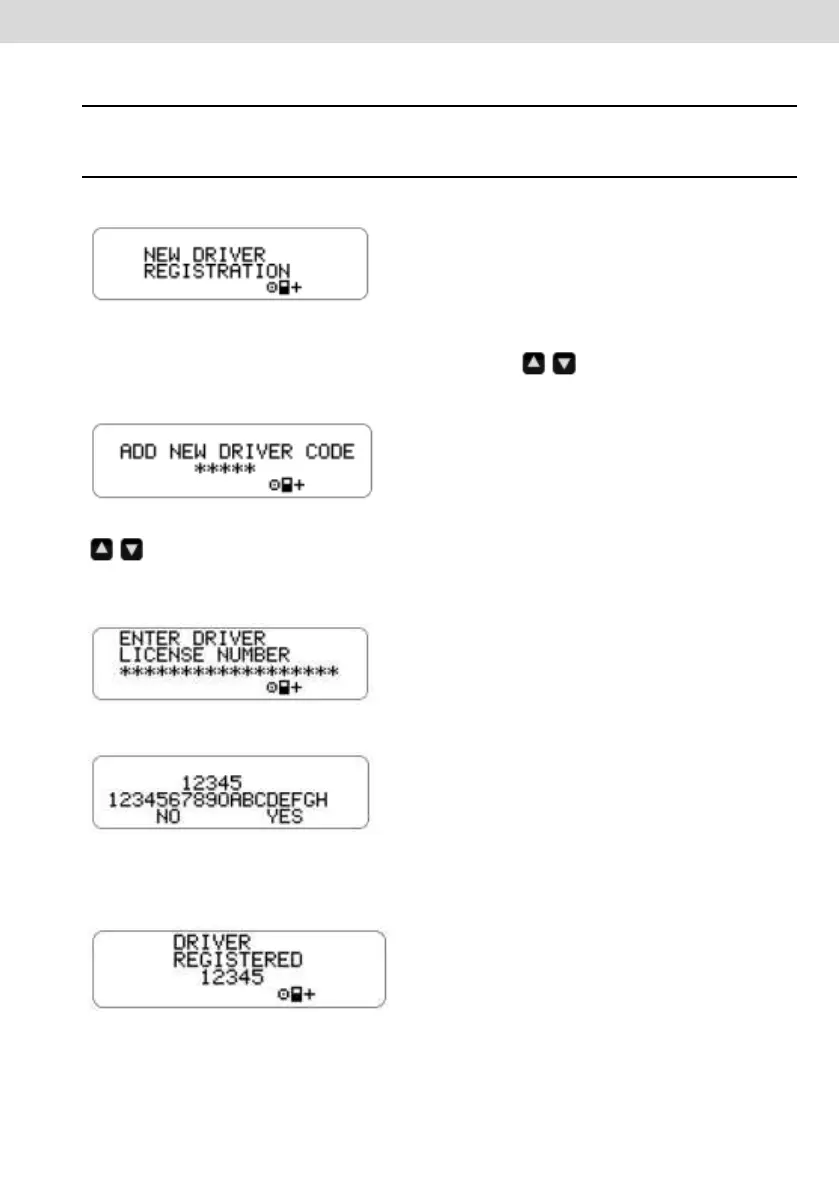
2.4.1 New Driver Registration
a) The driver selects the "New Drive Registration" menu through the front panel
keys.
b) A screen is displayed to enter the new driver code (integer number [0, 1, 2, 3,
4, 5, 6, 7, 8, 9]). The buttons are used to increment / decrease
the driver code digits. The "OK" button is used to select the driver code digit and
move the cursor to the next digit.
c) After a screen to enter the driver's license will be shown using the buttons
to choose the license number as described above. 18 alphanumeric
characters, usually numbers are used: 0, 1, 2, 3, 4, 5, 6, 7, 8, 9, A, B, C, D, E,
F, G, H, I, J, K, L, M, N, O, P, Q, R, S, T, U, V, W, X, Y, Z.
d) Then the code and driver's license will be shown to confirm the data.
e) If the information input is correct, the driver presses the OK button to validate
them. (Digital tachograph will include the new driver information in the internal
list).



 To Next Page