Issue 02/2017 © Continental Automotive 19
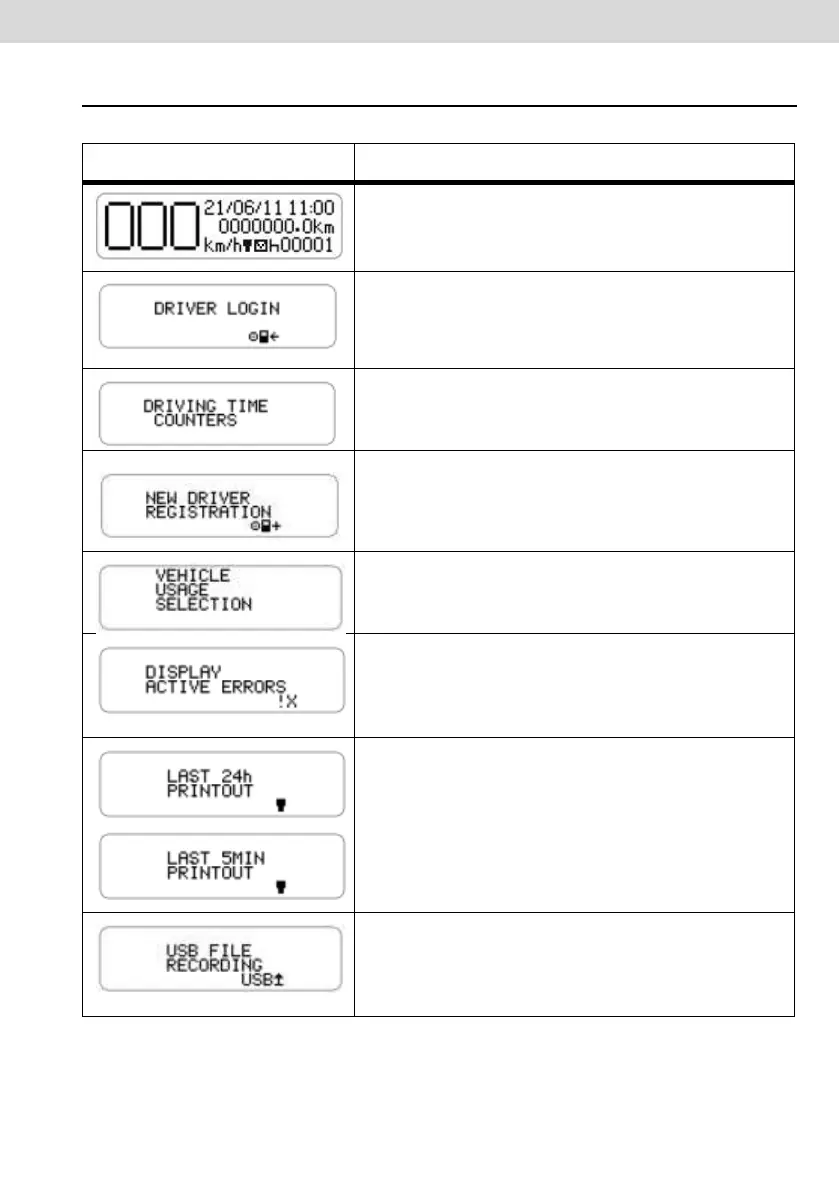
2.3 Summary of Menu Functions
Main screen.
In this screen by pressing the "DOWN" key,
the following screen will be shown.
This function allows the operator to select the
code from a previously already registered
driver in BVDR.
This function helps the driver to control the
direction and rest according to CONTRAN
legislation.
This function allows the operator to add the
driver code from the list of registered drivers in
BVDR.This menu will be unavailable if already
a diver is logged in.
This function allows you to define the area of
operation of the vehicle in order to determine
the amount of time to be considered as rest.
This function allows you to view the still active
errors in the digital tachograph. If the error no
longer exists, this will be considered as "last
errors".
This function allows the operator to print on the
tape the last 24 hours, in case of default
application or the last 5 minutes, in the case of
Chile application, counting as of the time the
printing was requested.
This function allows the operator to perform
the recording of BVDR information via USB, for
different time periods (last 24 hours, last 7
days, since the last collection).



 To Next Page