26 © Continental Automotive Issue 02/2017
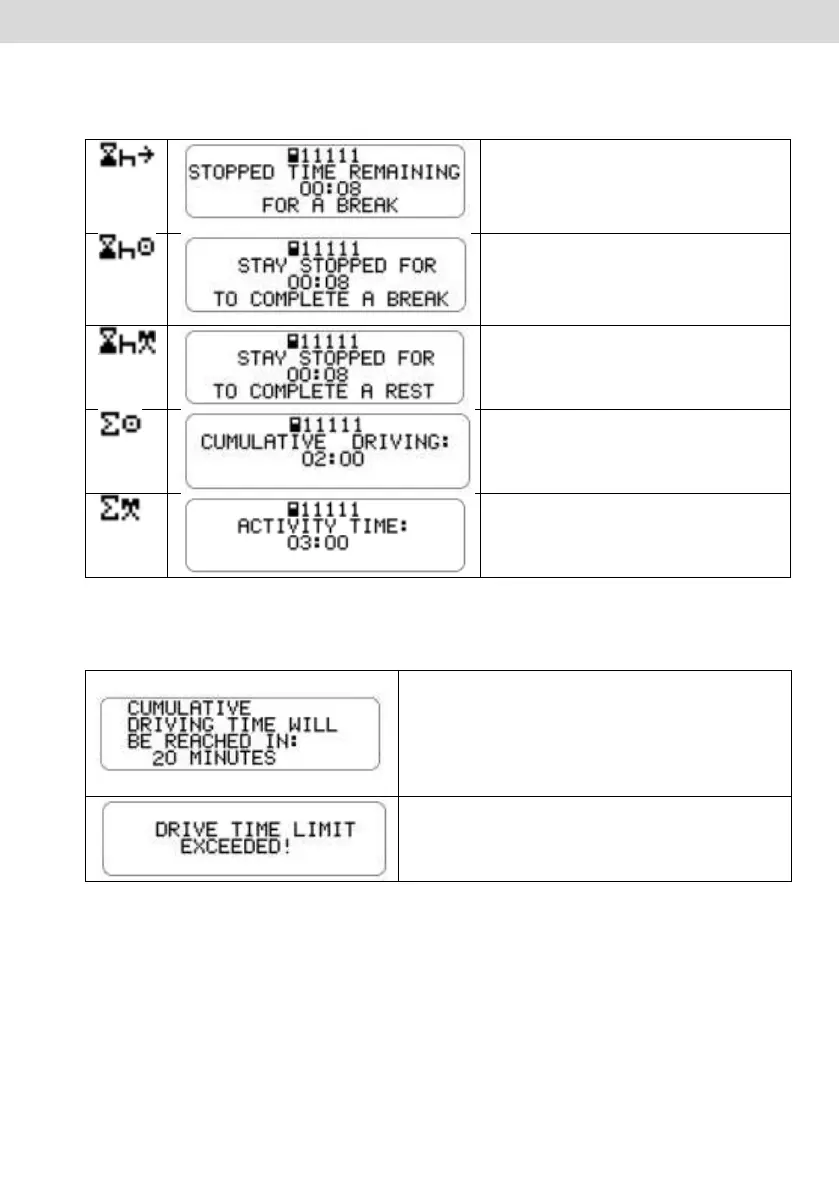
By pressing the "OK" button you can see in detail each time that the tachograph
BVDR estimates, being:
This screen shows the driver the
minimum downtime to be
considered the beginning of the
rest, as vehicle application.
This screen shows the driver the
remaining amount of stopping
time, to be considered the total
time of a stop.
This screen shows the driver the
remaining amount of stopping
time, to be considered a rest.
This screen shows the driver the
sum of the amount of
accumulated driving time.
This screen shows the driver the
sum of the total amount of
working hours (driving + rest).
b) The alert to the driver is done through message on the display and audible
alarm.
20 minutes before the end of the
maximum continuous driving limit.
Every 10 minutes after the maximum
continuous driving limit. And every 1
minute after 50 minutes exceeded.
c) To define the minimum time to be considered as rest, within the maximum
continuous driving time, the driver must set the vehicle type in which the digital
tachograph BVDR is installed, be it a passenger urban vehicle or not. Just
browse through the menu until the following screen:



 To Next Page