DLKPro Inspection Key • Operating Instructions – Edition 03/2012 31
8 “DownloadTools” PC programme / Breach module
Processing data
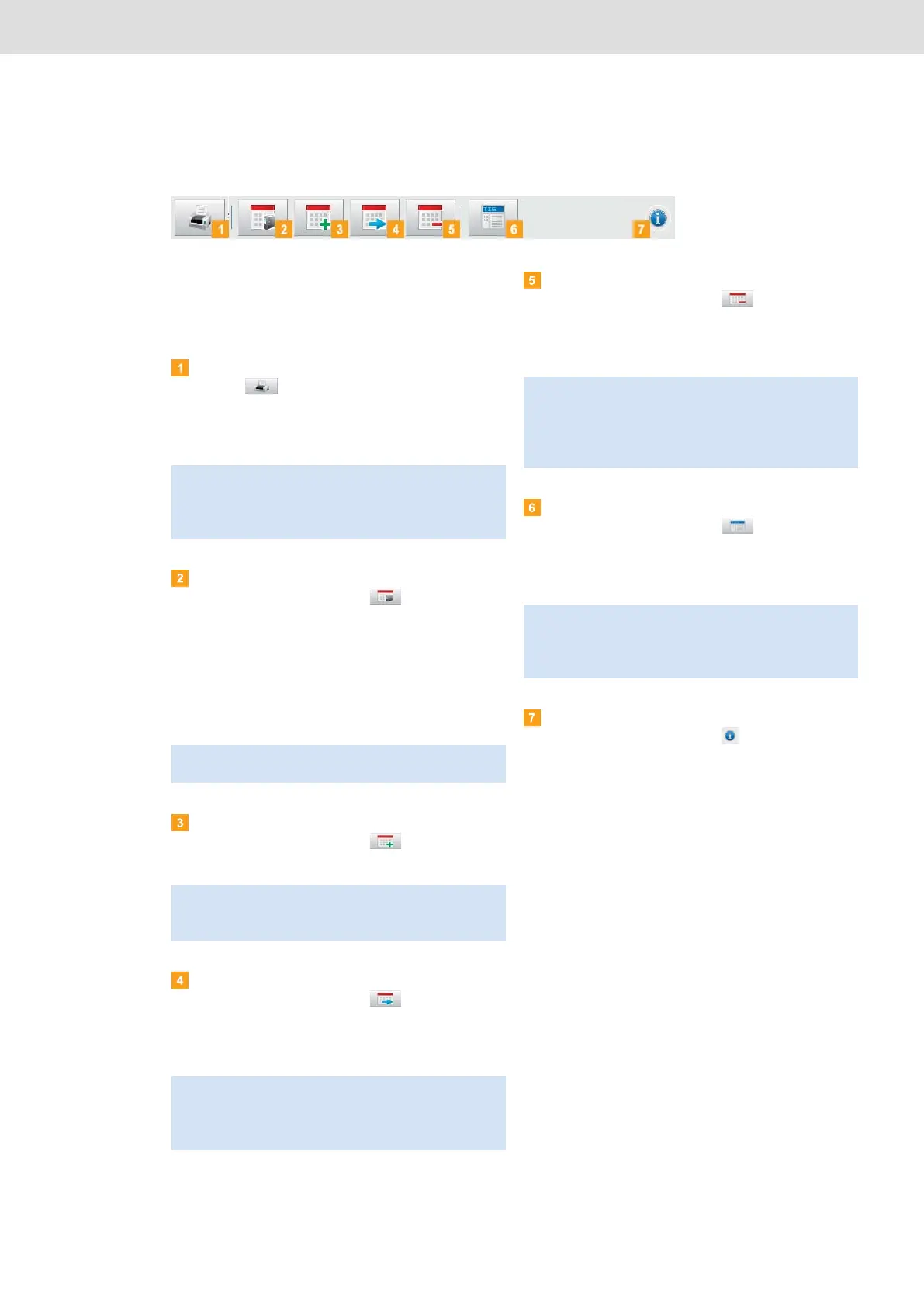
The buttons available in the Breach module depend on
the selected tab.
Specify how you want to process the data further by
clicking on a button in the function pane.
Print button
Click on to open a (print) preview of the
suspicious event analysis in the display and editing
pane. You can then save the analysis in a PDF file or
print it.
Archive button
In the function pane, click on to save the files
available for the selected day on the computer.
Specify the target folder for archiving via
[Configuration] > Options (tab) > Archive folder
(box); see page 34.
Vehicle or driver download files that have been
archived this way are denoted by a green number in
the calendar.
Copy button
In the function pane, click on to copy the files
available for the selected day to the computer.
Move button
In the function pane, click on to remove the
files available for the selected day from the DLKPro
or from the archive folder and move them to the
computer.
Delete button
In the function pane, click on to remove the
files available for the selected day from the DLKPro
or from the archive folder.
Confirm the query with [Yes] to delete the files.
TIS-Web button
In the function pane, click on if you want to
import the data into TIS-Web
®
.
Internet Explorer
®
starts with the TIS-Web
®
login
page.
Help button
In the function pane, click on to open these
Operating Instructions.
Note: In the Configuration module on the Options tab,
you can specify whether or not the legal provisions of
Regulation (EC) No. 561/2006 should be printed
together with the suspicious event analysis.
Note: Archiving does not delete the files from the
DLKPro.
Note: When copying files, the files are neither deleted
from the DLKPro nor from the archive folder, but copied
to the target folder.
Note: Download files that are moved are neither
available on the DLKPro, nor in the download archive.
The vehicles or drivers associated with the files are no
longer listed.
Caution: If you delete a download file that has not yet
been archived or copied, this action cannot be undone.
If you are not quite sure whether or not you will need the
file again, you should copy or move it.
Also remember the archiving obligation note on page 3.
Note: Depending on your TIS-Web
®
settings, the files
could be deleted from the DLKPro after import is
complete. Please read the notes in the TIS-Web
®
Quick
Reference Guide.


 To Next Page