EMR
3
Setup and Operation Manual Setup Mode Categories
14
PRICING
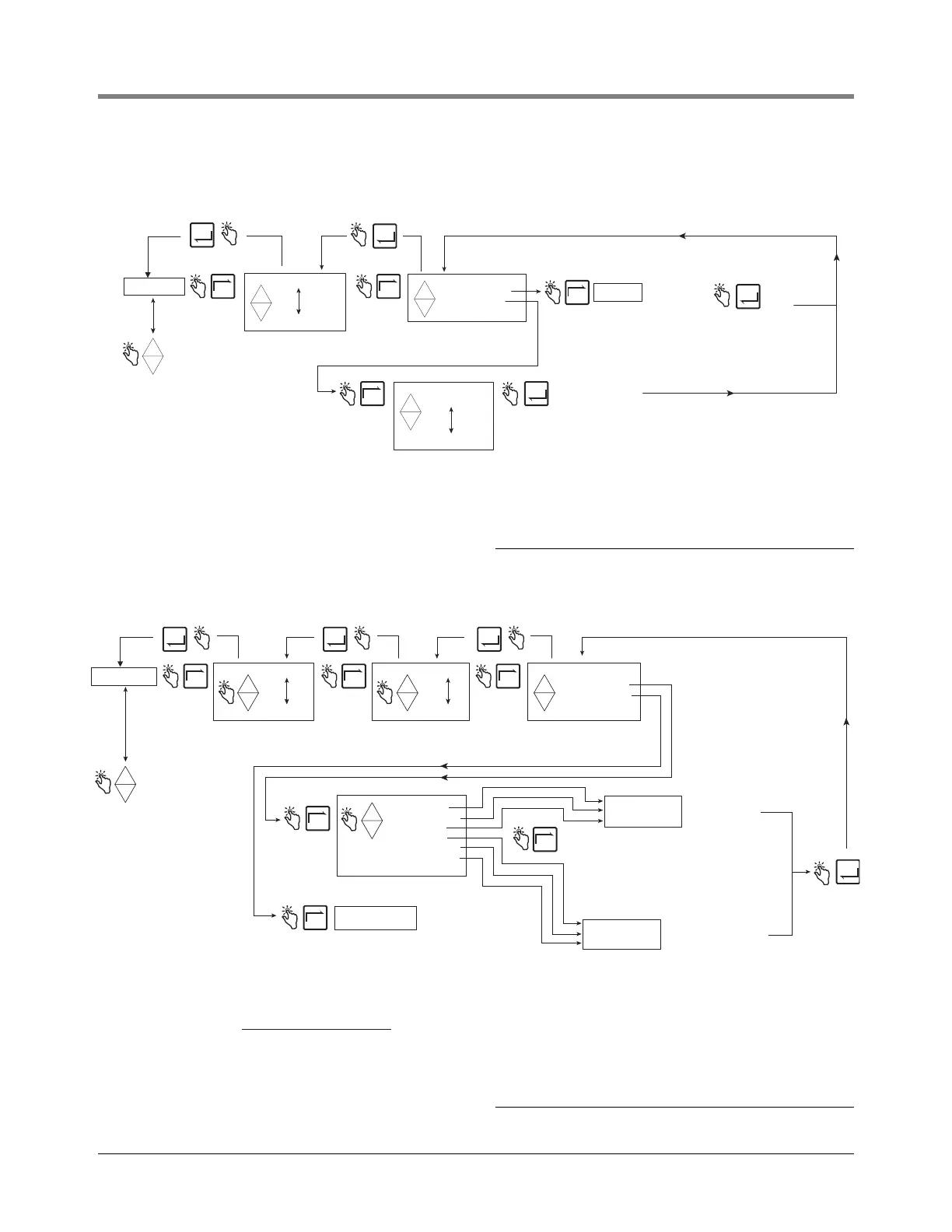
Figure 9 illustrates Pricing setup in Setup Mode.
Figure 9. Pricing Setup
TAX/DISCOUNT
Figure 10 illustrates Tax/Discount setup in Setup Mode.
Figure 10. Tax/Discount Setup
PRICING
Press ENTER to assign
a tax/discount selection
to Price X
Note: Select ASSIGN TAX/DIS if you
want to also assign a tax/discount to
Price Code X.
Note: ASSIGN NO T/D is the
default selection for all Price
Codes.
Press up/down
to change digit
and NEXT to
move to next digit.
CHANGE PRICE X
ASSIGN TAX/DIS
-
+
+
-
+
PRICE X
PRICE CODE 1
PRICE CODE 15
+
-
+
N
E
X
T
E
N
T
E
R
E
N
T
E
R
E
N
T
E
R
N
E
X
T
N
E
X
T
ASSIGN NO T/D
ASSIGN T/D 1
ASSIGN T/D 15
+
-
+
N
E
X
T
Press to accept
choice
E
N
T
E
R
TAX/DISCOUNT
DEFAULTS
RELAY CONTROL
SECURITY
PRINTER OPTION
VIEW RECORDS
RESTORE RECORD
SHIFT
DATE FORMAT
TIME/DATE
SYSTEM ADDRESS
TIME DELAYS
VERSION NUMBER
C AND C
ENTER SECURITY CODE
Press the up/down
buttons to cycle
through remaining
Setup Mode categories
TAX/DISCOUNT
-
+
T/D CODE 1
T/D CODE 15
+
-
+
IMPORTANT!
Only TAX PERCENT and DIS PERCENT T/D Values can access the
ASSIGN TO LINE feature. You must select at least one ASSIGN TO
LINE choice for TAX PERCENT and/or DIS PERCENT or they will not
be implemented. Depending on their initial T/D Line Value chosen
above, either one can also be assigned to other T/D Lines as follows:
(Note: Line 0 is the delivery's SUBTOTAL [volume times base price].)
Initial T/D Permissible additional
Line Value T/D Line Assignments
1 0
2 0, and/or 1
3 0,1, and/or 2
4 0,1,2, and/or 3
5 0,1,2,3, and/or 4
6 0, 1, 2, 3, 4, and/or 5
Note: DIS PERCENT
is a percentage.
DIS PER VOLUME
and DIS SURCHARGE
are currency units.
Enter Dis % as a percent
(e.g., 6 not 0.06)
Note: UNUSED is the default T/D Value setting.
Note: The order in which the T/D Value selections
are implemented begins with T/D Line 1 Value
and ends with T/D Line 6 Value.
Note: TAX PERCENT
is a percentage.
TAX PER VOLUME
and TAX SURCHARGE
are currency units.
Enter tax % as a percent
(e.g., 6 not 0.06)
NEXT
ENTER ENTER ENTER
ENTER
NEXT NEXT
T/D LINE 1
T/D LINE 6
+
-
+
CHNG T/D VALUE
CHNG T/D ASSGN
+
-
+
NEXT
NEXT
-
+
TAX PERCENT
TAX PER VOLUME
SURCHARGE
DIS PERCENT
DIS PER VOLUME
DIS SURCHARGE
UNUSED
ENTER NEW TAX
ENTER NEW DIS
NEXT
ASSIGN TO LINE
Press up/down to
change digit and
NEXT to move to
next digit.
Press up/down to change
digit and NEXT to move to
next digit.
DEFAULTS
RELAY CONTROL
SECURITY
PRINTER OPTION
VIEW RECORDS
RESTORE RECORD
SHIFT
DATE FORMAT
TIME/DATE
SYSTEM ADDRESS
TIME DELAYS
VERSION NUMBER
C AND C
ENTER SECURITY CODE
PRICING
Press the up/down
buttons to cycle
through remaining
Setup Mode categories


 To Next Page