26
Rev. 01.01
COMMISSIONING
5. COMMISSIONING
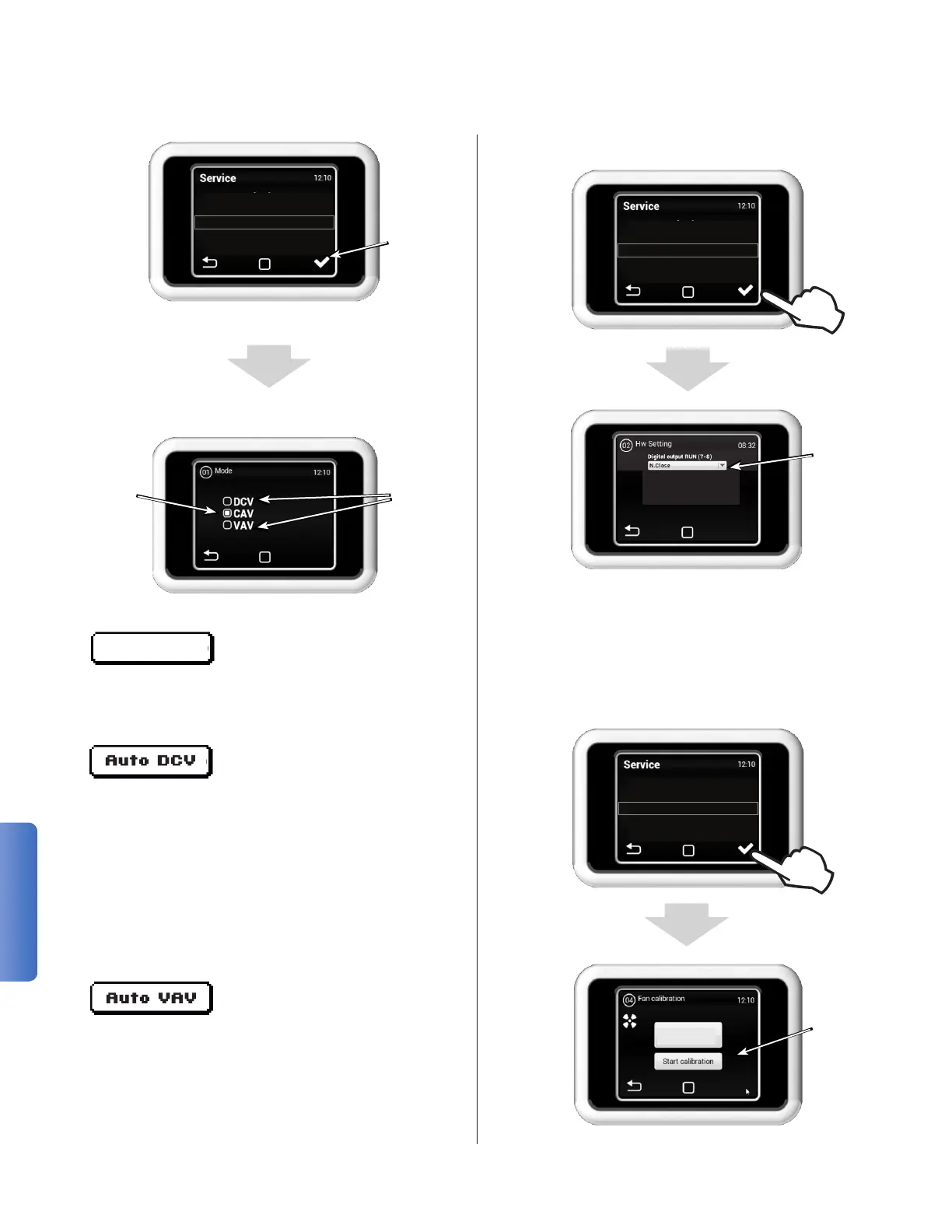
Navigate the menu by scrolling up and down on
the touch screen.
(Constant Air Volume) Temper-
ature controlled fresh outside
air is supplied to the building at a constant rate as
set on the control panel.
(Demand Controlled Ventilation)
Airow into the building is mod-
ulated in response to readings
from a variety of Indoor Air Quality (IAQ) sensors.
When properly congured, this mode can provide
signicant energy savings by not over-ventilating
while also ensuring no areas suffer from poor IAQ
as a result of under-ventilation. Sensor types avail-
able from Ventacity Systems include CO
2
, Relative
Humidity (RH), and Volatile Organic Compounds
(VOC). The VS3000 RT also features support for
any other external 0-10V IAQ sensor.
(Variable Air Volume) Airow
is automatically controlled to
maintain a constant pressure in
the supply duct. As such, total ow will be reduced
if the inlet to a ventilated room is closed off and
increased if an inlet is opened. Through the use
of ow control dampers, whether manually or
electronically actuated, airow can be precisely
and efciently tailored to the ventilation needs of
multiple zones.
Manual CAV
50 - Factory reset
01 - Mode
02 - HW Setting
04 - Fan Calibration
05 - Filter Calibration
Access
Selected
Menu
49 - Other settings
50 - Factory reset
01 - Mode
02 - HW Setting
04 - Fan Calibration
Manual
Ventilation
Mode
Automatic
Ventilation
Modes
MENU 01 - MODE
MENU 02 - HW SETTING
This menu lets you select the logic using with the
digital input and the RUN output.
Input (7-8) - The logic of the connected RUN con-
tact can be set as follows: as N. Close (normally
closed) or N. Open (normally open)
You can
choose the
logic of the
RUN contact
MENU 04 - FAN CALIBRATION
Run
Calibration
1000cfm
0-12inH2O
01 - Mode
02 - HW Setting
04 - Fan Calibration
05 - Filter Calibration
08 - AQS Sensor


 To Next Page