29
Rev. 01.01
COMMISSIONING
5. COMMISSIONING
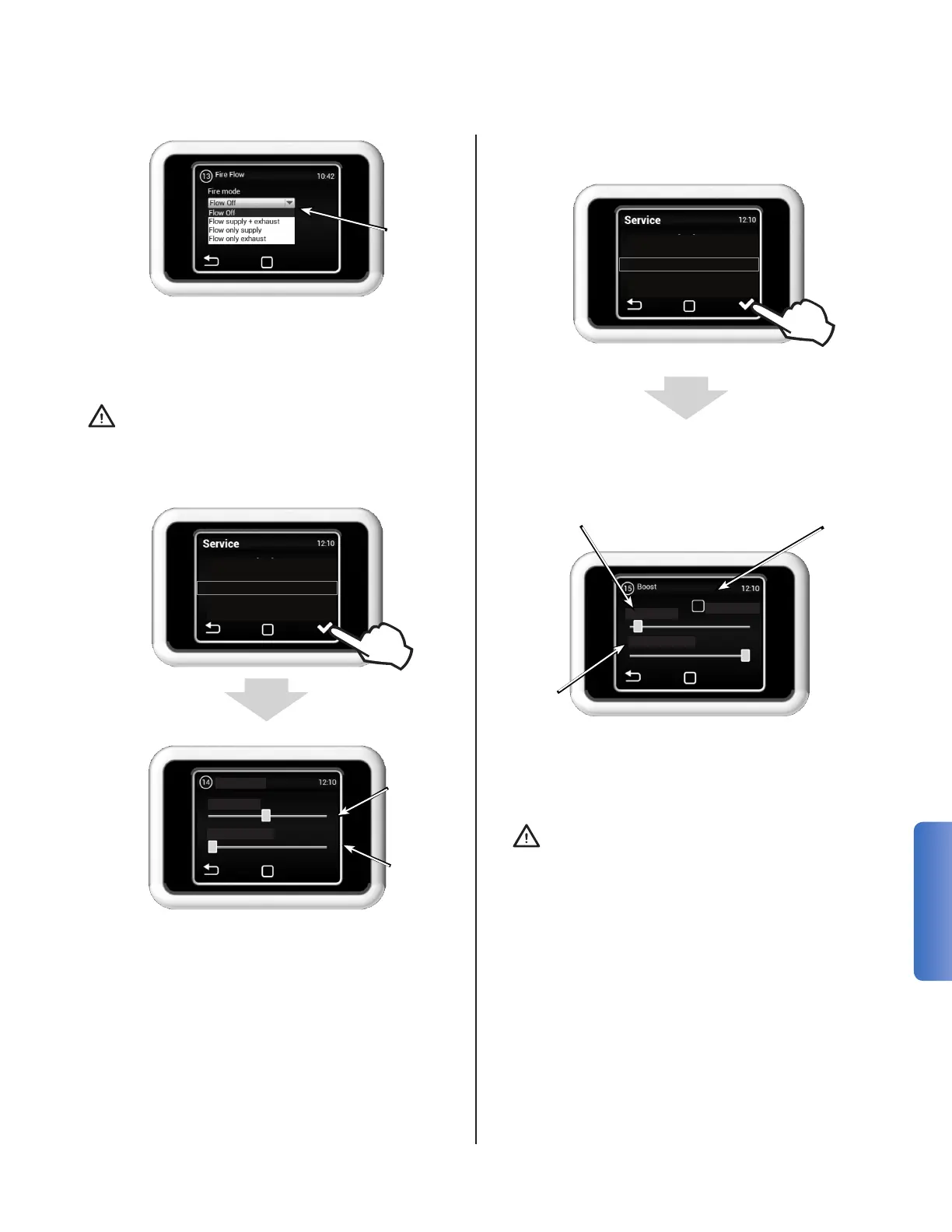
Note: BOOST mode is not compatible with the
Multizone mode.
After activation of the Boost mode (the mode can
be activated on main display or optional exter-
nal trigger), the unit operates in pre-set speed
for pre-set time period. (Maximum duration is 60
min.)
While presence is detected, the scheduled set-
tings will run as normal. After no presence has
been detected for the specied amount of time,
the system will run at the ow rate set here until
presence is detected again.
In the occupancy sensor mode the temperature
cannot be regulated.
Note: The occupancy sensor available as an ac-
cessory from Ventacity Systems is preset. There-
fore, it is not necessary to set the delay.
Setting the
unit's rate
when the
FIRE contact
opens (input
terminals
15-16)
The FIRE input has the highest priority (it
disables all the other modes, including anti-
freeze protection)
Fire ow modes:
• Flow off
• Flow supply + exhaust
• Flow only supply
• Flow only exhaust
MENU 13 - OCCUPANCY
12 - Flow Offset
13 - Fire Flow
14 - Occupancy
15 - Boost
16 - Freecooling
Set the
required
ow
Set delay
period
Time 30 min.
Flow 20 %
Occupancy
MENU 15 - BOOST
Allow to activation of
BOOST mode with the unit
in stand-by mode
Time interval for which
the mode is activated
after the BOOST contact
is activated
Set the
required
ow
Boost can be activated with the button
connected to the input 13/14, or with the
Boost button on the main screen
From OFF
Time 3 min.
Flow 100 %
12 - Flow Offset
13 - Fire Flow
14 - Occupancy
15 - Boost
16 - Freecooling


 To Next Page