32
Rev. 01.01
COMMISSIONING
5. COMMISSIONING
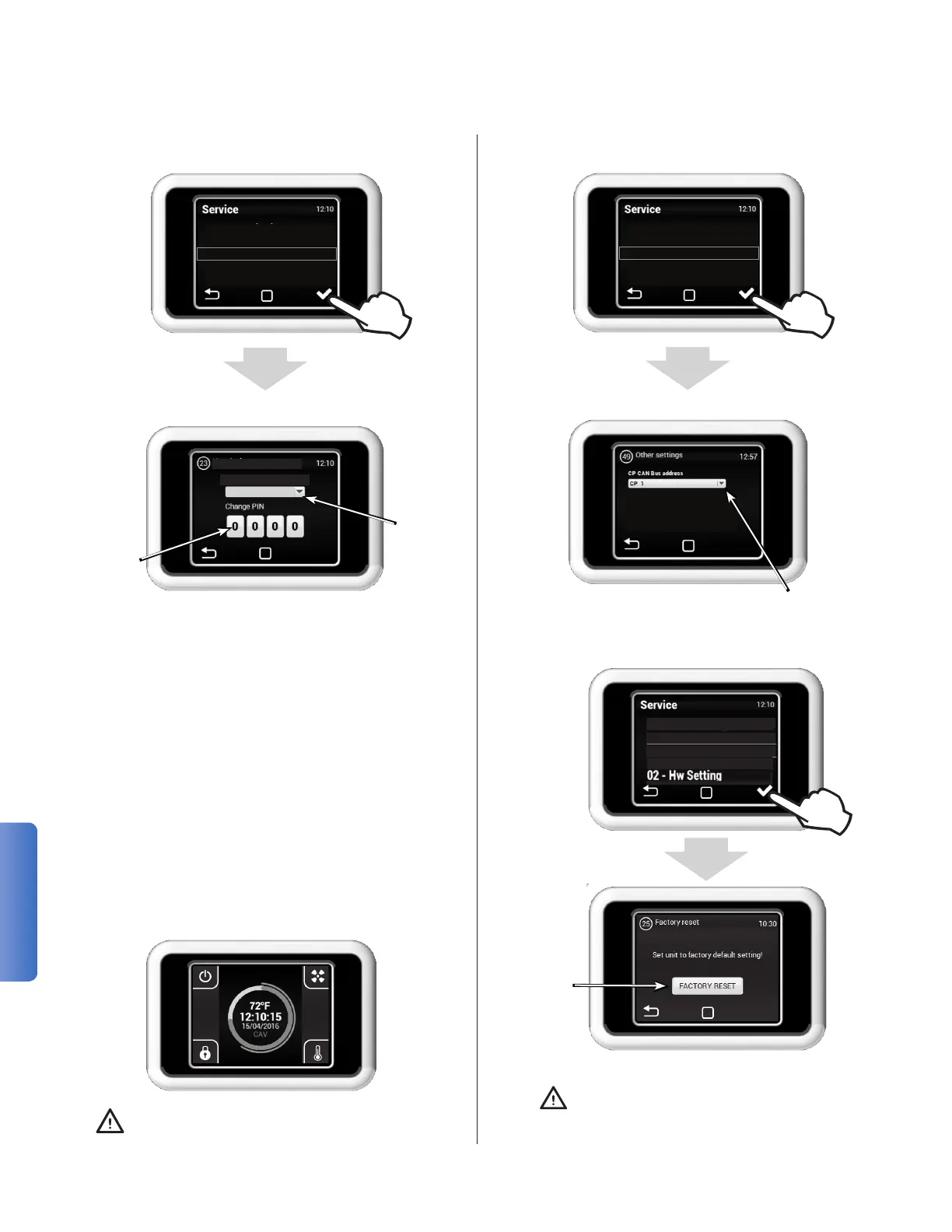
MENU 23 - USER LOCK
20 - Modbus RTU
21 - Network
23 - User Lock
49 - Other Settings
50 - Factory Reset
Activation unit of the sec-
ond control panel
User secu-
rity level
Digital
password
Several security levels can be chosen:
ON/OFF
The unit can be turned on or off without pass-
word.
ON/OFF, Temp, Flow
Allows unit to be turned on or off, set the re-
quiredtemperatureandairow without pass-
word.
Temp, Flow
Allows to set the required temperature and air
owwithout password.
Full
Does not allow any settings without password.
User Mode
The unit can be turned on or off and the re-
quired temperature and air ow can be set
without password.
After entering the password, the unit can be
fully controlled and set.
User lock
Protection level
None
MENU 49 - OTHER SETTINGS
21 - Network
23 - User Lock
49 - Other Settings
50 - Factory Reset
01 - Mode
MENU 50 - FACTORY RESET
01 - Mode
15 - Modbus RTU
21 - Network
25 - Factory reset
23 - User lock
Restart the
unit with
the factory
parameters
It does not change
- Settings like AQS
- Ventilation mode
- HW settings
- Temperature sensor
- ModBus settings
50 - Factory reset
23 - User lock
49 - Other setting
TOVÁRNÍ RESET


 To Next Page