DEVICE SETUP
Optional Accessories
V210 I
NSTALLATION GUIDE 25
Optional
Accessories
These accessories can be used to further enhance the device’s functionality. See
Accessories and Documentation for additional information.
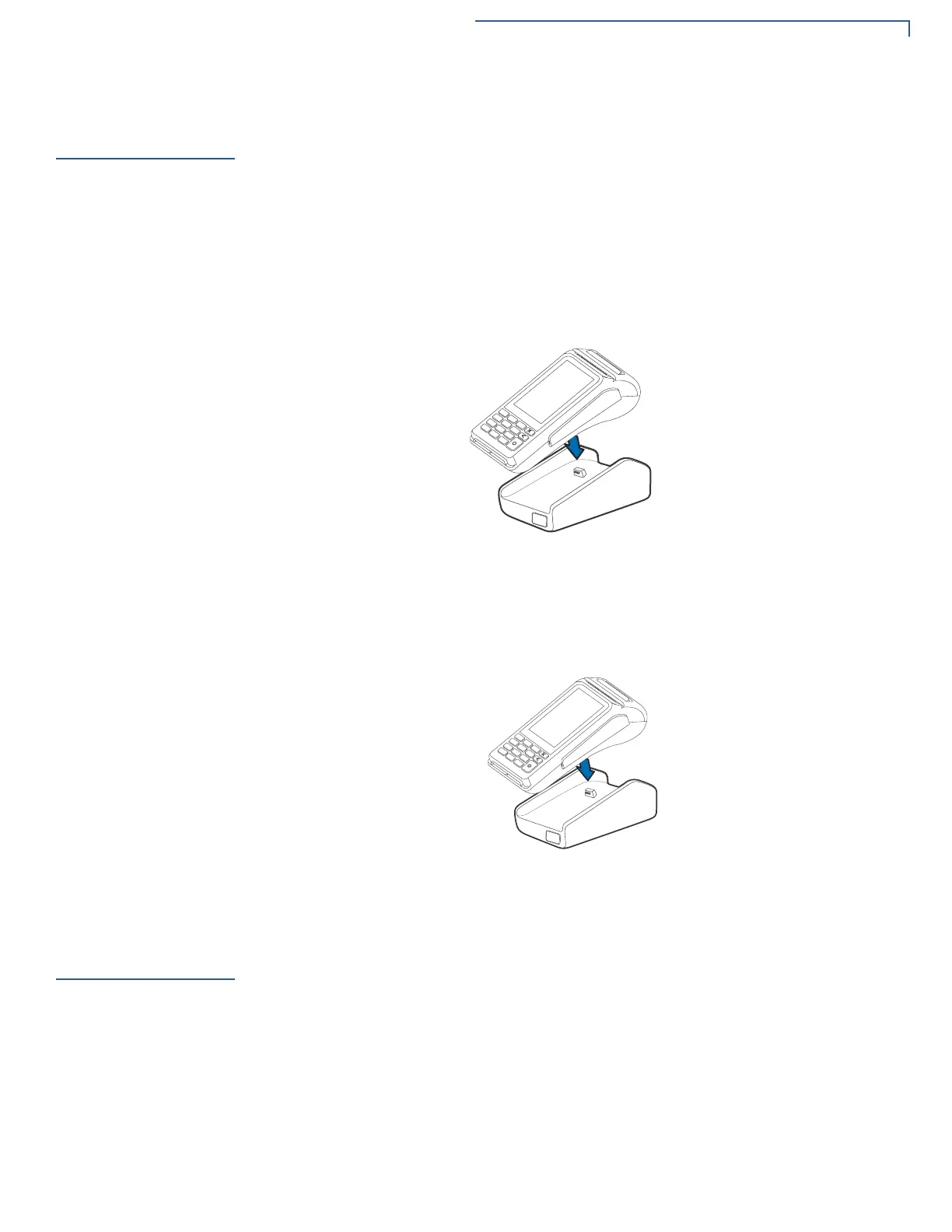
Full-Feature Base
The Full-Feature Base with Modem(M183-S02-01) or FF Base without
Modem(M183-S02-02
) and charging base(M183-S02-00) provides Bluetooth (BT)
v4.2 as well as all BT v4.1 features. It also supplies power, Dial up, Ethernet, USB
Host and USB Device, plus powered RS232 connection. See
Cable Connections
Using the Full-Feature Base.
Figure 17 V210 Docking with Full-Feature Base
Charging Base
The Charging Base (M183-S02-00) provides a stable dock plus power charging
for the V210 terminal.
Figure 18 V210 Docking with Charging Base
Periodic
Inspection
• Periodically inspect the terminal for possible tampering. Signs of tampering
include:
• Overlays in the PIN pad area
• Wires protruding out of the device
• Foreign objects inserted into the smart card slot or magnetic stripe slot
• Any bumps in the casing below the mag stripe slot and any noticeable
additional mag stripe head from the side
• Signs of damage to the tamper-evident labels








 To Next Page