EasyManua.ls Logo

VeriFone V240m+ - Transaction Processing; User Logon

VeriFone V240m+
79 pages
Print Icon
To Next Page IconTo Next Page
To Previous Page IconTo Previous Page
Loading...
V240m+ User Manual 40
Public | V240m+ External User Manual | Version 1.5 | September 15
th
2020
5 TRANSACTION PROCESSING
This section will cover the on-screen messages that you will see on the terminal. Please note
messaging will be dependent on the settings enabled on the account and level of integration
performed by your POS provider.
5.1 USER LOGON
Step
Instruction
Screen Information
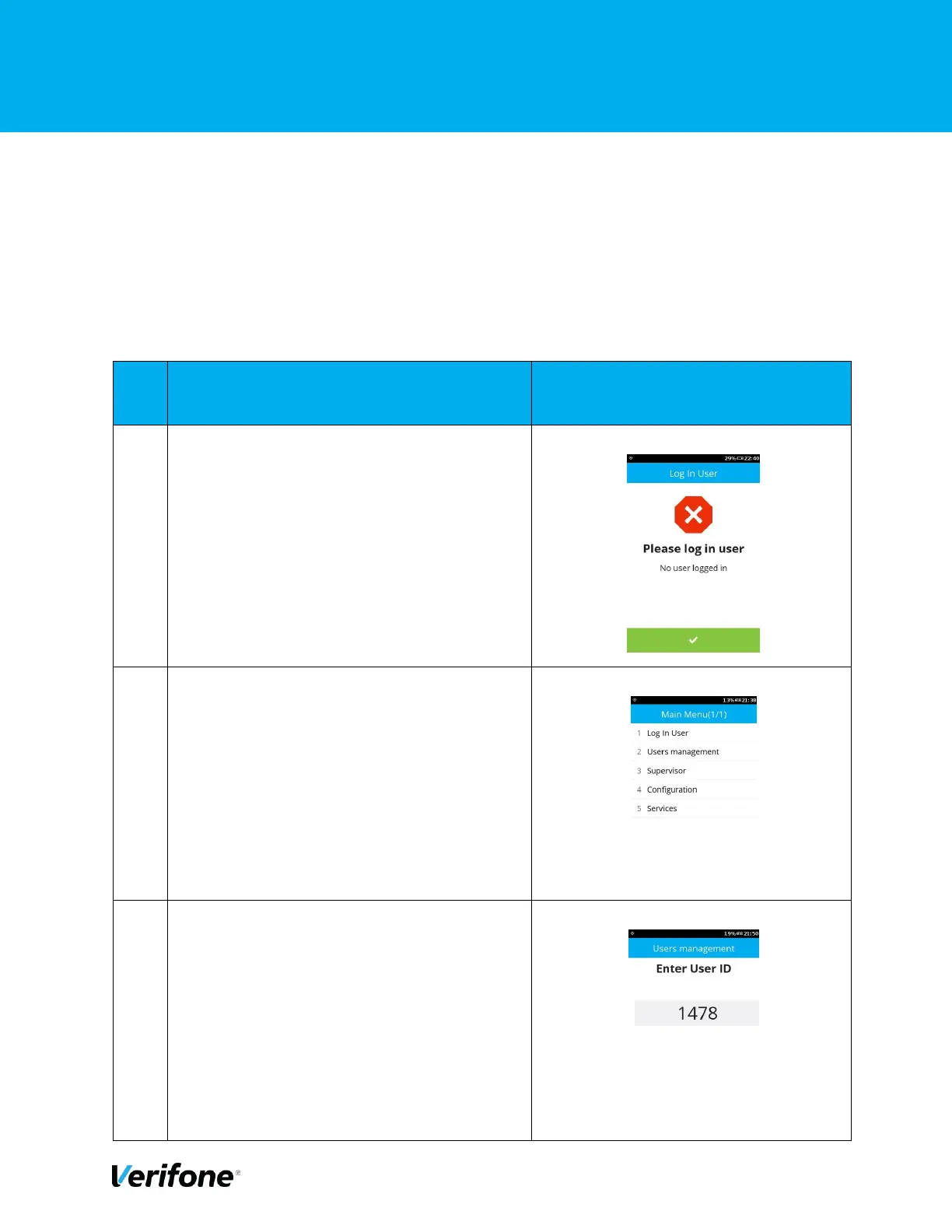
1
Either press “Green Bar” at the bottom of the
screen” or press “Green Circle” or “Enter”
button to enter the Main menu.
2
Press “1” to go to the “Log In User” menu.
3
Enter “User ID” and press “Enter” to continue.

Other manuals for VeriFone V240m+

Related product manuals