22
device will automatically connect to WAN when it is powered on.
2. Auto Connect (GlobalAccess Mode): The device will automatically connect to WAN when it is powered on
no matter on which network it is registered.
3. Manual Connect: Connect/Disconnect to Internet manually.
Click Apply to confirm your configuration
Hotspot
LAN
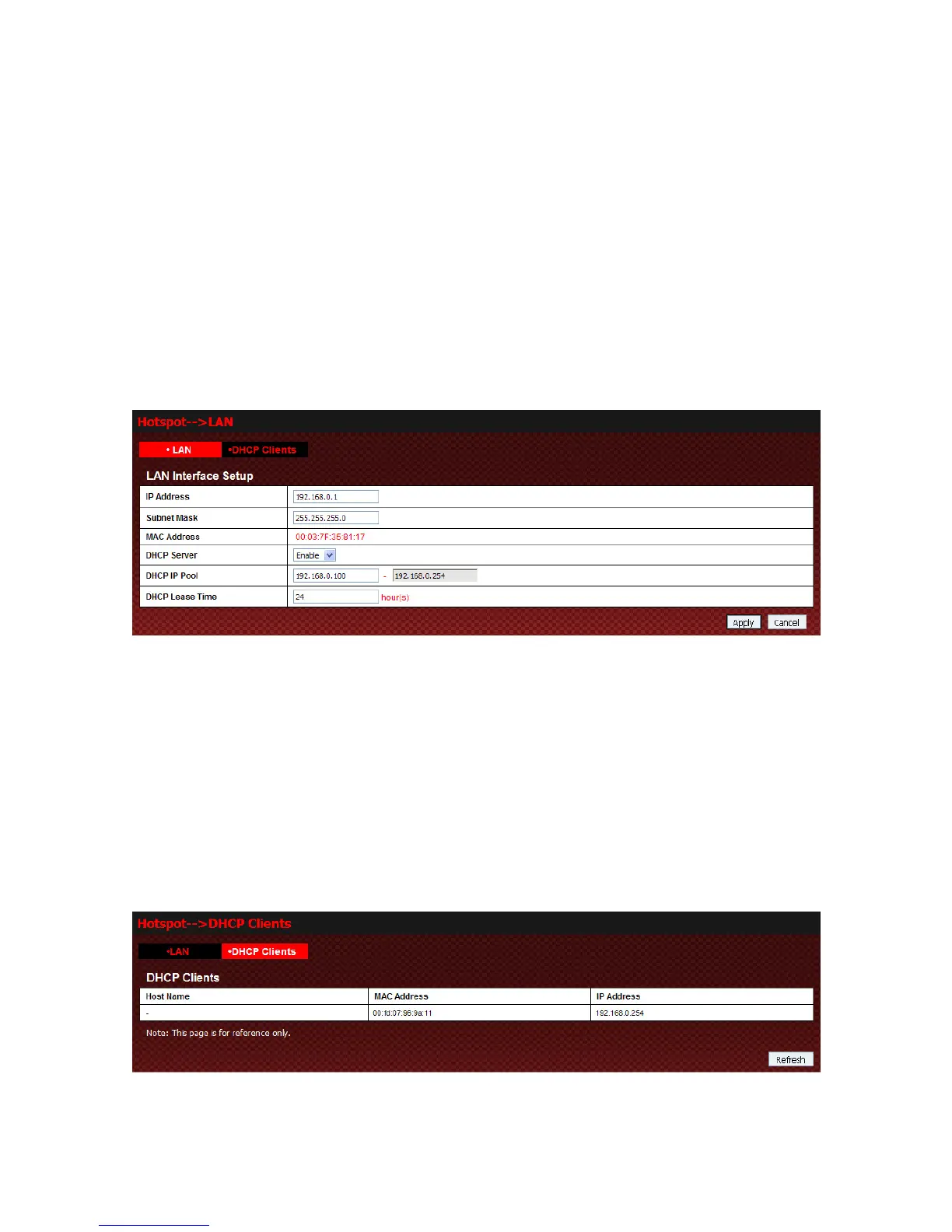
Select Hotspot→LAN to access:
z IP Address: IP address for LAN interface.
z Subnet Mask: Subnet mask for the IP address.
z MAC Address: MAC address for the LAN interface.
z
DHCP Server: Enable/Disable DHCP server function.
z DHCP IP Pool: Allocate start and end IP address for IP pool.
z DHCP Lease Time: Define how long the leased IP address will be expired, and will relocate new IP
address.
DHCP Clients
Select Hotspot→DHCP Clients to access:
Click Refresh to update DHCP Clients.



 To Next Page