23
Wi-Fi Settings
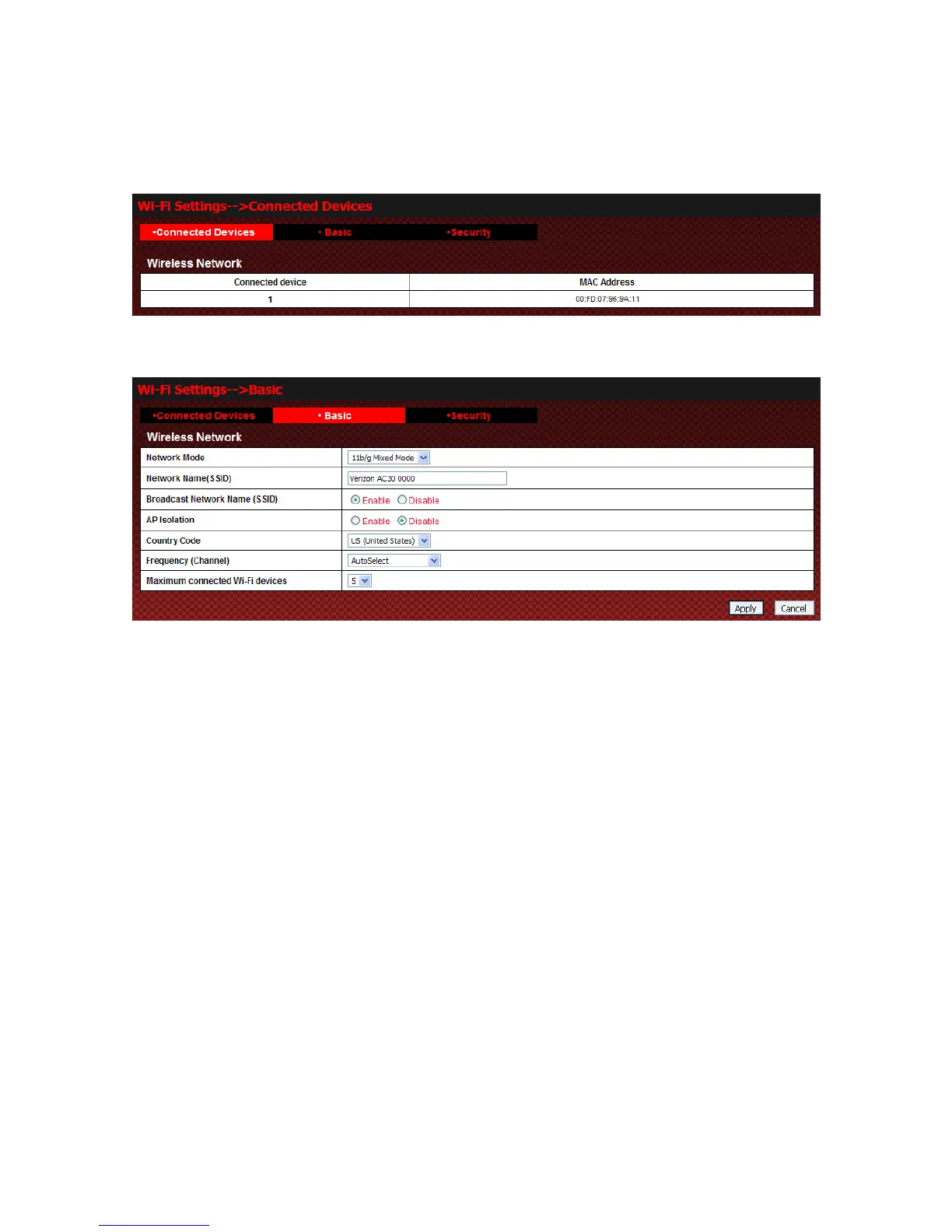
Connected Devices
Select Wi-Fi Settings→Connected Devices to access:
Basic
Select Wi-Fi Settings→Basic to access:
z Network Mode: If all of the wireless devices connect with this device in the same transmission mode,
performance will be improved by choosing the appropriate wireless mode.
z Network Name(SSID): Service Set Identifier(SSID). Enter a string less than 32 characters as the name
for your wireless local area network(WLAN).
z Broadcast Network Name(SSID): Disable or Enable(Default) this function. If Enable is selected, the
device broadcasts the SSID, and other devices can search and connect to it. When you select Disable,
other devices can not search out the SSID. If you want someone to connect, you need tell them the SSID,
and let them to setup manually.
z AP Isolation: When Enable is selected, each of your wireless clients will not be able to communicate
with each other.
z Country Code: Choose the right country code.
z Frequency(Channel): Choose the appropriate channel to optimize the performance and coverage of your
wireless network.
z Maximum connected Wi-Fi devices: Choose the maximum number of the stations which connect the AP
simultaneously.
Click Apply to confirm your configuration, or click Cancel to cancel your configuration.
Security
Select Wi-Fi Settings→Security to access:



 To Next Page