• 800mm fans: 32.75 to 38 in-lb (3.7 to 4.3Nm)
Dispose of the old cable glands once the new glands are installed.
12. Add a compression nut to the wire—Do not tighten the nut.
13. Reconnect the wiring to the proper terminals and verify that the run jumper is in place. Refer
to Figure 11.2 on page119, Figure 11.3 on page119 and Figure 11.1 on page118 for wiring
details.
The torque for the electrical terminals is 11.5 in-lb (1.3 Nm). Tighten the compression nut to a
torque of 22 in-lb (2.5 Nm).
14. With the PCB powered, the display should read F00. Refer to Figure 9.1 on page90 and Figure
9.2 on page91.
15. Press the ESC button.
16. Press the Up arrow key once—If P- - is displayed, perform step 17; if P- - is not displayed,
perform steps 18 through 49.
17. If P- - is displayed, press the ENT button to enter the P- - Menu.
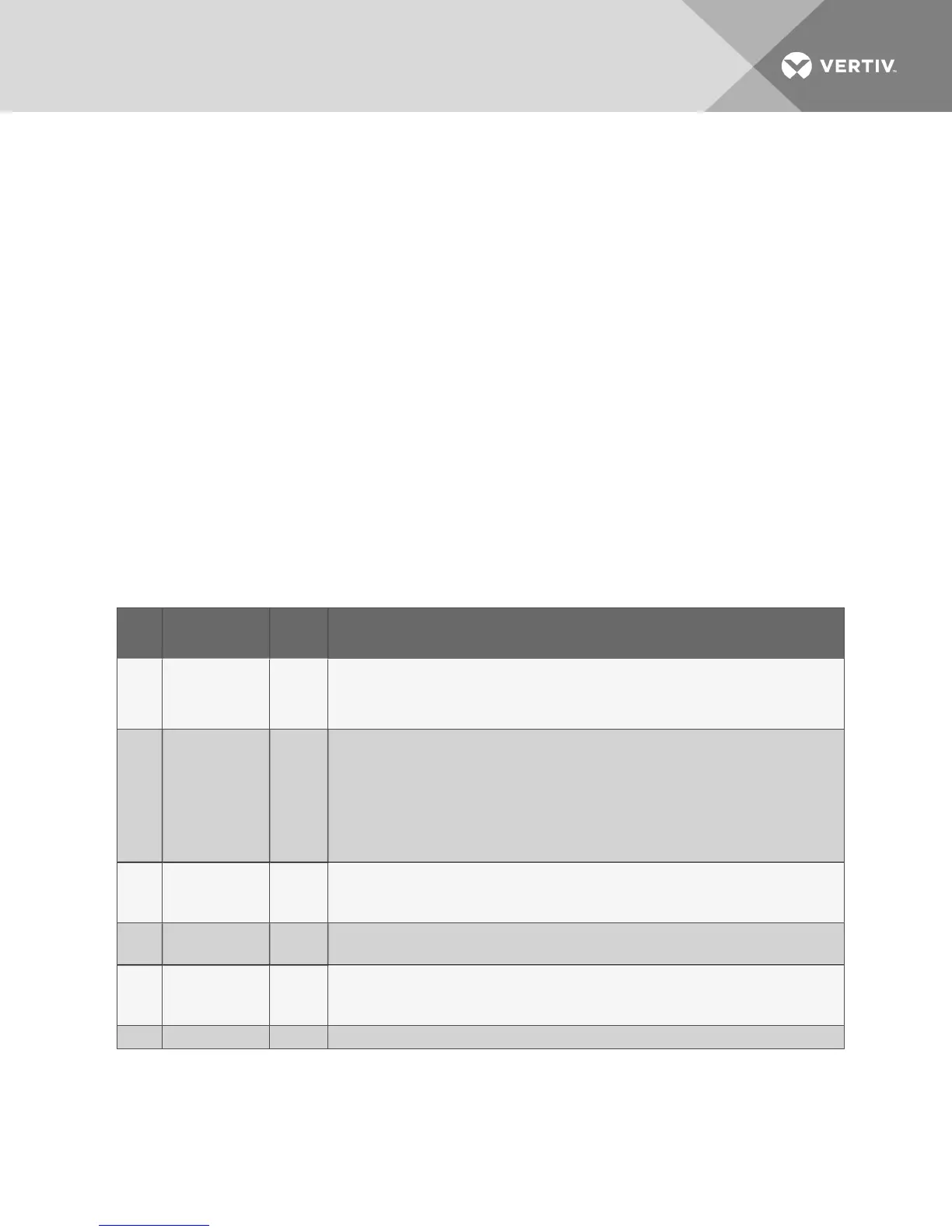
The P- - Menu allows for compact setup/preparation of the unit either in the factory or in the
field. Use these functions in the table below to establish a default control configuration for the
board. Items in the preparation menu are described in Table 11.1 below.
Item
ID
Meaning Default Notes
P01
Enter
Preparation
Mode
0
Setting this value to ‘1’ will enable preparation mode. All other ‘P—‘menu items will be disabled until this
value is ‘1’. Note that control operations may be affected during preparation mode therefore the indoor unit
should be off. Setting this value back to ‘0’ will cause the board to create new default values based upon
selections in this menu. After default values are established the board will exit preparation mode and
reboot.
P02
Automatic VSD
Configuration
1
This item should only be used to address the VSDs for the unit. The value entered indicates the model of
the VSD:
1 – EBM
2 – Ziehl-Abegg
3 – Fans Tech
All fans must be the same model to use this parameter. When ENT is pressed, the board will operate and
power contactors for the VSDs and assign ModBus addresses. This procedure may take up to 5 minutes
to complete.
P03
Refrigerant
Type
2
1 = R22
2 = R407C
3 = R410A
P04
Number
of Circuits
1
1 = Single Circuit
2 = Dual Circuit
P05
Liebert
Lee Temp
Option
0
0 = No Lee Temp installed
1 = Liebert Lee-Temp installed
P06 Condenser 1 0 = Small
Table 11.1 P-- menu items and definitions
18. Turn the power On.
19. The control board will flash F00 on the display when it has completed its boot cycle.
20. Press the ESC button.
21. Use the Up or Down arrow key until C-- is on the display.
Vertiv | Liebert® MC™ Installer/User Guide | 113



 To Next Page