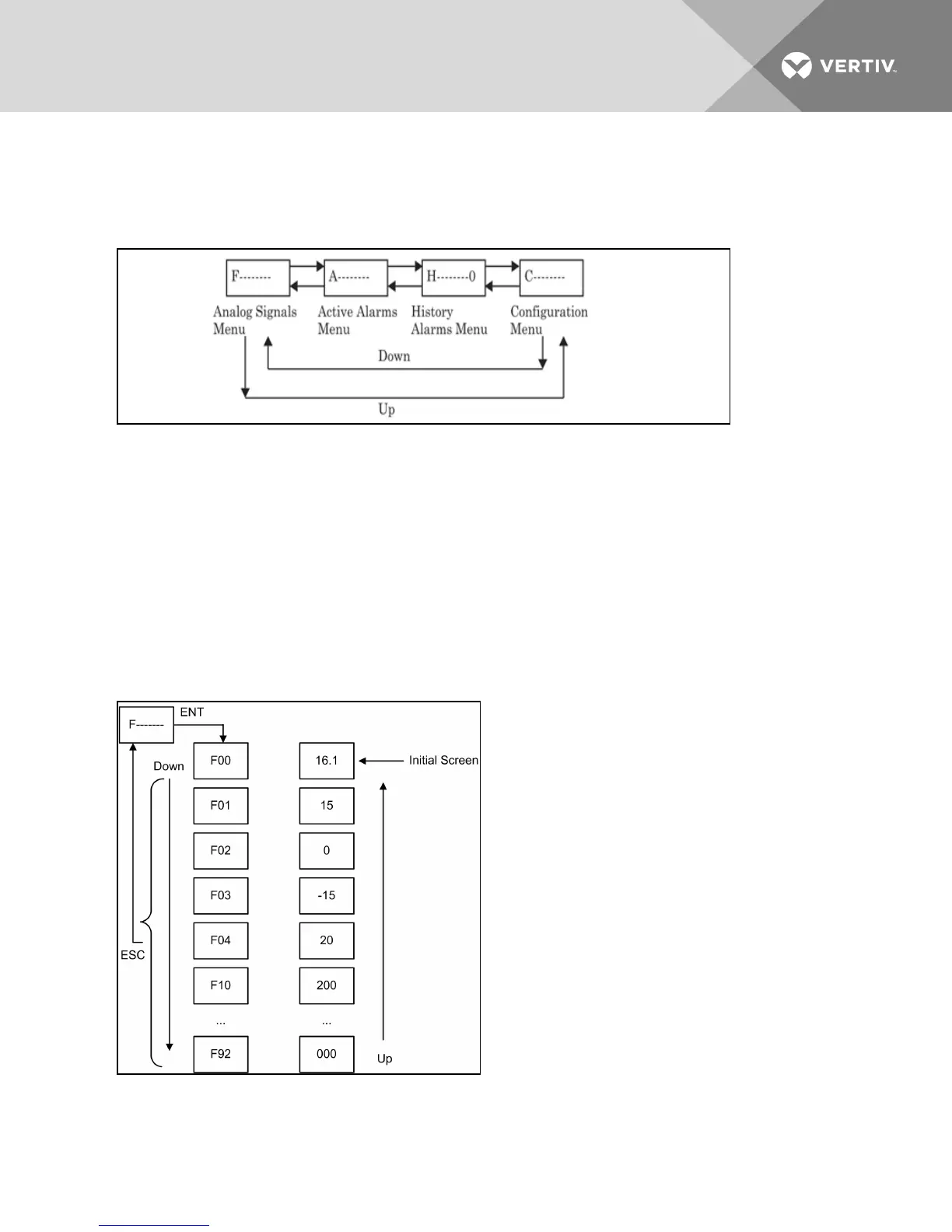
In the Main Menu, press Up and Down keys to switch to different menus, and press the ENT key to enter
the sub menus of the current menu. The operation and structure of main menu are shown in the following
figure.
Figure 9.4 Main Menu operation and structure
Notice
Risk of improperly altered configuration menu settings. Can compromise equipment operation.
Changing the configuration menu settings can cause unanticipated results. These settings should be
changed only by properly trained and qualified personnel or as directed by the factory.
9.1.3 Analog Signals Menu Description
In analog signals menu F-----------, press the ENT key to enter its items. The information of analog signal
items includes condenser pressure, temperature and EC Fan actual speed. The display mode is that the
item ID and signal value are displayed alternatively. The operation and item structure of analog signals
menu are shown in Figure 9.5 below. Table 9.1 on the facing page defines the signals.
Figure 9.5 Analog Signals Menu
Vertiv | Liebert® MC™ Installer/User Guide | 92



 To Next Page