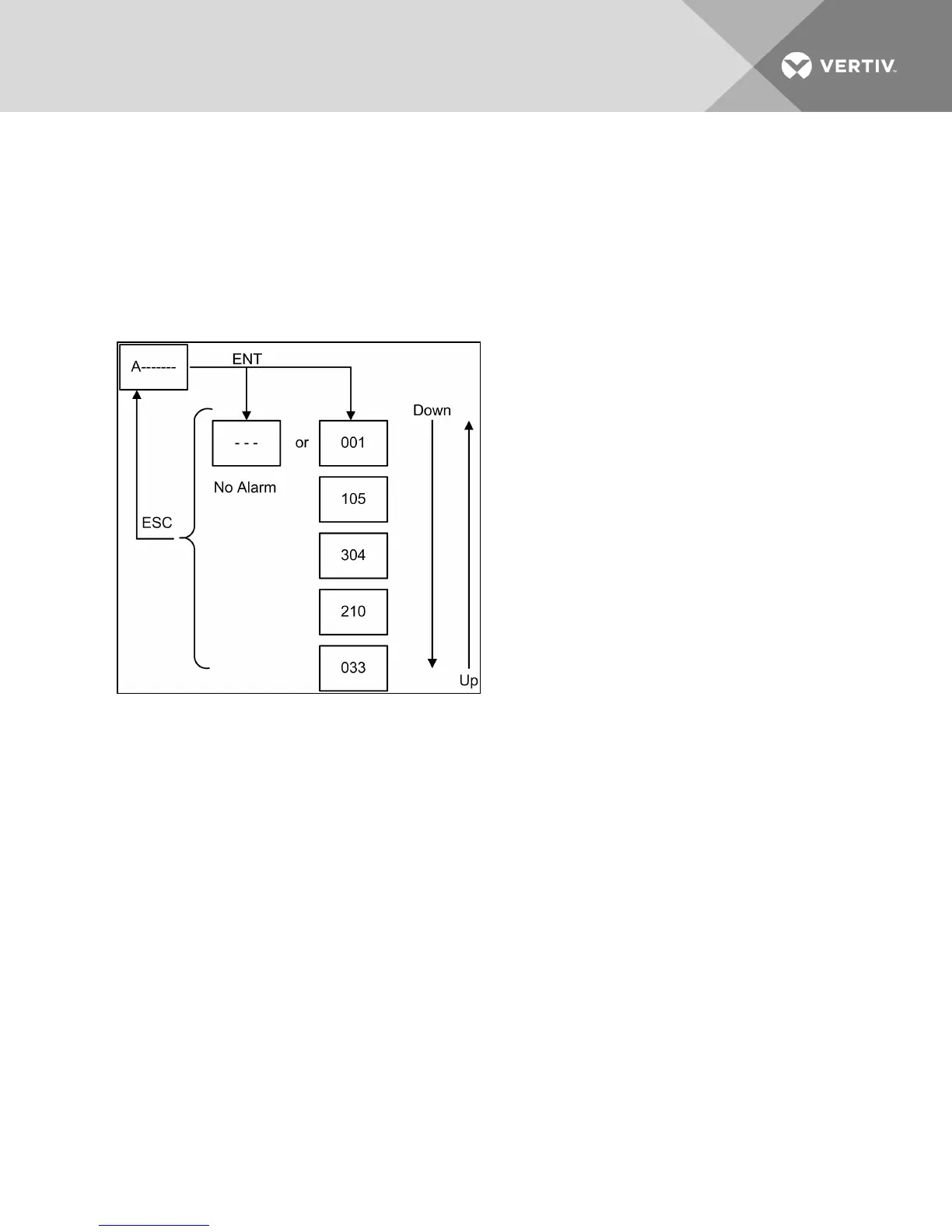
9.2.1 Active Alarms Menu Description
In active alarms menu “A——,” press the ENT key to enter its items. The active alarm item displays all the
active alarms of condenser. When there is an active alarm, the alarm information ID will be directly
displayed. When there is no alarm, “---” is displayed. When there are multiple alarms, the alarm information
IDs will be displayed according to the time sequence (the most-recent alarm will be displayed first). The
operation and items structure of active alarms menu are shown in the following figure. The meanings of
alarm information ID are found in Table 9.2 on the facing page and Table 9.3 on page96.
Figure 9.6 Active alarms menu
9.2.2 History Alarms Menu Description
In history alarms menu “H——―”, press ENT key to enter its items. The history alarm items display 100
history alarm records of the condenser. The item ID is for the sequence number of the history alarms. The
display mode is that the item ID and alarm information ID are displayed alternatively. When there is no
alarm, “---” is displayed. Alarm history can be cleared using the C98 configuration menu item. The
operation and items structure of history alarms menu are shown in the following figure. The meanings of
alarm information ID are given in Table 9.2 on the facing page and Table 9.3 on page96.
Vertiv | Liebert® MC™ Installer/User Guide | 94



 To Next Page