193 Operation
Vertiv™ | Liebert® PSI5 120V Input / 120V Output & 208V lnput / 208V Output Installer/User Guide
3.2 Display Panel Indicators
NOTE: The display automatically powers o to conserve power. Press any button quickly to wake the
display.
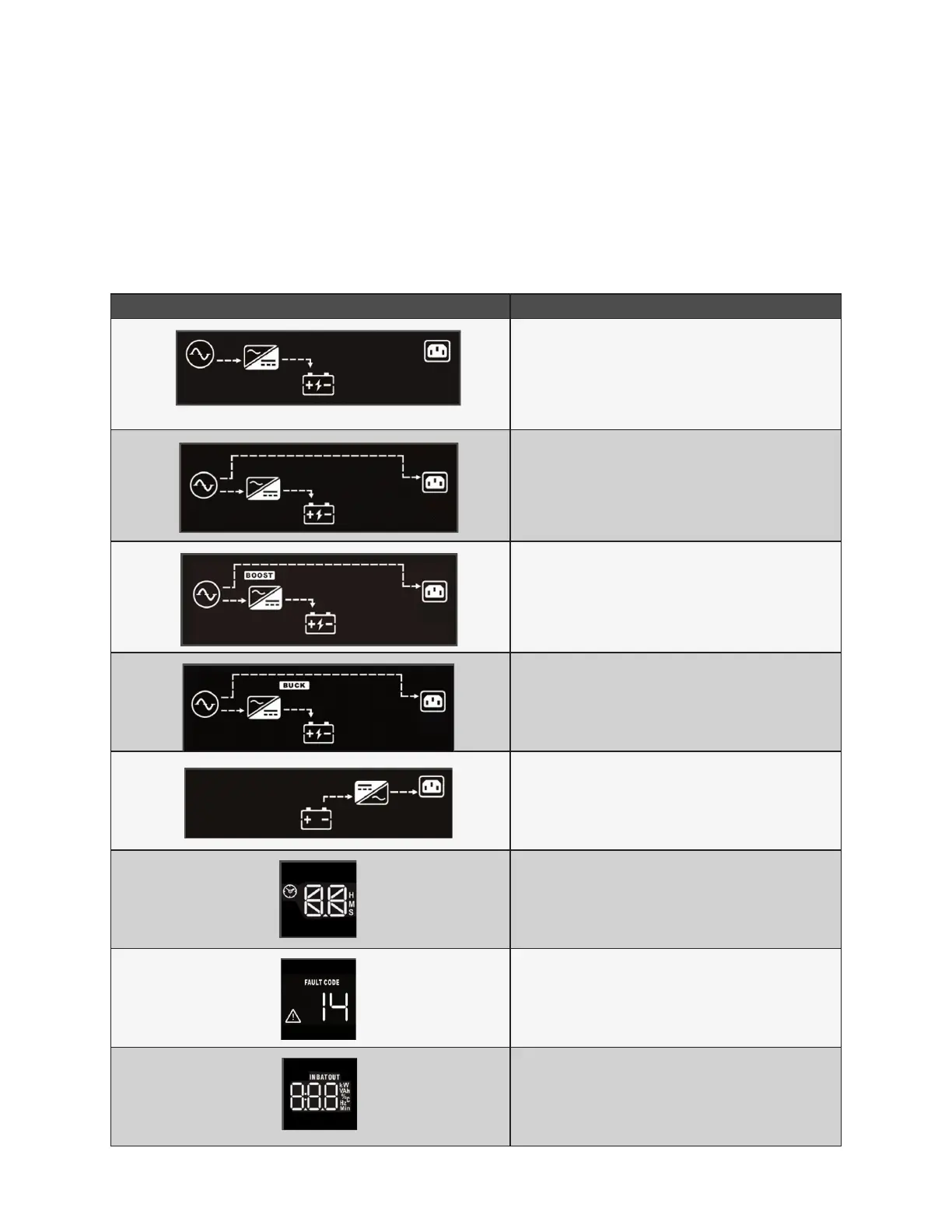
Figure 3-1 on page 18, shows the LCD on the front panel of the UPS.
Table 3-2 Display icons, sections and functions
ICONS AND DISPLAY DESCRIPTION
O mode
On/Normal mode
On/AVR/Boost mode
On/AVR/Buck mode
On/Battery mode
Estimated backup time in H (hours). M (minutes), or S
(seconds)
Indicates warning and fault codes. See Faults on page
22, and Warnings on page 21.
Displays various UPS operation parameters.










 To Next Page