132 Installation
Vertiv™ | Liebert® PSI5 120V Input / 120V Output & 208V lnput / 208V Output Installer/User Guide
ITEM DESCRIPTION
1 Attach the rack ears with four rack ear screws to the front right and left sides of the external battery.
2
Attach two xing studs to each rail. Select the desired U position and position the rails onto the rack using the xing
studs.
3 Attach two rail kit screws to each rail to secure the rails to the rack.
4 Attach three rack nuts on each side of the rack.
5 Place the external battery with attached rack ears onto the rail supports.
6
Attach two rail kit screws to each external battery kit rack ear and corresponding rack nut to secure the external
battery to the rack.
2.4.2 Installing a 1U Model
CAUTION: Do not use the mounting brackets to lift the unit. Use the mounting brackets only to
secure the UPS to the rack.
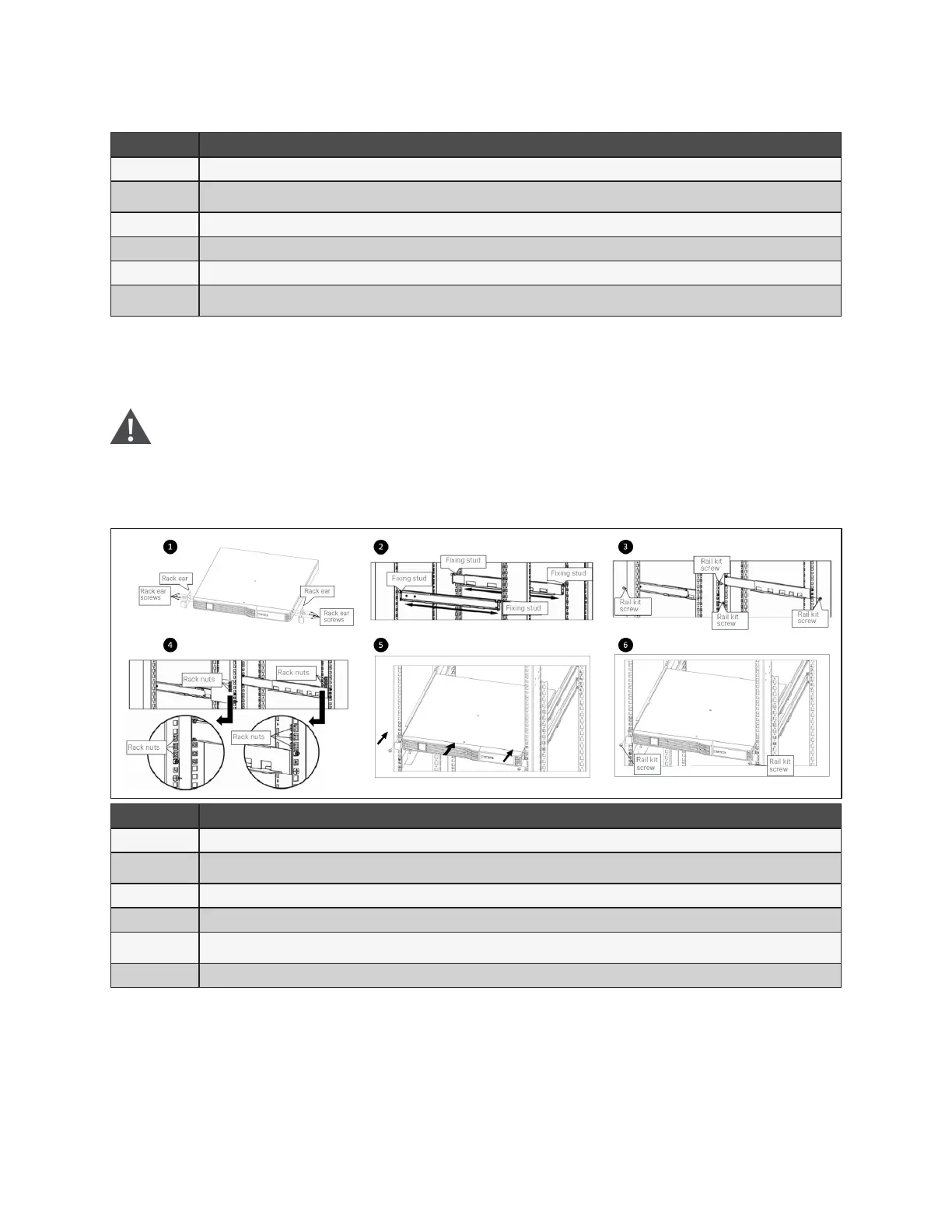
See Figure 2-5 below to install the unit.
Figure 2-5 Installing the UPS in a rack
ITEM DESCRIPTION
1 Attach the rack ears with four rack ear screws to the front right and left sides of the UPS
2
Attach two xing studs to each rail. Select the desired U position and position the rails onto the rack using the xing
studs
3 Attach two rail kit screws to each rail to secure the rails to the rack
4 Attach rack nuts on each side of the rack
5
Place the UPS with attached rack ears onto the rail supports. The batteries may be temporarily removed for easier
installation.
6 Attach a rail kit screw to each UPS rack ear and corresponding rack nut to secure the UPS to the rack
2.4.3 Installing a Mini Tower (MT) Model
Place the unit upright, on its feet without blocking air inlets.










 To Next Page