22 3 Operation
Vertiv™ | Liebert® PSI5 120V Input / 120V Output & 208V lnput / 208V Output Installer/User Guide
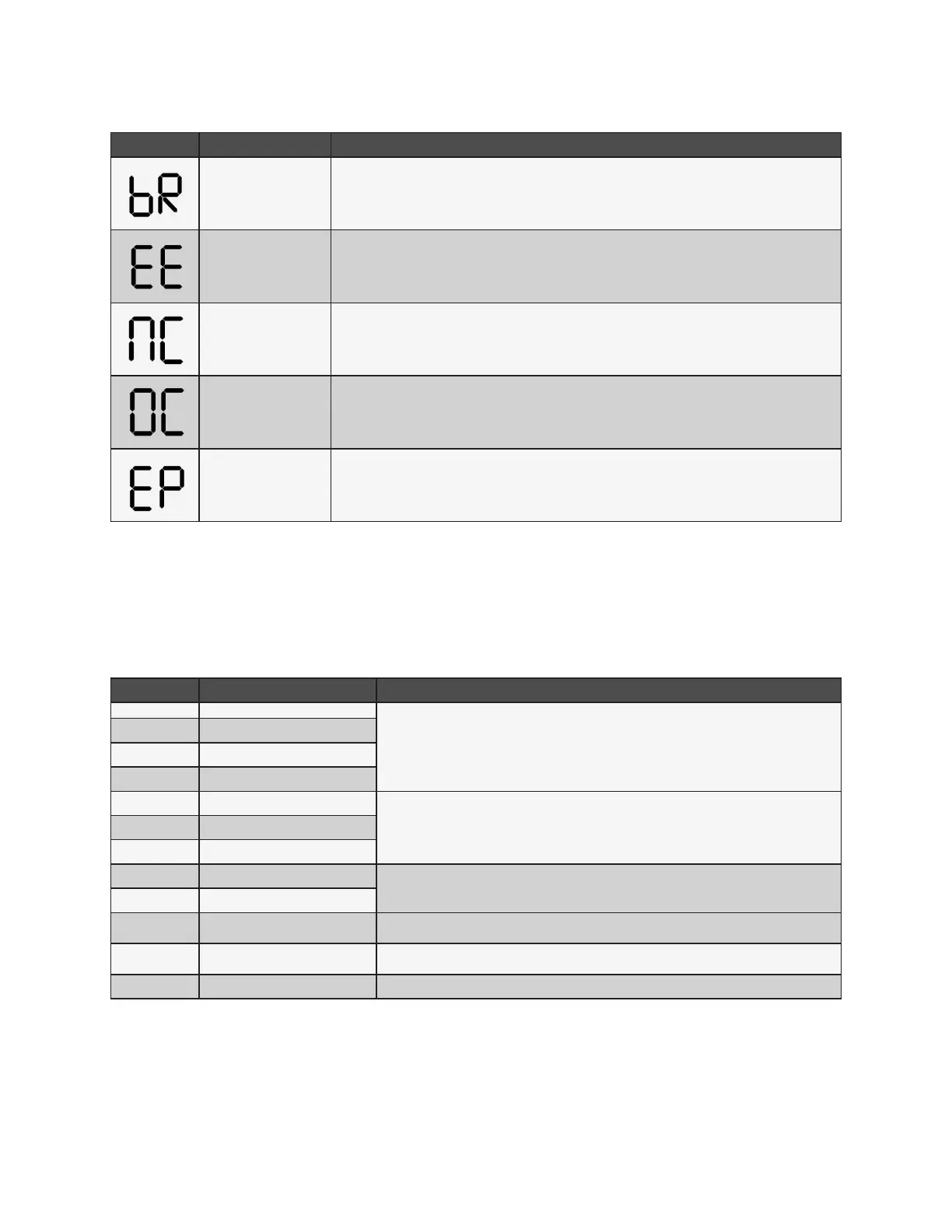
ITEM DESCRIPTION TROUBLESHOOTING
Battery replacement
Charge the UPS battery for at least 12 hours or replace the battery; see Replacing the UPS
Batteries on page 27.
EEPROM error Call Vertiv
TM
customer support, 1-800-222-5877.
Internal battery is not
connected
Check the connection of the battery, see Replacing the UPS Batteries on page 27.
Over charge Call Vertiv
TM
customer support, 1-800-222-5877.
Emergency Power O
activated
Remove the EPO state on the EPO connector.
NOTE: Output Immediately shuts o when the EPO warning occurs.
3.5 Faults
The UPS displays fault codes when it detects a problem and automatically shuts o output power.
Table 3-5 Fault Codes and Actions
CODE DESCRIPTION TROUBLESHOOTING
01 Bus start fail
Call Vertiv
TM
customer support, 1-800-222-5877.
02 Bus over
03 Bus under
11 Inverter soft start fail
12 Inverter voltage high
Turn O the UPS, disconnect all connected loads and restart the UPS. If the fault
is still active, call Vertiv customer support, 1-800-222-5877. If the fault is no longer
active, plug each piece of equipment in one at a time to locate the device that has
the short circuit
13 Inverter voltage low
14 Inverter output short
27
Battery voltage too high
Replace the battery or call Vertiv
TM
customer support, 1-800-222-5877.
28 Battery voltage too low
41 Over temperature
Make sure that the air temperature is within the range listed in Specications on
page 31. Otherwise, call Vertiv
TM
customer support, 1-800-222-5877.
43 Overload
Reduce the load to below the UPS rating listed in Specications on page 31, and
restart the UPS.
45 Charger failure Call Vertiv
TM
customer support, 1-800-222-5877.
3.6 Normal Startup
• With the UPS connected to AC input Press and hold the ON/MUTE button for 2 seconds.
The UPS is in Battery Self-Test mode for 10 seconds. After a successful self-test, the UPS is on.










 To Next Page