Chapter 3 Web Interface of RDU501
RDU501 Intelligent Monitoring Unit User Manual
Access control management
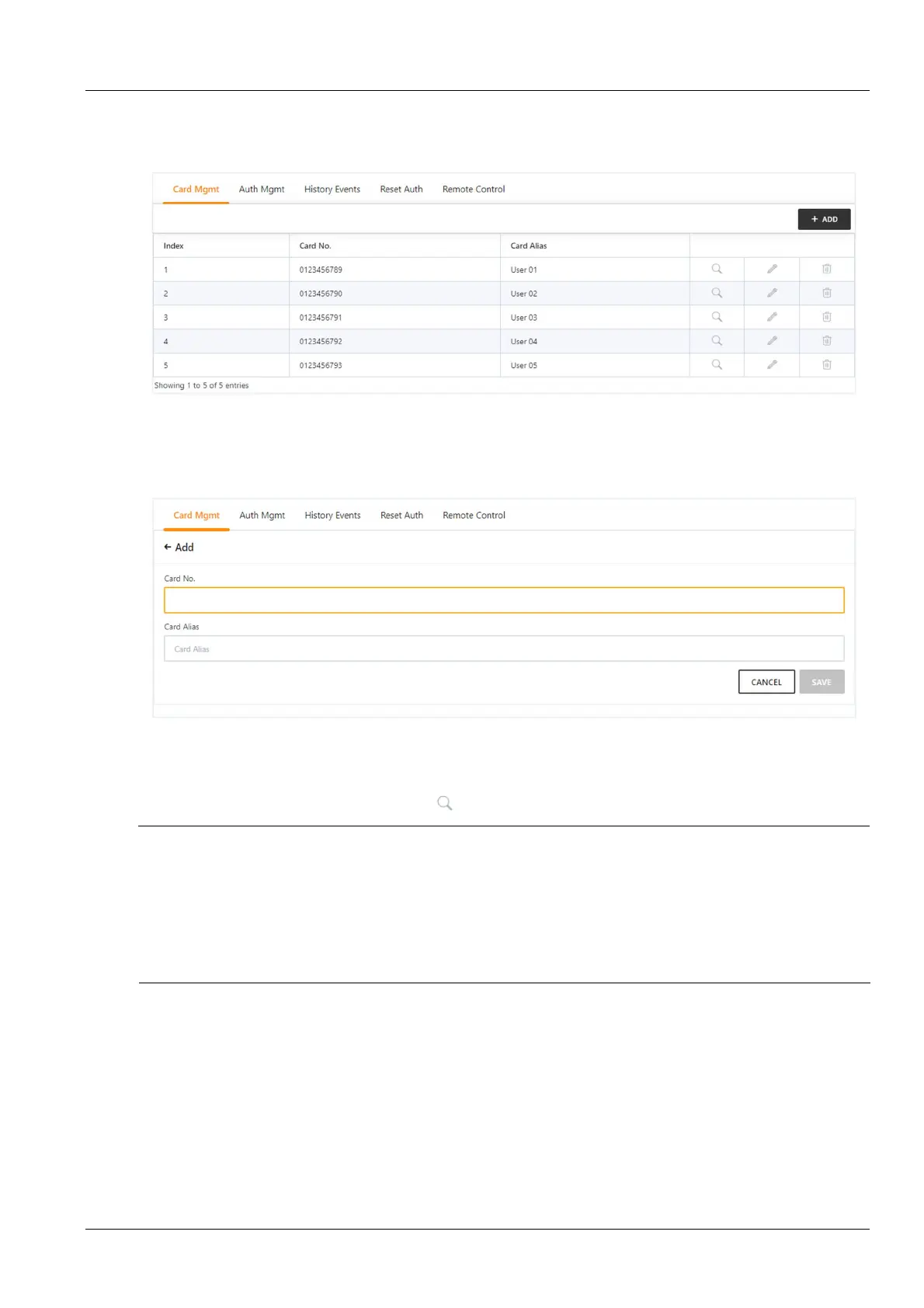
Click the Access Control Management submenu under the Security Management menu to display the page shown
in Figure 3-17.
1.
Access card management
Figure 3-17 Access control card management
Click the Add button to open the page for adding the access control card, enter the access control card number and
alias (alias as optional), click the Save button to complete the addition. As shown in Figure 3-18.
Figure 3-18 Add access control card
Select an access control card to modify or delete the access control card information. When modifying the access
control card information, you cannot modify the access control card number.
Click the authorization information query button to query the authorization information of the access control card.
Note
1.
The user can set the display or hide access control management module in System Settings -> Monitoring Unit -> Settings
Signal, as shown in Figure 3-19.
2.
After the RDU501 is connected to the higher level management platform, the access management function can be
implemented through the higher level management platform.
3.
Maximum number of access controllers: 2 aisle door controllers + 2 x 24 cabinet door lock controllers.
4.
When adding an access control card, you can not only manually enter the access card number, but also click the card number
link from the access control history to add.



 To Next Page