Chapter 3 Web Interface of RDU501
RDU501 Intelligent Monitoring Unit User Manual
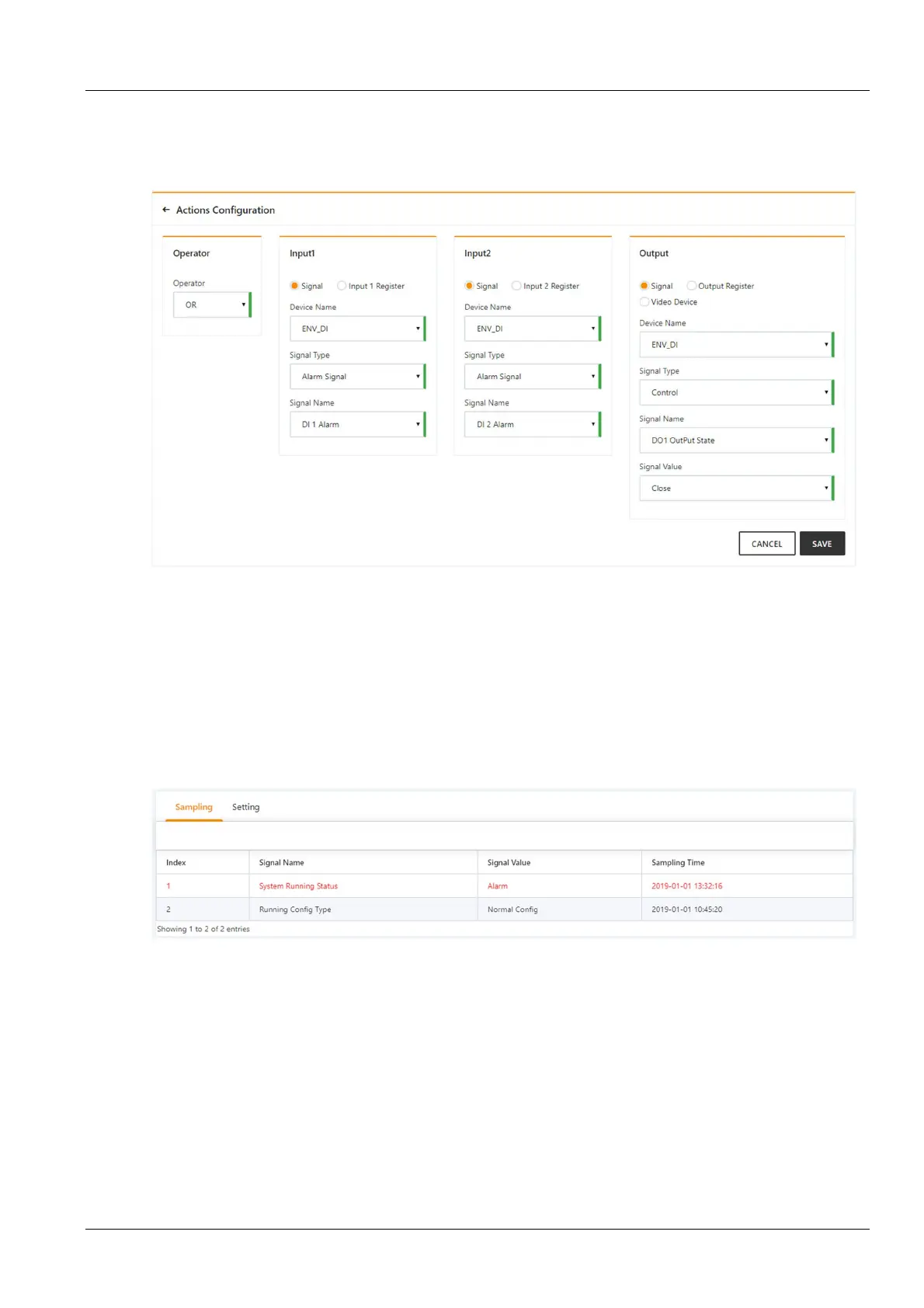
Expression: [DI1 Alarm] OR [DI2 Alarm] = [DO1] [Closed]
Figure 3-132 shows the configuration method. The meaning is that when the alarm signal RDU501 DI1 is turned on
or the RDU501 DI2 is turned on to generate an alarm, the RDU501 DO1 is triggered to be closed, thereby lighting the
alarm indicator.
Figure 3-132 Configuration example of alarm linkage 2
3.4.9 System setting
In the RDU501 home page, click on the system settings menu on the left, and you can see 10 submenus, including:
monitoring unit, network settings, user management, system upgradetime, calibration, restore default, site
information settings, authorization code management, title bar settings and about RDU501.
Monitoring unit
The Monitoring unit submenu is set for the signal of the RDU501 system itself, including the acquisition signal and
the setting signal, as shown in Figure 3-133.
Figure 3-133 Monitoring unit (acquisition signal)
For the method of operating the acquisition signal and the setting signal tabs in the monitoring unit, see 3.4.1
Device.
Click the Set Signal tab to enter the signal setup page and display the signal settings of the monitor unit, as shown in
Figure 3-134.



 To Next Page