Chapter 3 Web Interface of RDU501
RDU501 Intelligent Monitoring Unit User Manual
Note
1.
You can only receive the password sent by the system if you have set the email or SMS parameters correctly in the Email and
SMS Configuration page. For details, see section 3.4.8 Email Configuration in Configuration Management.
2.
The retrieved password is a new password generated randomly by the system. Please modify it after you log in successfully.
3.3 RDU501 Main Page
In the RDU501 homepage, click on the left Homepage menu to see two submenus, including: Power and
Environment Overview and IT Device Overview.
3.3.1 Power and Environment Overview
Click on the Power and Environment Overview menu to open the Power and Environment Overview page. You can
customize a flat layout based on the physical location of the device room for centralized display. After configuration,
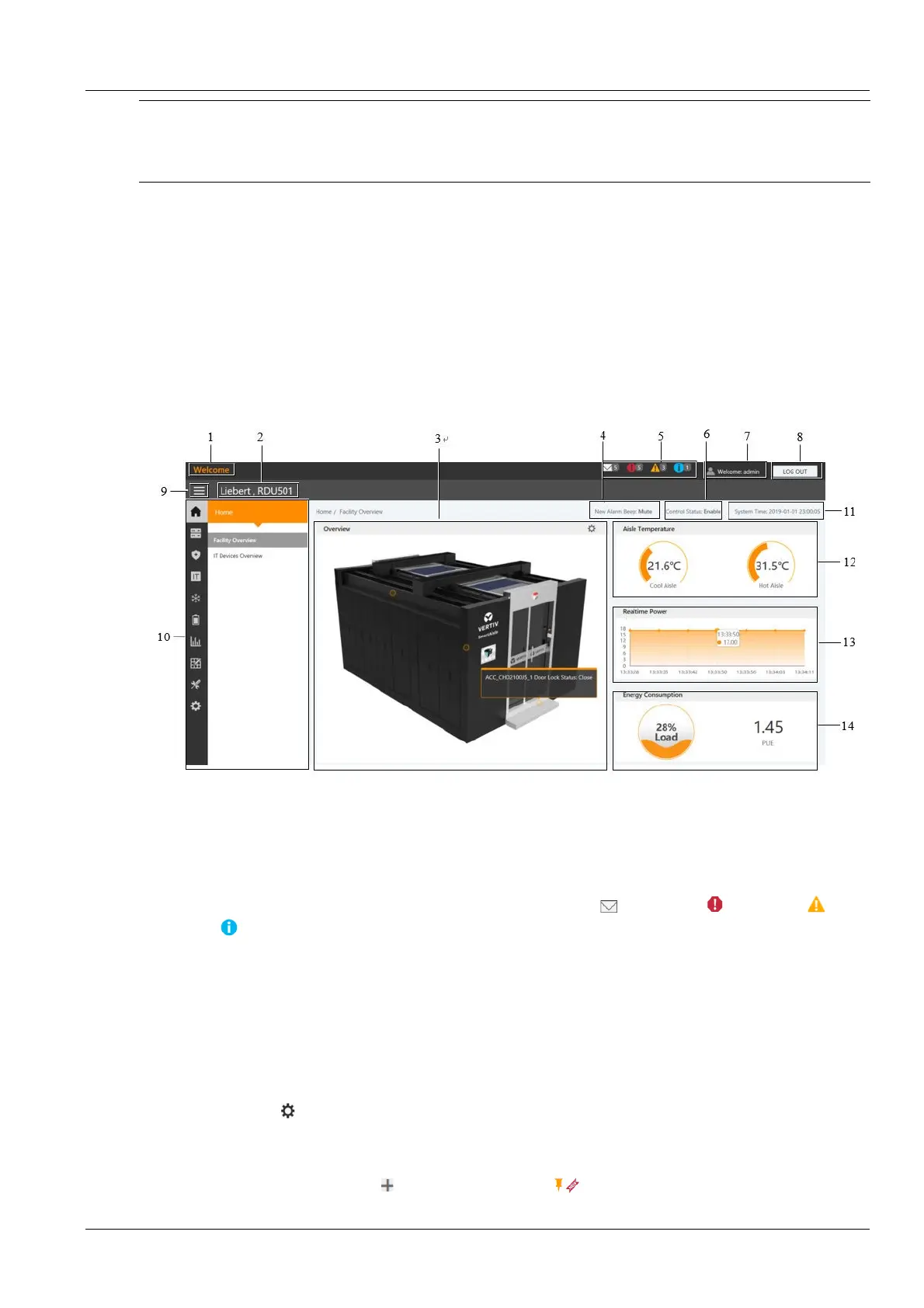
the effect is shown in Figure 3-4.
4. Alarm reminder sound settings
5. Number of real-time alarms
9. Fold submenu button 10. Menu item
11. System Time and time
calibrating link
12. Hot and cold aisle temperature
13. Real-time power 14. Power consumption
Figure 3-4 RDU501 Homepage (Power and Environment Overview)
The number of active alarm displays the number of IT device event / alarm , critical alarm , major alarm and
minor alarm .
The hot and cold aisle temperature displays the average temperature of cold and hot aisles in the module. For details
about the temperature sensor of the rack in the module, see rack property settings for 2D Modeling in 3.4.7 Smart
Solution Modeling.
Real-time power shows the current real-time power of the system. For details, see Real-Time Power Settings in
Energy Settings in 3.4.5 Power Management.
The power consumption shows the current system load rate and PUE. For details, see System Load Percentage
Settings in Energy Settings in 3.4.5 Power Management.
Click the Mode button in the room information to enter the setting state. After entering the setup state, the setup
method is as follows:
1.
Device hotspot settings
Click the Add Device Hotspot button , a hot spot will be added .



 To Next Page