Chapter 3 Web Interface of RDU501
RDU501 Intelligent Monitoring Unit User Manual
Press the left mouse button to drag the hotspot to move the hotspot location.
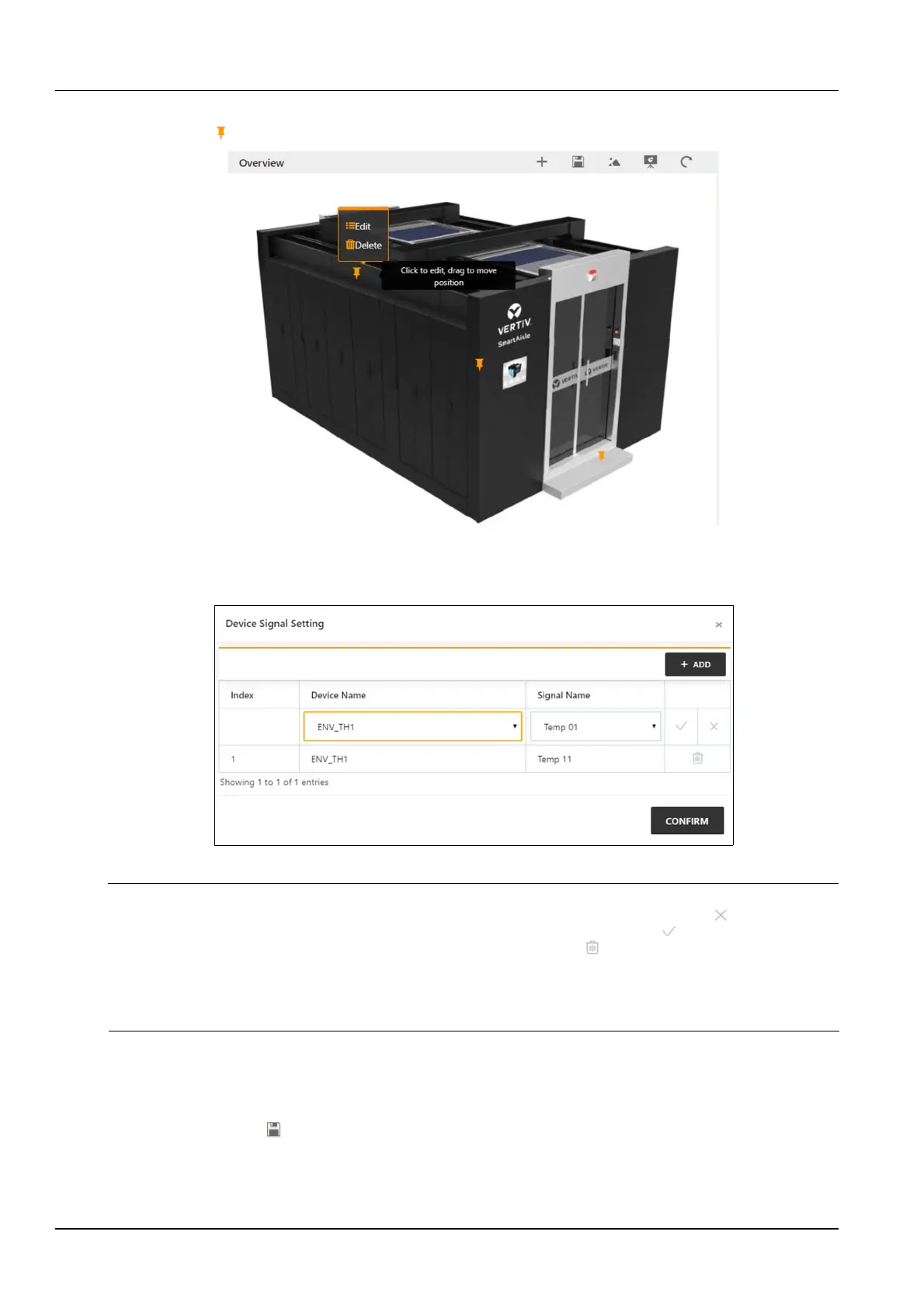
Click the hot spot , the Edit and Delete options will pop up, as shown in Figure 3-5.
Figure 3-5 Setting page
Click Edit to bring up the device signal setting page. After adding or deleting device signals, click the OK button to
save.
Figure 3-6 Device signal setting
Note
Clicking the Add button in the device signal settings will add a new row to the table. Click the Cancel icon on the right side of
the line to cancel the addition; after selecting the device name and signal name, click the OK icon on the right side of the line
to complete the addition of the line. When the addition is completed, the delete icon will appear on the right side of the line,
and clicking the icon will delete the line. When you have finished modifying all the lines, you need to click the OK button to
save.
The above operation mode is in-line editing. When such an operation occurs in the following text, it will not be explained one by
one.
Click Delete. A confirmation box for deleting the hotspot will pop up. Click the OK button in the confirmation box to
delete the hotspot.
2.
Save
Click the Save button to save all configurations and return to the browse state.



 To Next Page