Chapter 3 Web Interface of RDU501
RDU501 Intelligent Monitoring Unit User Manual
5.
Back to browse
Figure 3-8 Display setting
Click to Back to Browse button to return to the browse state from the configuring status.
3.3.2 Overview of IT Device
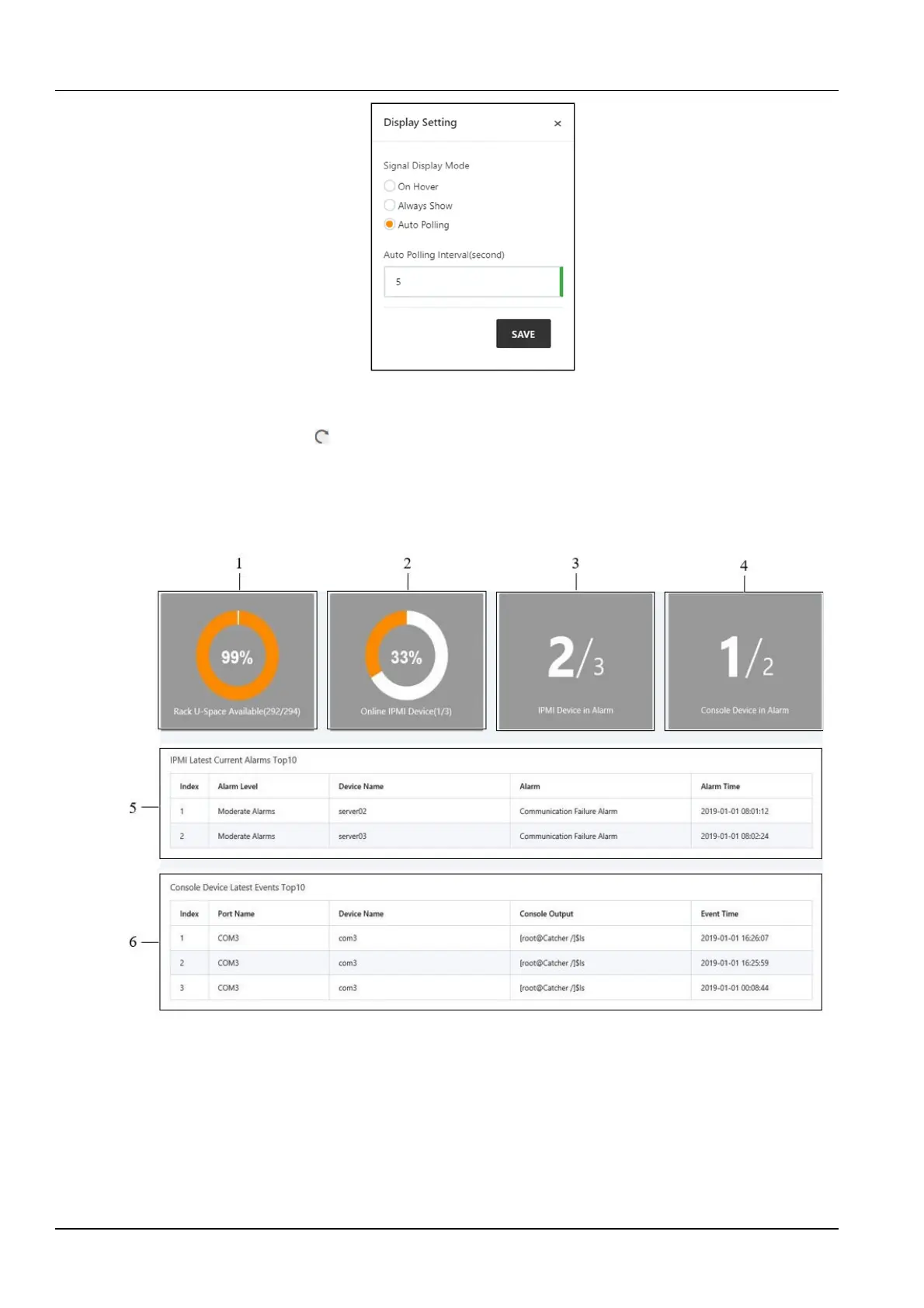
As shown in Figure 3-4, click the IT device overview submenu. The IT device overview page will be displayed in the
display area on the right. The page displays the corresponding information of the device, as shown in Figure 3-9.
1.
U space availability 2. IPMI device online rate 3. IPMI alarm device number
4. Number of console alarm devices 5. The last 10 current alarms of
IPMI
6. The last 10 events of the console device
Figure 3-9 RDU501 homepage (IT device overview)
1.
U space availability is the ratio of the number of available U spaces to the total number of U spaces.
2.
The IPMI device online rate is the ratio of the number of online IPMI devices to the total number of IPMI devices.
3.
The ratio of the number of devices with IPMI alarms to the total number of IPMI devices.
4.
The ratio of the number of devices with alarms to the total number of console devices in the console device for the
past 3 days.



 To Next Page