Chapter 3 Web Interface of RDU501
RDU501 Intelligent Monitoring Unit User Manual
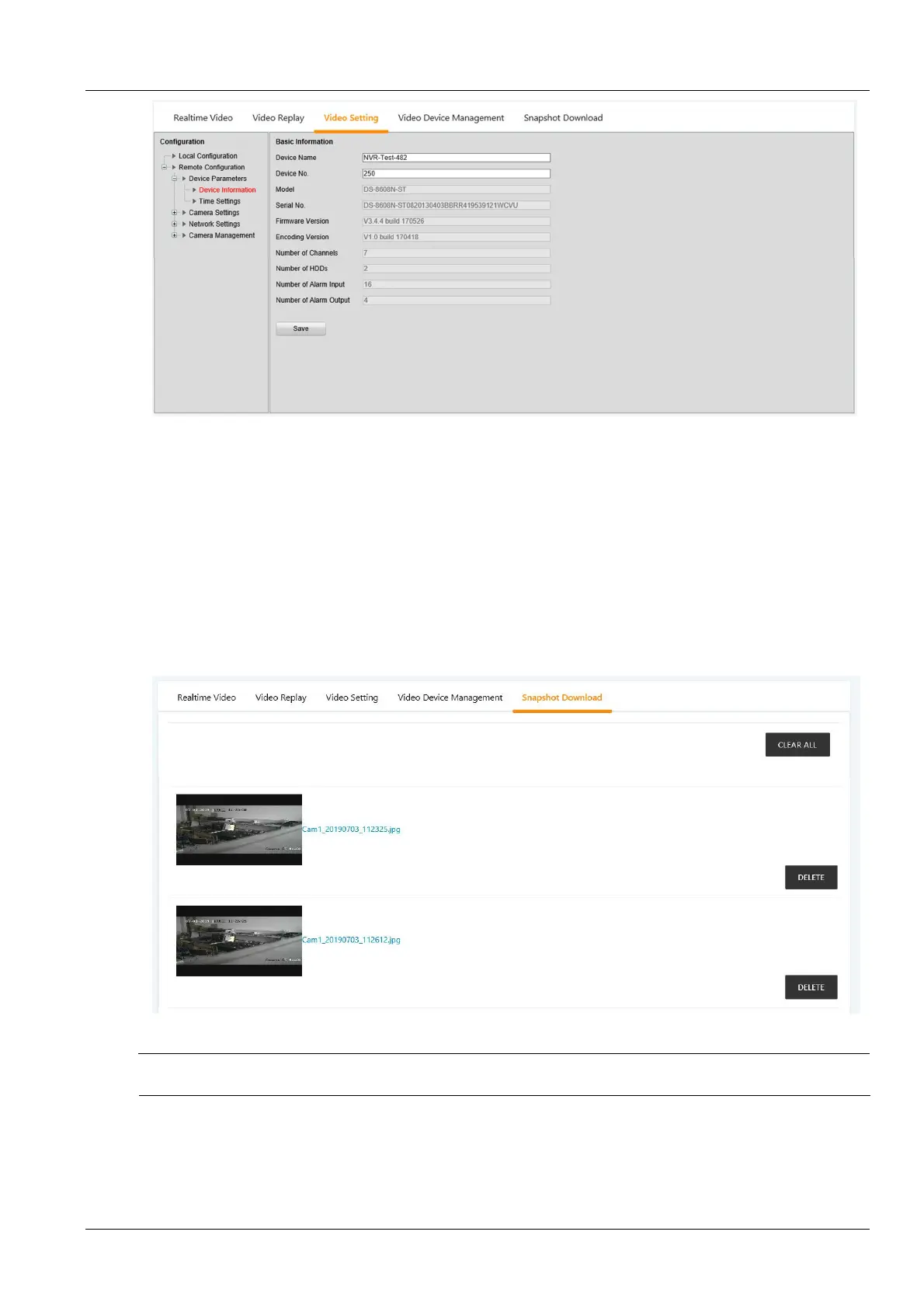
Figure 3-29 Parameter settings
The parameter setting tab provides settings for various parameters of the camera. For details of the parameters,
please refer to the Network Camera Operation Manual provided with the NVR. Among them, the channel
management is only for the NVR setting, and the IPC camera does not involve this function.
5.
Download linkage photographs
Click the Alarm Linkage submenu under the Configuration Management menu to add the alarm linkage
configuration. See section 3.4.8.
After the configured alarm condition is triggered, the video device will capture or record the captured image. The
captured image can only be downloaded by clicking the Download linkage photographs in the Video management
menu to view and delete the photos. As shown in Figure 3-30. The system can save up to 50 latest photos. The
captured video can be viewed through the Video Playback tab under the Video Management menu.
Figure 3-30 Download linkage photographs
Note
The video triggered can be displayed as yellow manual video recording when it is played back.
Fire fighting management
With the fire fighting device (ENP_ENV_FIREFIGHTING[SENSOR]) configured, click the Fire Fighting Management
submenu under the Security Management menu. The page shown in Figure 3-31 is displayed.



 To Next Page