Chapter 3 Web Interface of RDU501
RDU501 Intelligent Monitoring Unit User Manual
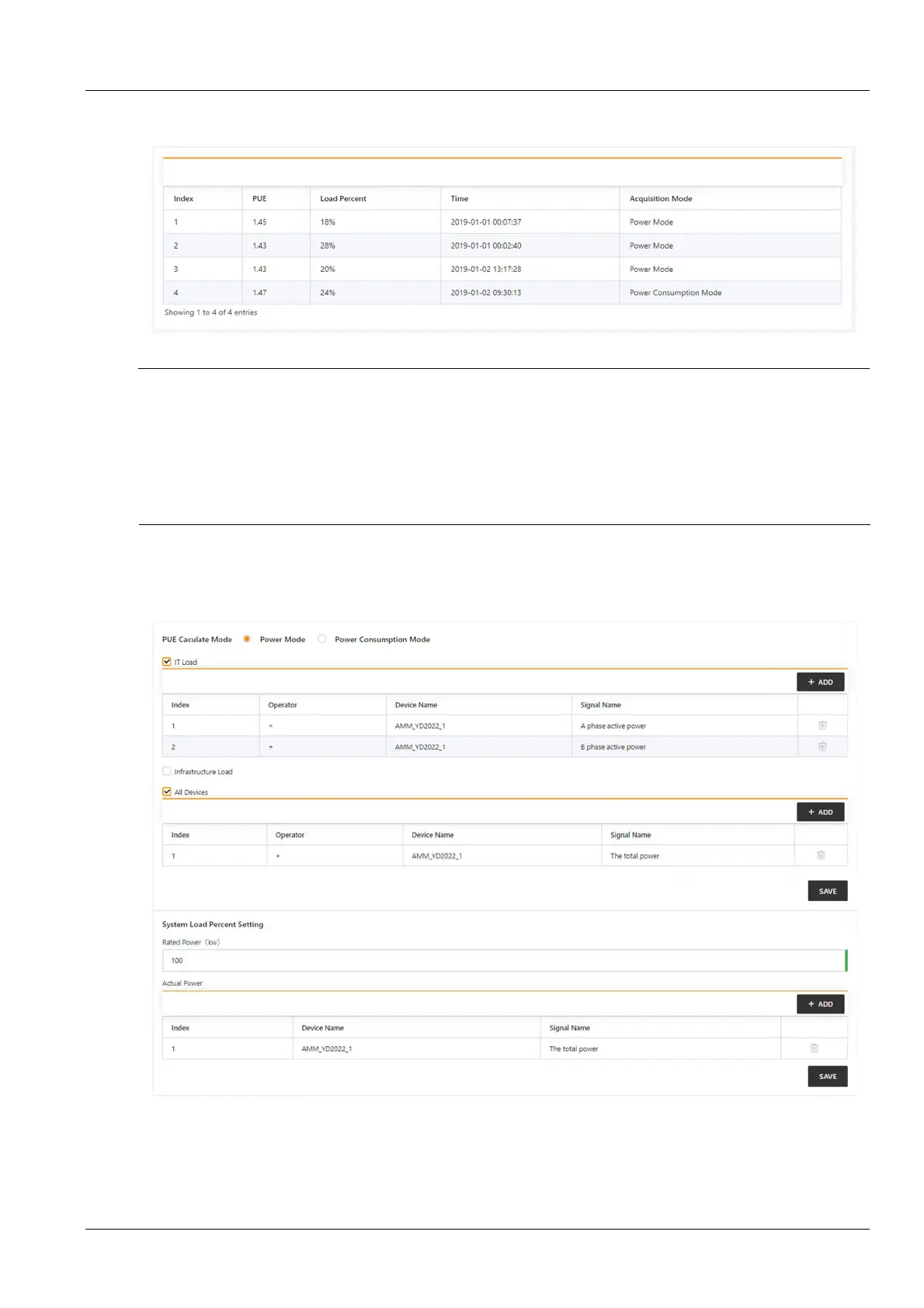
Click the History submenu under the Power Management menu to display the historical data recorded in the
system, as shown in Figure 3-65.
Figure 3-65 Power management history record
Note
1.
The RDU501 records and displays up to 1000 energy consumption history records.
2.
After the user has set the energy consumption, the system will save the record every 24 hours according to the user's
configuration.
3.
When the user does not perform any energy consumption statistics setting, the system does not save the energy consumption
record.
4.
When the user has set the energy consumption statistics without setting the system load percentage, the system will still save
the energy consumption record, but the load rate will always be 0.
Energy consumption setting
Click the Energy Consumption submenu under the Power Management menu to display the page shown in
Figure 3-66.
Figure 3-66 Energy consumption setting
1. Energy consumption statistics setting
1)
The user needs to select two energy consumption types to complete the energy consumption statistics. For the
convenience of description, define A=IT equipment energy consumption, B=power environment equipment energy
consumption, C=all equipment energy consumption, the rules are as follows:



 To Next Page