Safety Tips
Number: JT190199990 Version Number: A1
Note: Subsequent versions of this specification are subject to change without prior notice. Thank you
7/23
10. Operation
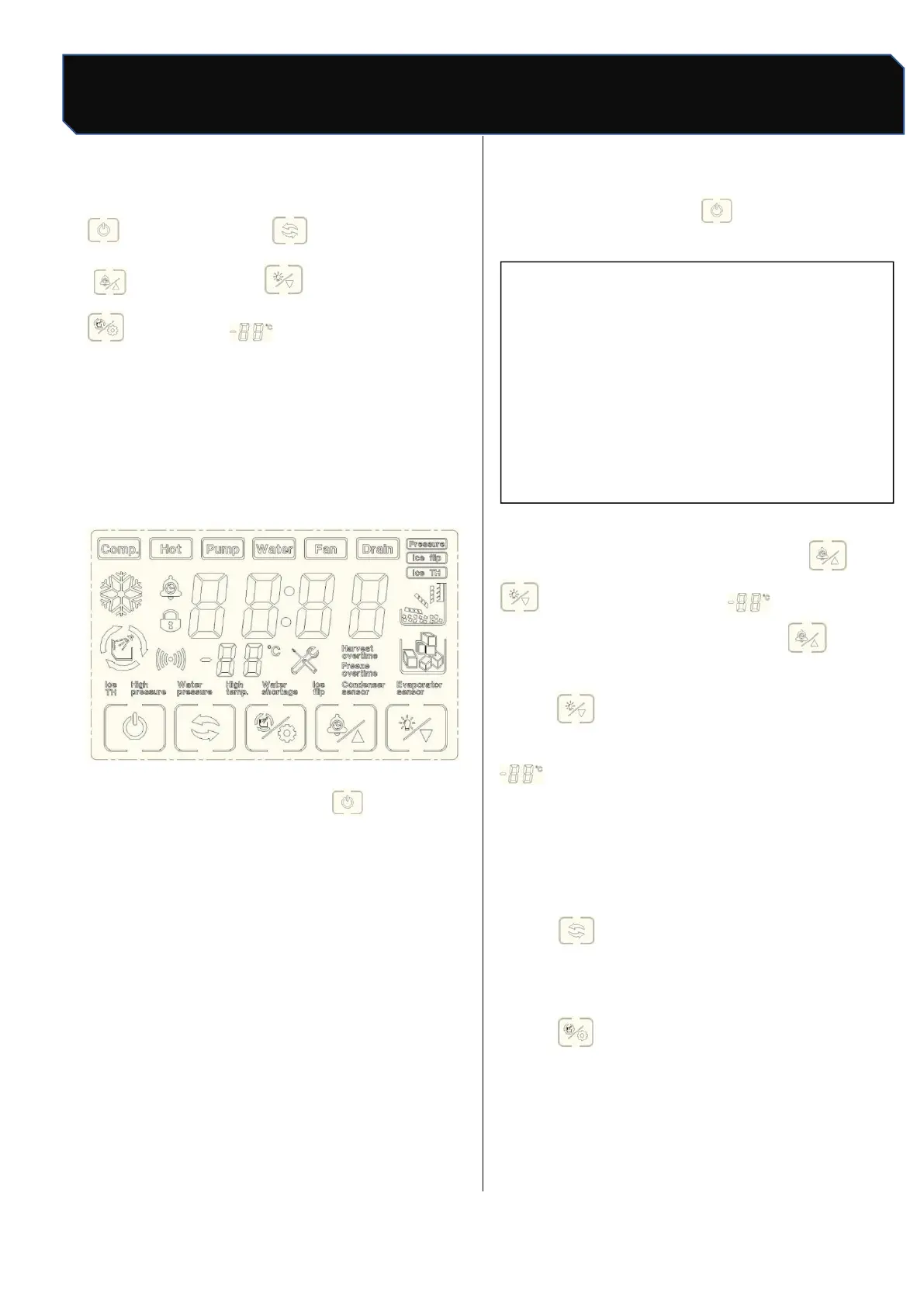
"boot/ shutdown " : mode
" ": Booking / Plus: Lighting / Subtraction
": Clean/set " temperature or count
display area
10.1 Turn on/off
Boot: connect water supply and drainage, plug in
power plug, press power switch, touch screen
start to light up;
Figure 1 Touch screen
Shutdown: in ice making, press "once, the ice
maker stops making ice (standby state), the screen
shows" OFF", press the power switch, then pull out
the power plug.
10.2 Ice
After the a. is electrified, the ice maker
automatically enters the ice making preparation
work. The preparation process includes water
pump start, hot valve open, compressor start, fan
start, etc. Under normal circumstances, after the
preparation work is finished, the ice maker opens
Start automatic ice making, no need to do any
more operation until the ice machine stops making
ice; when the ice is removed, the ice machine
begins to make ice;
b. in standby state, press "once, start making
ice.
▲ attention
The ice maker has been tested and
debugged in the factory before shipment. In
general, the new machine can make ice without
any debugging.
10.3 Ice thickness regulation function
In the ice-making state, press " "or
"can see the screen" count display
number start flashing, each press "can
increase the ice-making time for 1 minute, each
press" can reduce the ice-making time for 1
minute; after adjustment, stop operation ,"
the number no longer flashes, the ice
thickness setting is complete (note: before and
after the ice thickness adjustment, the ice maker
has been making ice);
10.4 Mandatory deicing
Press "to force deicing under ice-making
condition;
10.5 Manual cleaning
Press "in standby state, enter manual
cleaning state, cleaning icon flicker, inlet valve
open, screen display start timing, about 15
minutes later, cleaning stop, start drainage 30s



 To Next Page