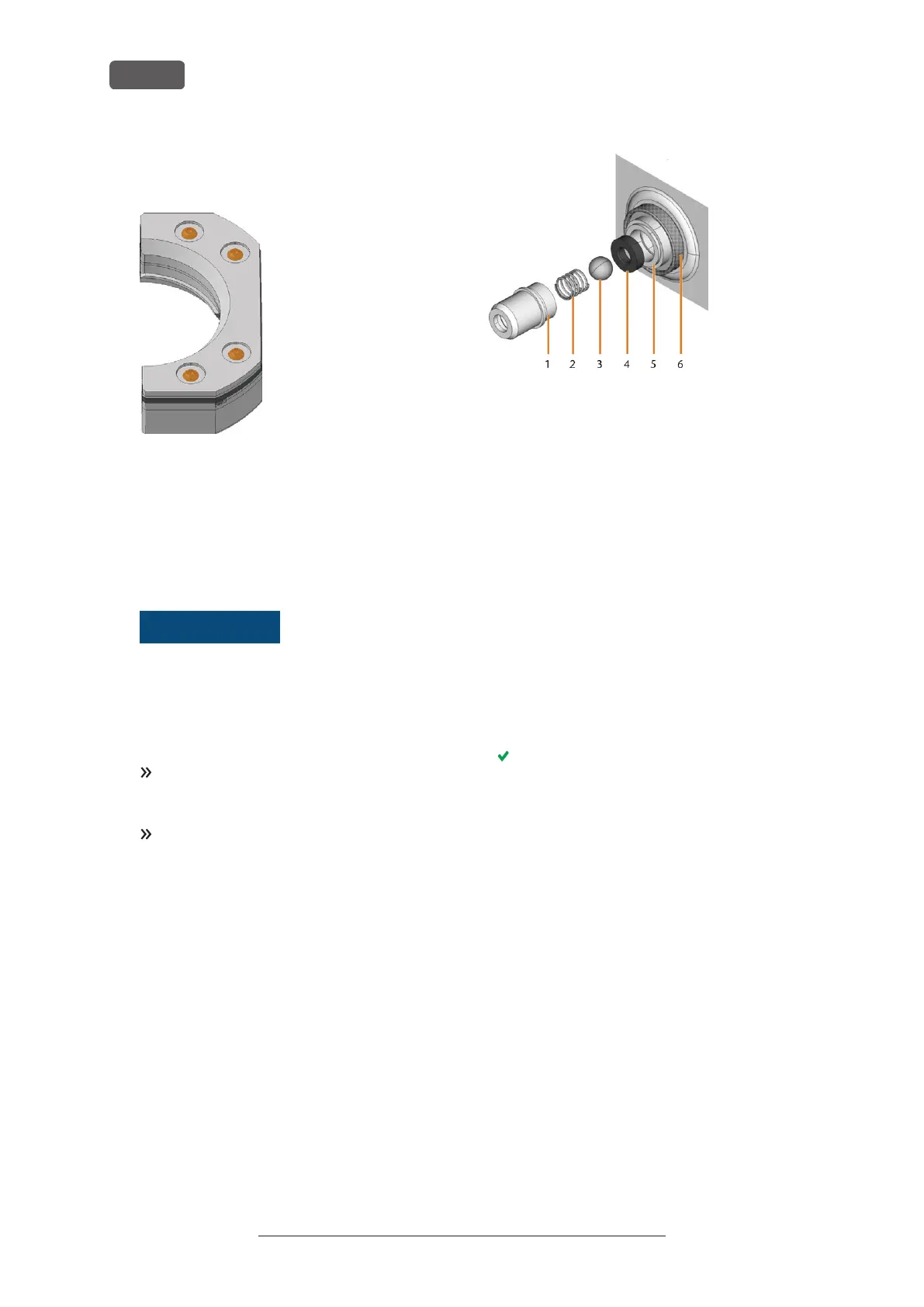
12. Screw in the 4 screws (marked orange) that fixate
the workholding strap of the blank holder.
FIG. 106 SCREWS OF THE WORKHOLDING STRAP
8.13 Cleaning the coupling of the
cooling liquid tank
1. Clean the cooling liquid tank and remove the cool-
ing liquid filter. Exchanging the carbon filter – on
page61
NOTICE
Damaging of the machine
when improperly
cleaning the cooling liquid coupling
Internal components of the cooling liquid coup-
ling can get lost during cleaning, which impedes
the proper functioning of the coupling.
Unscrewing the fixing nut can alter the position of
the coupling and cause leakage.
Always open the cooling liquid coupling care-
fully and ensure that you do not lose any com-
ponents during cleaning.
Never unscrew the fixing nut during cleaning.
2. Unscrew the cap [1] of the coupling with your
hand. Do not unscrew the nut [6] that fixates the
coupling to the tank.
3. Remove the valve spring [2], ball [3] and valve seat
[4] from the socket [5] and the cap [1] of the coup-
ling.
FIG. 107 COMPONENTS OF THE COUPLING OF THE COOLING LIQUID
TANK
1. Cap of the coupling
2. Valve spring
3. Ball
4. Valve seat
5. Socket of the coupling
6. Fixing nut (do not unscrew during cleaning)
4. Rinse the disassembled components of the coup-
ling under running water and dry them with a
cloth.
5. Place the valve seat in the socket of the coupling.
6. Place the spring in the cap of the coupling.
7. Position the ball in the valve seat and screw the cap
onto the socket of the coupling.
The coupling is cleaned and reassembled.
8. Install the cooling liquid filter and refill the tank.
Exchanging the carbon filter – on page61
Original Operating Instructions:R5
Version: 12/16/2021
R5 – Maintenance and do-it-yourself
EN 64



 To Next Page