10
3.3 Operation for Tare Subtraction
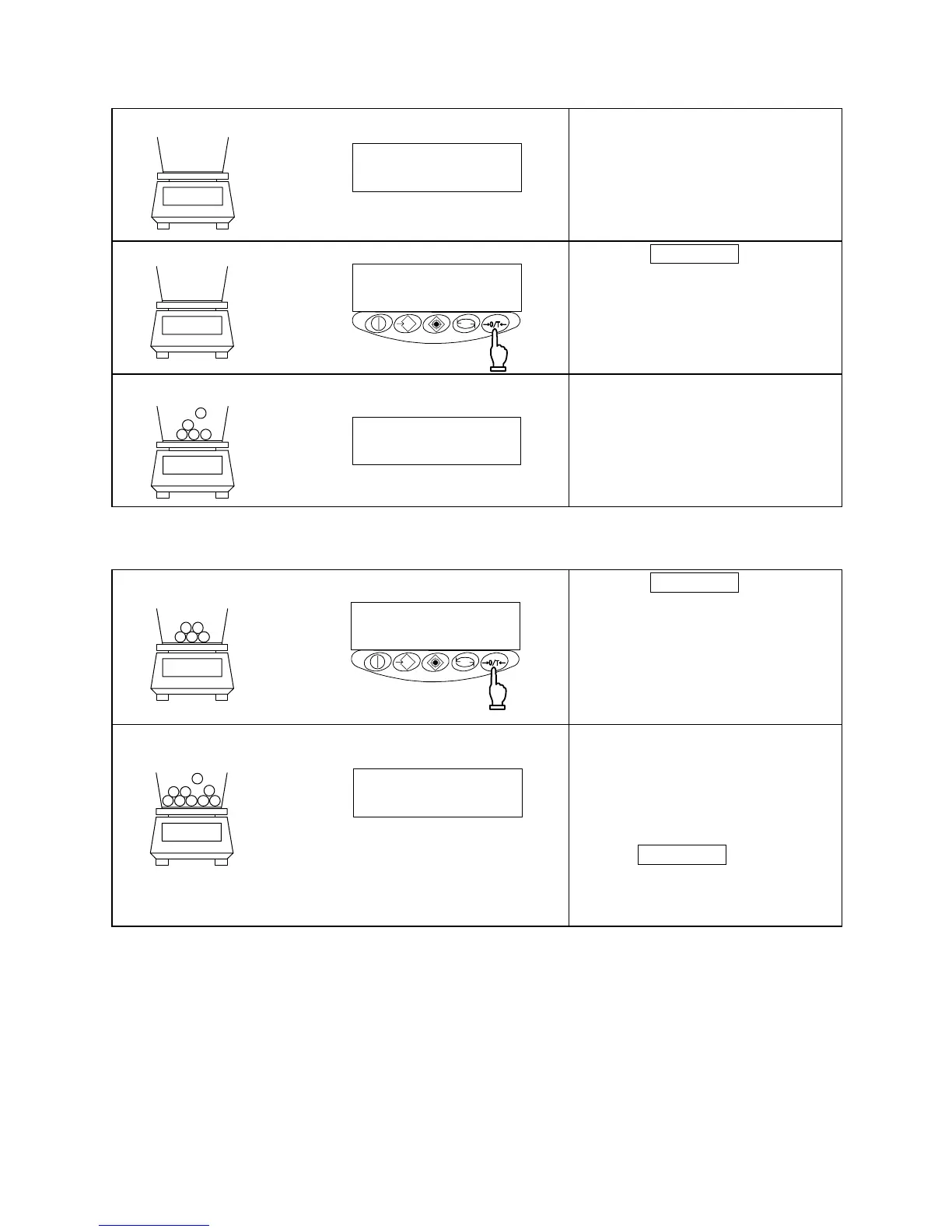
1 Place the tare (container) on the balance.
As you place the tare, the balance
indicates its weight.
2 Reset read-out indication to zero.
Press the Zero/Tare key.
The tare is subtracted and the
balance indicates zero.
3 Load the sample to be weighed.
The balance will now indicate only
the weight of the sample loaded in
the tare.
☆ Weighing only the weight of an added sample
4 Resetting the indication to zero
Press the Zero/Tare key.
The total weight of the sample
loaded on the measurement pan is
indicated as zero.
5 Adding samples to be measured
The balance indicates only the
weight of an added sample.
When the weight (of a sample)
currently loaded on the
measurement pan is reset to zero
with the Zero/Tare key, as
mentioned above, only the weight of
the sample will be measured.
→0← 0・| | | F NET
g
0・|||F
g
0・|・| | F NET
g
→0← 0・|・| | F NET
g
0・|・|・| F
NET
g



 To Next Page